Solved

Version control IAL's

  • February 24, 2023
  • 8 replies
  • 164 views

Forum|alt.badge.img+5

Hi,

Is there a way to version control IAL files in cloud to make it automatically picked by the automation? Or else we have to manually deploy them across environments?

Thanks

Roshanga

Best answer by wahelk

you can add it to component database/IAL folder which is deployed during installation.

but note that IAL will be a depreciated functionality that will be removed in future release. 

8 replies

wahelk
Hero (Former Employee)
Forum|alt.badge.img+11
  • Hero (Former Employee)
  • Answer
  • February 27, 2023

you can add it to component database/IAL folder which is deployed during installation.

but note that IAL will be a depreciated functionality that will be removed in future release. 


Forum|alt.badge.img+5
  • Author
  • Sidekick (Customer)
  • February 28, 2023

you can add it to component database/IAL folder which is deployed during installation.

but note that IAL will be a depreciated functionality that will be removed in future release. 

Thanks a lot Wasana. Yes, i know it will be depreciated and we have already converted some into proper db views.


Regards,

Roshanga


Forum|alt.badge.img+5
  • Author
  • Sidekick (Customer)
  • February 28, 2023

you can add it to component database/IAL folder which is deployed during installation.

but note that IAL will be a depreciated functionality that will be removed in future release. 

Thanks a lot Wasana. Yes, i know it will be depreciated and we have already converted some into proper db views.


Regards,

Roshanga

Hi wasana,

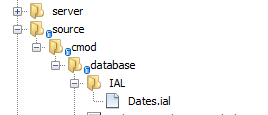
I have following folder structure,


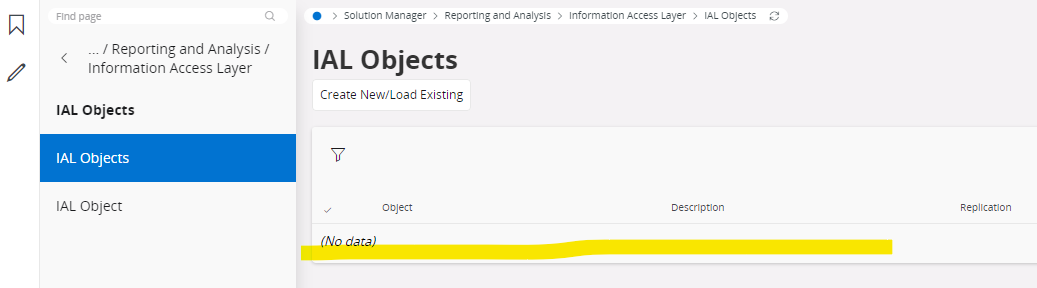
but after build and logged into the environment, i cannot see any IAL’s deployed.


Any ideas? Am i missing something?


Thanks

Roshanga


wahelk
Hero (Former Employee)
Forum|alt.badge.img+11
  • Hero (Former Employee)
  • February 28, 2023

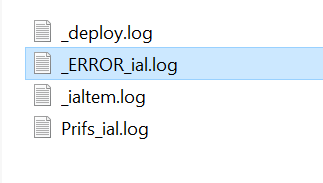
Any errors in logs?


Forum|alt.badge.img+9
  • Sidekick (Partner)
  • June 19, 2026

In our case we got deployment errors for the delivery when there were non UTF-8 characters in the IAL file:


!!!Error deploying file genled/IAL/M10_M18_Wa_Cons_Part.ial
!!!General read file error. Look for invalid, none UTF-8 characters in the file! Input length = 1


PhillBronson
Hero (Customer)
Forum|alt.badge.img+12
  • Hero (Customer)
  • July 6, 2026

@jasahu glad to see this still being used, where is this `<component>\source\<component>\database\IAL` directory noted in the documentation? 


Forum|alt.badge.img+9
  • Sidekick (Partner)
  • July 7, 2026

@jasahu glad to see this still being used, where is this `<component>\source\<component>\database\IAL` directory noted in the documentation? 


I could not find it in the docs, I believe it was like that in App10 and before and still works the same way


PhillBronson
Hero (Customer)
Forum|alt.badge.img+12
  • Hero (Customer)
  • July 7, 2026

@jasahu thanks! A couple other questions you may or may not know:


If there are dependencies between IAL and should be deployed in a certain order, would the `fileexec` action for the installer need to be used? 


Do you happen to have a list of other directories for config tracking? I already use `appconfig` for quick reports and appearance design…but there are data sources for tabular models, information sources, data marts, and data mart categories.