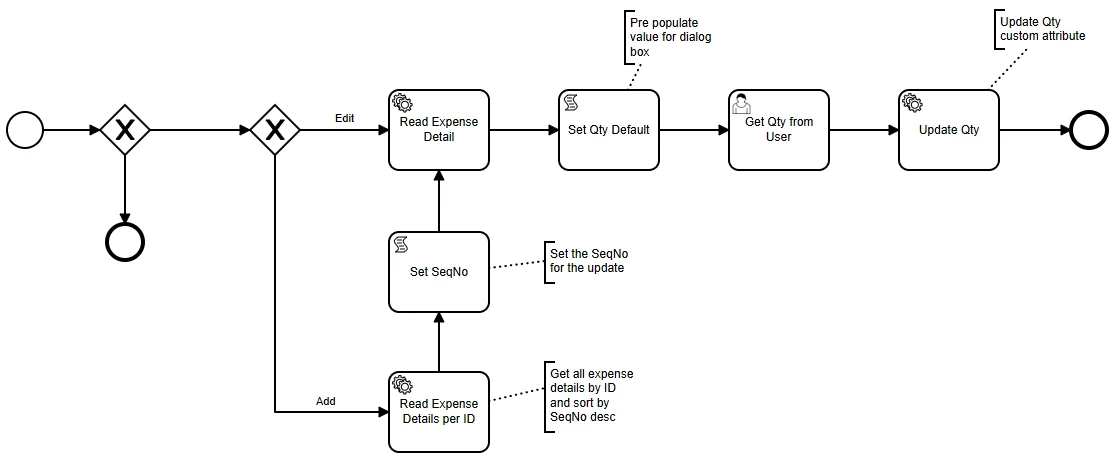
Summary of issue:
- I have a user interaction workflow on adding/editing an expense line -> it gets triggered on a projection ExpenseSheetHandling "AddOtherExpense" - since we want the user to add a value to a field as soon as they add/edit an expense line.
- After the user clicks on "save" in the IFS dialog box, it closes and another dialog box pops up asking the user to enter a value for a field (user interaction workflow) ← This is the expected behavior that happens most of the time.
- When it doesn't work
- after the user clicks on “save” in the IFS dialog box, the save button turns grey and the dialog box does not close.
- the user interaction dialog box does not pop up.
- they need to refresh the page and "edit" the line that was added.
For debugging - I watched the workflow and was able to capture a JSON payload that this happened to. When I use the payload in the the Workflow designer page - no error occurs and it works as intended.
In DevTools - When this issue happens, the page is stuck in the call "........projection/v1/WorkflowService.svc/ContinueWorkflow(id=........"
If there are no issues in the workflow, no visible errors in dev tools, no pop up error and if this only happens sometimes - then is this some kind of workflow and dialog box bug or is there something I’m missing?
This is a snippet of the workflow: