Question

Updating the homepage for users

  • September 22, 2023
  • 2 replies
  • 120 views

Forum|alt.badge.img+11

Hello.

By logging in on IFS IEE, a lobby page is displayed as their homepage.

How can administrators update this homepage to define another lobby page for specific users?

2 replies

Forum|alt.badge.img+11
  • Author
  • Hero (Customer)
  • September 27, 2023

Still awaiting a solution


Forum|alt.badge.img+7
  • Sidekick (Partner)
  • March 10, 2026

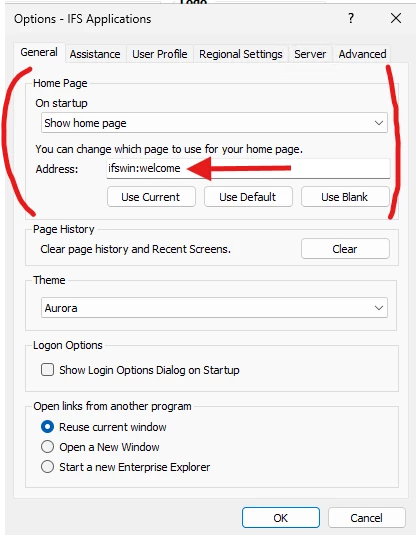
Hi ​@romsar - if you load up the IEE client, and select either a Base Profile (assigned to many users) or the personal profile of the user in question, you can set the Home Page by clicking on your user initials in the top-right, selecting Options, and then setting the home page address to your lobby page in question by entering in the address bar for it.

Other way is to navigate to the IFS Lobby page in question, setting your active profile to the one you’re wishing to make the update to, and hit the Use Current button on the Options > General tab > Home Page section.

Make sure you save the profile on the User Profile tab when exiting!