


Question

Translate EE fields

  • February 21, 2022
  • 3 replies
  • 297 views

Forum|alt.badge.img+14

Hello, 
I wanted to change the translation of a field in the "Text Translation" screen: 

"Pays" to "Pays123".

I then refreshed the language cache.

When I go to the concerned screen, my field is still not translated:
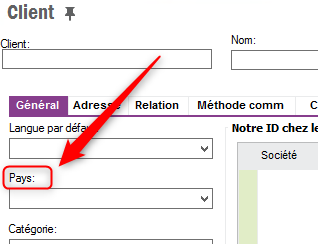
 

Is it necessary to make other manipulations?
Thanks in advance! 

 

This topic has been closed for replies.

3 replies

Forum|alt.badge.img+9
  • Hero (Employee)
  • February 21, 2022

Hi @TheoB 

Sometimes the application cache still present in 2.0 folder (C:\Users\<User>\AppData\Local\Apps\2.0)

this also might affect this kind of issue

Thanks & Regards
Shan


Forum|alt.badge.img+7
  • Hero (Employee)
  • February 21, 2022

Hi @TheoB,


When translating messages and report fields, you can immediately see the effect after language cache refresh while those translations are fetched from DB. But To see the effects of label translations, you either have to create satelite assemblies and run on your local machine runtime (language runtime) or export translations and make a delivery to affect the environment because IEE fields translations are  kept in their dll files located under language based coded folders.


Forum|alt.badge.img+14
  • Author
  • Hero (Partner)
  • February 22, 2022


Hi @AHMET.GULTEKIN,

I could see in the documentation that satelite assemblies are only available for "RWC" type translations.
Only, my translation is of type "LU".
I guess I have to create a delivery. Do you have a procedure to give me? 
Thanks for your help !