Question

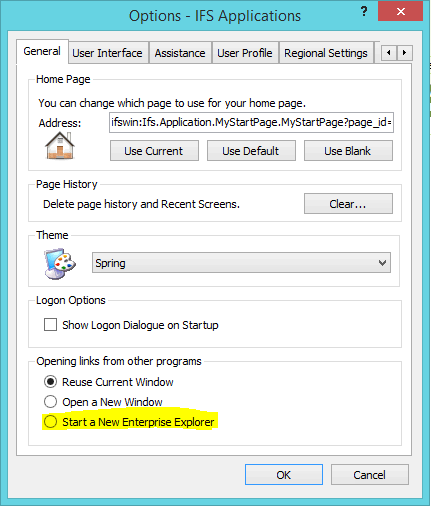
Start a New Enterprise Explorer set as default

  • October 2, 2020
  • 2 replies
  • 103 views

HayleyG
Do Gooder (Customer)
Forum|alt.badge.img+9

Hi

We are trying to get the ‘Start a New Enterprise Explorer’ option (see screen shot) to be set as default in the options area, however due to our Citrix environment this option gets lost each time we log out of Citrix. I was just wondering if anyone else has had a similar issue and how you overcame it.
 

2 replies

Yasas Kasthuriarachchi
Superhero (Employee)
Forum|alt.badge.img+30

Hi @HayleyG, Thank you for your engagement with IFS Community.
I just noted that there hasn’t been a response on this over a long period of time and also wondered if you were able to get it sorted? And this comment would uplift the thread so if anyone has encountered similar issue may note. I am not sure how the option gets lost with the Citrix environment, did you save all the settings to the profile once modified?
Thanks & Best Regards,
Yasas


HayleyG
Do Gooder (Customer)
Forum|alt.badge.img+9
  • Author
  • Do Gooder (Customer)
  • May 12, 2021

Hi Yasas,

No we never did resolve this issue, it also occurs with the shortcut window pane, if anyone expands that to say 4x4 then saves their profile as soon as they log off Citrix at the end of the day, when they log back in the following morning, none of the settings stay. 

Many thanks,

Hayley