

Does anyone know how to set this toggle off by default? Is there a setting somewhere?
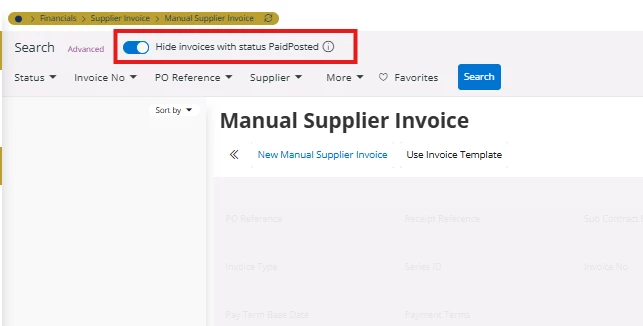

Does anyone know how to set this toggle off by default? Is there a setting somewhere?
Best answer by Abdul
Hi
There is no standard setting available to disable such a toggle by default for any screen. Please review the discussion below.
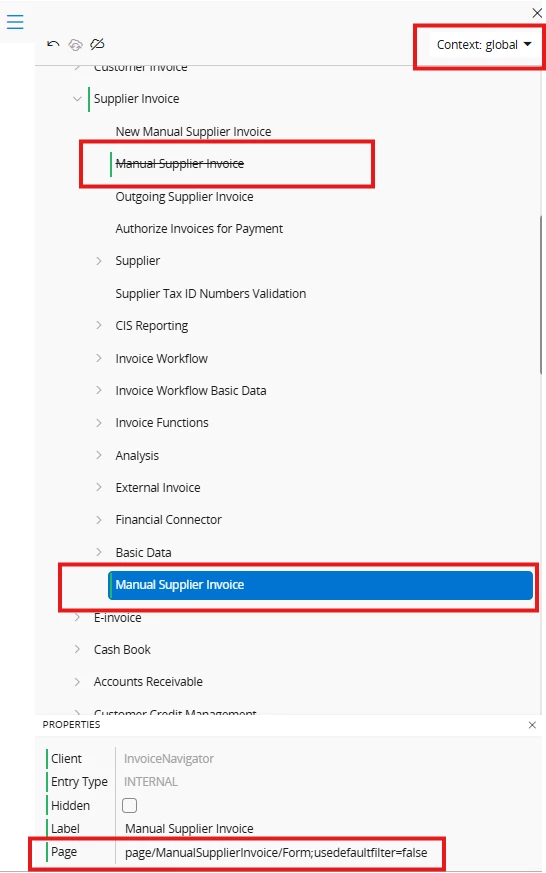
A potential workaround worth exploring is to remove the standard navigation option for the Manual Supplier Invoice screen under the Global Context, and then create a new custom navigation option specifically for that context.
By doing this, you can control the behavior more precisely. Additionally, you can disable the default toggle by modifying the custom navigation link settings. Please refer to the screenshot below for a visual reference.
Regards
Abdul Rehman
Enter your E-mail address. We'll send you an e-mail with instructions to reset your password.


