


Question

Saved Searches Not Visible After Customization in IFS Apps 10

  • September 25, 2026
  • 3 replies
  • 14 views

Forum|alt.badge.img+10

In IFS Apps 10, existing saved searches are visible and work correctly before any customization is applied.

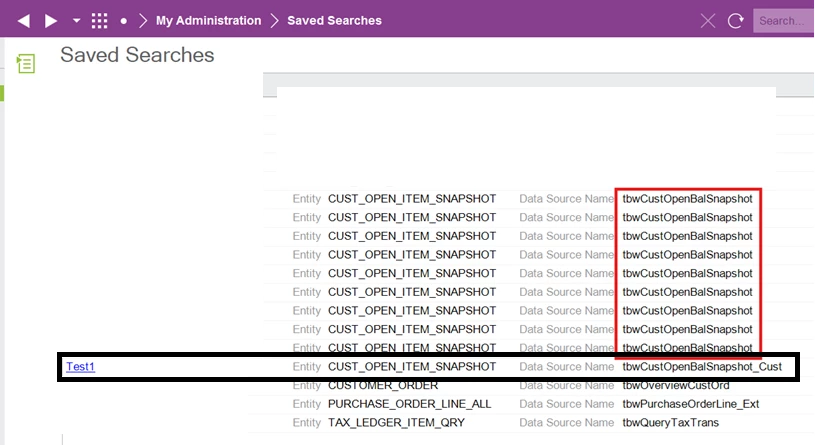
However, after a customization is delivered, the previously created saved searches are no longer visible from the relevant form. They still appear under Saved Searches, but the user cannot see or access them from the form. New saved searches are created under the customized form.
Saved Searches
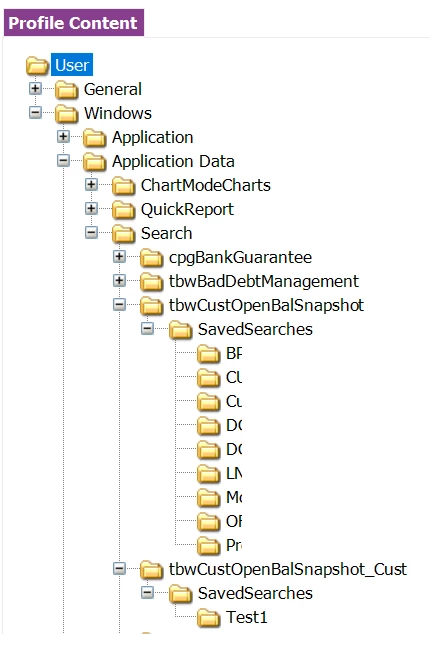
Personal Profile
Has anyone experienced this issue? Could it be related to the customization or changes to the form metadata?

Is there a recommended solution or workaround to make the existing saved searches available again without recreating them?


Best Regards,
Nisansala

3 replies

Forum|alt.badge.img+17
  • Superhero (Partner)
  • September 25, 2026

Hi


After customization the page address has additional “_Cust”(frmCustomerOrder_Cust) in the name. The saved search is linked to the original(core or ext) layer and then disapears. If You go to the page and load Core/Ext page(by removing “_Cust” from the address ) then saved search will be available.


It is a common issue.


Forum|alt.badge.img+10

Hi ​@knepiosko ,
Thanks for the response.

Does that mean we need to reimplement the saved searches for the Cust window?

I tried the following workaround:

  • Export the saved searches from tbwCustOpenBalSnapshot

  • Replace tbwCustOpenBalSnapshot with tbwCustOpenBalSnapshot_Cust

  • Save and import them

This is working, but I’m not sure whether this could have any other impact. Could you please advise?

Best Regards,
Nisansala


Forum|alt.badge.img+17
  • Superhero (Partner)
  • September 25, 2026

I think this is good way.
