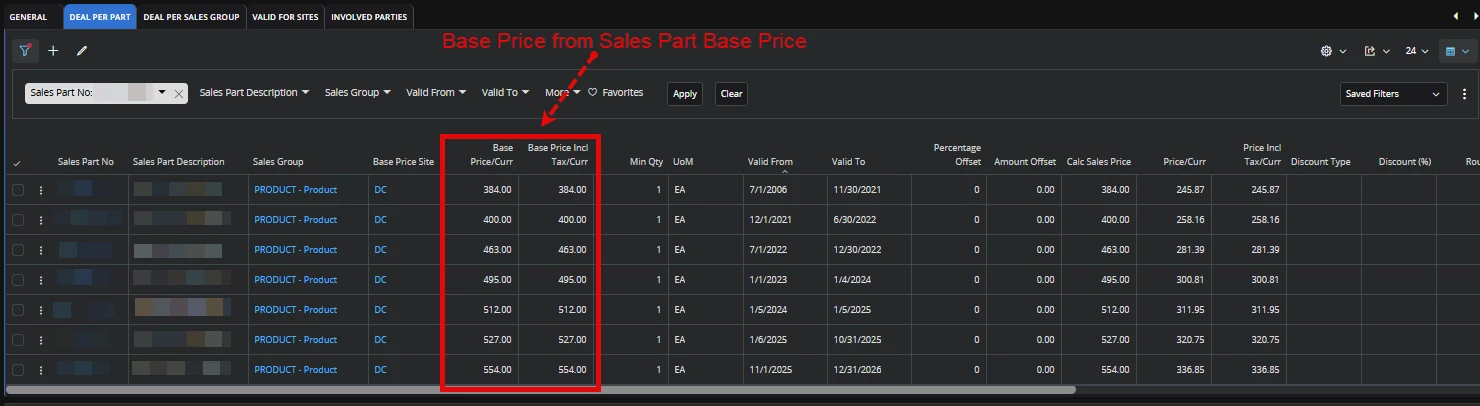
Hi. I searched on your post and found the following information -
To reliably retrieve the Sales Part Base Price (or original starting price before discounts) for Customer Order Confirmations and Invoices without risking historical mismatch when master data changes, you must rely on transactional snapshot fields rather than querying master data or dynamic pricing APIs at report runtime.
Why Direct Master Joins or Dynamic APIs Fail
-
Master Data Drift: Querying SALES_PART_BASE_PRICE_TAB or SALES_PART_TAB directly in a report dataset fetches the current master base price. If base prices update next month or next year, re-printing an old invoice or order confirmation will display current prices instead of the original prices at order entry, leading to audit and compliance discrepancies.
-
Dynamic Pricing API Re-evaluation: Calling Customer_Order_Pricing_API inside a report view dynamically re-calculates pricing hierarchy rules using current customer agreement/price list dates, which can yield different results than what was originally committed on the order line.
Standard IFS Transactional Snapshot Fields
IFS automatically freezes and snapshots pricing hierarchy details on the order line and invoice item records at the moment of transaction creation:
1. Customer Order Line (CUSTOMER_ORDER_LINE_TAB / CUSTOMER_ORDER_LINE)
When a line is created or prices are fetched, IFS writes frozen pricing values directly to the line record:
-
BASE_SALE_UNIT_PRICE: Stores the base sales unit price in company/base currency before order-line level discounts were applied.
-
SALE_UNIT_PRICE: Stores the gross sales unit price per price unit in the customer/order currency prior to line discount deductions.
-
PRICE_SOURCE & PRICE_SOURCE_ID: Captures where the price originated in the pricing hierarchy (e.g., Base, Price List, Agreement, Campaign, Cost Based, Manual).
-
DISCOUNT: The net discount percentage applied directly on the customer order line.
2. Invoice Level Snapshot (CUSTOMER_ORDER_INV_ITEM_TAB / CUSTOMER_ORDER_INV_ITEM)
When an order line is invoiced, IFS creates a permanent financial record in the invoice item tables (CustomerOrderInvItem):
-
BASE_SALE_UNIT_PRICE, SALE_UNIT_PRICE, PRICE_QTY, and DISCOUNT are frozen on CUSTOMER_ORDER_INV_ITEM.
-
Standard invoice reports (CUSTOMER_ORDER_IV_REP) read directly from these frozen invoice tables, ensuring reprints generate identical output regardless of future master data updates.
3. Line Discount Breakdown (CUSTOMER_ORDER_LINE_DISCOUNT_TAB)
If discounts are composed of multiple steps (e.g., Price List Discount + Customer Agreement Discount + Manual Line Discount):
-
IFS records each discrete discount item on CUSTOMER_ORDER_LINE_DISCOUNT_TAB (and corresponding historical invoice discount tables).
-
You can query this child table linked by ORDER_NO, LINE_NO, REL_NO, LINE_ITEM_NO to display line-itemized discount breakdowns without re-calculating aggregated percentages dynamically.
Recommended Solutions for Report Implementation
Option A: Use BASE_SALE_UNIT_PRICE / SALE_UNIT_PRICE (Standard / Out-of-the-Box)
-
For Order Confirmations (CUST_ORDER_PRINT_REP): Pull BASE_SALE_UNIT_PRICE (or SALE_UNIT_PRICE) directly from CUSTOMER_ORDER_LINE.
-
For Invoices (CUSTOMER_ORDER_IV_REP): Pull BASE_SALE_UNIT_PRICE (or SALE_UNIT_PRICE) directly from CUSTOMER_ORDER_INV_ITEM.
-
Calculate the displayed starting unit price as:
$$\text{Displayed Starting Price} = \text{SALE_UNIT_PRICE}$$
$$\text{Displayed Discount Amount} = (\text{SALE_UNIT_PRICE} \times \text{QTY}) - \text{NET_AMOUNT}$$
Option B: Persistent Custom Field Snapshot (For Non-Standard Base Price Requirements)
If your business definition of "Base Price" requires a specific un-discounted list price that differs from standard BASE_SALE_UNIT_PRICE:
-
Create a Persistent Custom Field on CustomerOrderLine (e.g., CF$_ORIGINAL_BASE_PRICE).
-
Use an Event Action (or standard Custom Field Default/PL/SQL Logic) on line insertion to copy the master Sales_Part_Base_Price_API value once upon creation.
-
Pass this custom field value down to CustomerOrderInvItem via custom field mapping during invoice generation.
-
Include CF$_ORIGINAL_BASE_PRICE in your operational report views (.rdf / Report Designer / BI Reporter).
Key Takeaways
-
Never join SALES_PART_BASE_PRICE or call dynamic price logic inside operational report views or layouts.
-
Use BASE_SALE_UNIT_PRICE and SALE_UNIT_PRICE from CUSTOMER_ORDER_LINE / CUSTOMER_ORDER_INV_ITEM for a reliable point-in-time snapshot.
-
Use CUSTOMER_ORDER_LINE_DISCOUNT_TAB if individual discount step details need to be itemized on the document.
I hope this information helps. Thanks! Jane