


A. What is your idea?
1) Classification
Choose ONE: keep the applicable option and delete the rest.
Opportunity for improvement
2) Brief description
What happened, what is missing, or what could be better? Focus on the problem or opportunity (not the solution).
Write here:
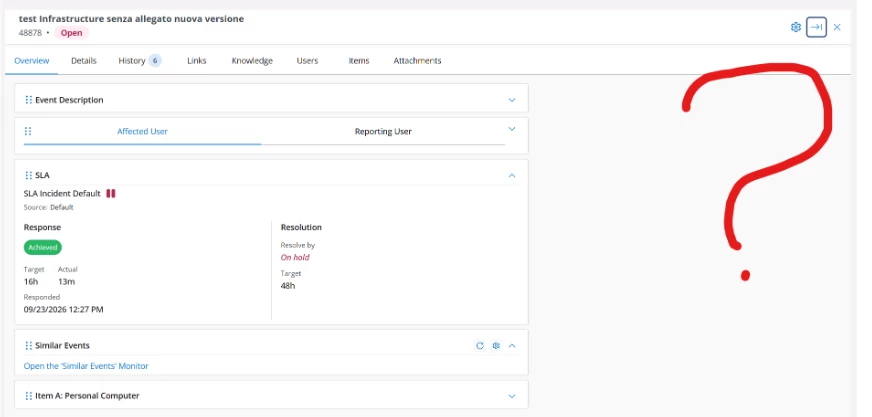
In the Modern Event Monitor, users cannot perform ticket actions directly from the individual ticket view.
When a ticket is opened, the details are displayed in a side panel, but actions such as Assign, Resolve, Close, or Waiting for User Input are not available within that view.
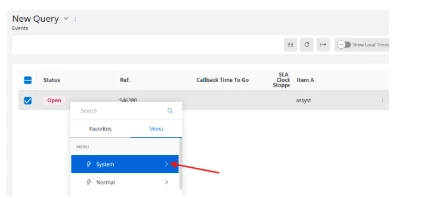
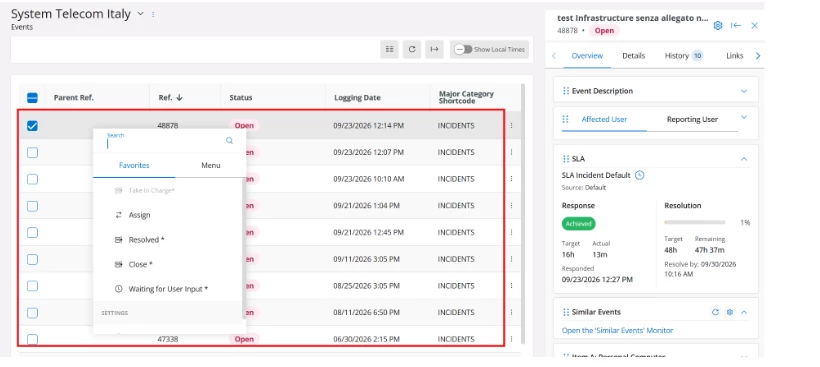
To perform these actions, users must return to the event list and access a context menu from the selected ticket.
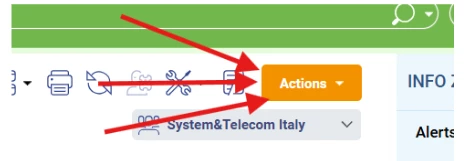
In previous versions of assyst, a clearly visible Actions button was available directly within the ticket view, allowing users to safely and efficiently manage the ticket they were reviewing.
The absence of this functionality reduces usability, increases navigation effort, and introduces operational risks when working with large ticket queues.
B. Context and scope
1) Who is affected?
Choose ONE or MORE: keep the applicable options and delete the rest.
Internal users
Customers
2) Frequency
Choose ONE: keep the applicable option and delete the rest.
Daily
C. Value and impact
1) What is the business outcome?
Choose ONE or MORE: keep the applicable options and delete the rest.
Improves productivity or efficiency
Reduces cost or manual effort
Enhances user experience
Supports compliance or reduces riskù
2) Impact scale
Choose ONE: keep the applicable option and delete the rest.
2 — Team / department (all the operational teams use this functionality)
4 — Company-wide
5 — Enterprise-wide
3) Workaround
If there is a workaround, describe it briefly. Otherwise write “No workaround”.
Write here:
Current users must return to the Event Monitor ticket list, locate the ticket again, and access actions through the context menu.
This workaround is inefficient and creates a risk that operators may unintentionally update the wrong ticket when multiple similar tickets are displayed in the list.
D. Evidence and examples
Attach screenshots, documents, or examples using the buttons below. If helpful, summarize key supporting evidence here.
Write here:
In our daily Service Desk operations, agents frequently need to perform actions while reviewing ticket details.
In the previous assyst interface, the Actions button was always visible and allowed users to immediately perform operational activities on the currently opened ticket.
In the Modern Event Monitor, actions are hidden behind the event list context menu and are no longer accessible from the ticket details view.
This change introduces additional navigation steps and increases the possibility of user error, particularly in high-volume operational environments where agents manage multiple tickets simultaneously.
Supporting screenshots will be provided showing:
- Previous interface with visible Actions button.
- Modern Event Monitor ticket view. There isn’t an Actions button.
- Current workflow required to access actions through the event list.
E. Additional details
1) Enter support ticket ID reference (If applicable)
Write here:
541587
2) Would you like to participate in validation or early testing?
Answer “Yes/No”.
Write here: Yes