


Hi all,
I'm trying to connect IFS to an external REST API using IFS Connect REST Sender with OAuth2 Client Credentials authentication.
Configuration
- Authentication Method: Client Credentials
- REST Sender configured with:
- REST Root Endpoint
- Client ID
- Client Secret
- Token Endpoint
- HTTP Method: POST
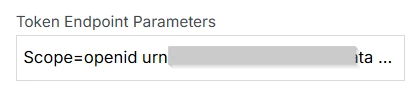
The OAuth provider requires a scope value when requesting an access token. Therefore, I have configured the following in Token Endpoint Parameters:
scope=openid <required-scope>
Issue
The message fails with the following error:
ExecutionException from Sender thread
Caused by: ifs.fnd.connect.senders.ConnectSender$TemporaryFailureException: Unauthorized access
Caused by: ifs.fnd.connect.http.HTTPClient$UnauthorizedAccessException:
POST error #401: Unauthorized access
Validation Using Postman
Using the same OAuth2 Client Credentials configuration in Postman works successfully:
- Same Client ID
- Same Client Secret
- Same Token Endpoint
- Same Scope
- Client Authentication: Send as Basic Auth Header
Postman successfully retrieves an access token and the API call completes successfully.
I have already tried the solution suggested in the following IFS Community post:
I configured the scope in Token Endpoint Parameters and also tested adding the scope as an Additional Header, but the request still fails with 401 Unauthorized. The same OAuth2 Client Credentials setup continues to work successfully in Postman.
Has anyone encountered a similar issue or successfully configured OAuth2 Client Credentials with custom scope parameters in IFS Connect REST Sender?
Any suggestions, troubleshooting tips, or examples of working configurations would be greatly appreciated.
Thanks in advance for your help!


