


Question

Prevent Default Selection in Radio Buttons

  • May 22, 2026
  • 1 reply
  • 14 views

Forum|alt.badge.img+3

Hi Community,


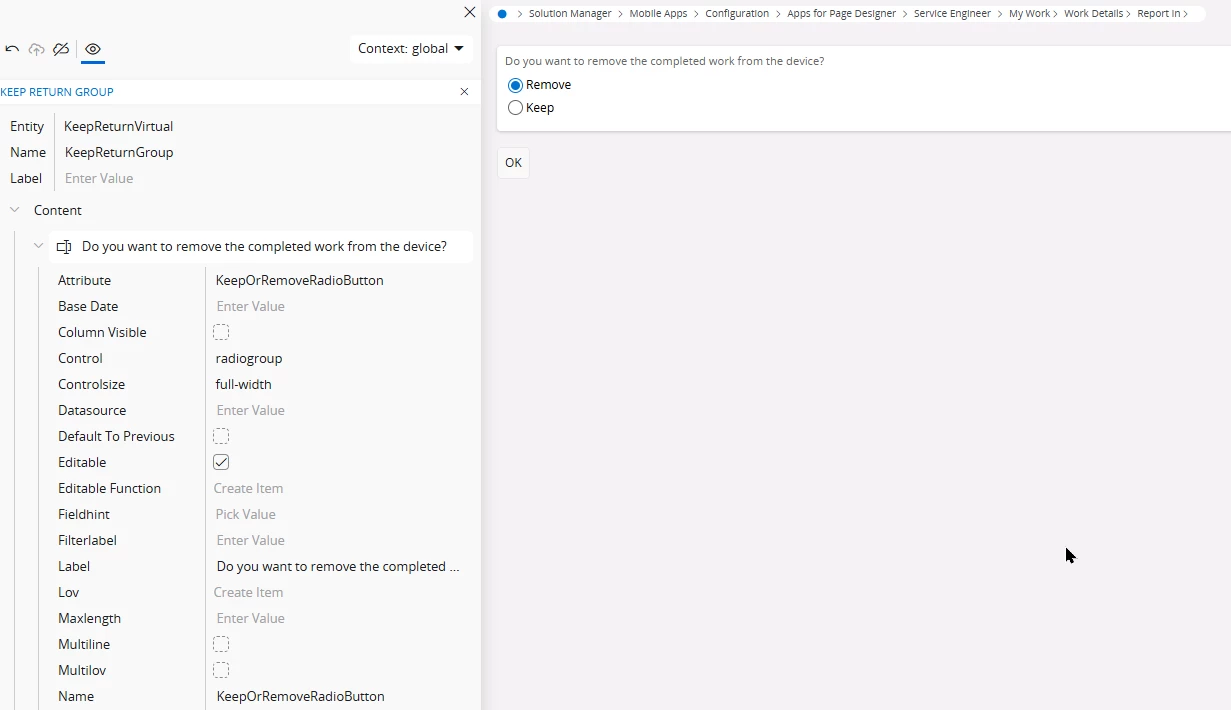
I have a question regarding radio buttons that are automatically filled with a default value. Is it possible to change this so that no option is selected by default?


For example, I would prefer that neither option (remove/keep) is preselected, so that the end user is required to make a decision before being able to press OK. At the moment, the user can immediately press OK, and there is no way to undo the action afterward, since remove is automatically selected when opening the assistant.

 

1 reply

ashen_malaka_ranasinghe
Hero (Employee)
Forum|alt.badge.img+14

Hi ​@ANQLeon,

In IFS (both Apps 10 and Cloud UI/assistant framework), radio buttons are typically bound to an attribute that has a defined default value at either the client metadata level or the underlying LU/API level. Because of this, when the assistant opens, one option is automatically selected - this is not just a UI behavior but often comes from how the attribute is initialized in the business logic.

From a standard configuration perspective, there is no out-of-the-box option to render a radio group with “no selection” if the attribute has a default value defined. The assistant will always display the current value of the attribute, and if a default is provided (either in the projection, client file, or API), one of the radio options will be preselected. This is why users can proceed immediately without actively choosing.

If your goal is to force the user to make an explicit decision, the behavior needs to be controlled indirectly. One approach is to remove or avoid setting a default value at the attribute level, so the field is initially null. However, this is only possible if the underlying API allows null values for that attribute. If the field is mandatory at the API level, the system will usually enforce a value before allowing the action to complete.

Another common approach (and typically the recommended pattern) is to enforce validation rather than relying on UI defaults. For example, you can:

  • Make the field mandatory and ensure validation logic checks whether the user has actively changed the value.
  • Disable the Next/OK command until all required values are explicitly provided, which is a supported design pattern in assistants.

In more advanced scenarios (especially in Aurena/IFS Cloud), developers sometimes introduce a “dummy” or neutral state (e.g., an empty or “Select…” option) instead of using a strict two option radio group. This forces the user to pick a value before proceeding, but it requires changes at the projection/client level rather than simple configuration.

