Hi @pshields ,
Why #NUMBER_OF_THIS_YEAR# doesn't work
IFS Cloud's CSV (Context Substitution Variable) support in lobby navigation is primarily limited to date-type fields Azurewebsites — things like #TODAY#, #START_OF_THIS_YEAR#, #END_OF_THIS_YEAR#, etc. There is no built-in CSV that returns just the year as an integer, which is what your YEAR page parameter (a number type) needs.
Recommended Workarounds
Option 1 — Add YEAR as a page parameter on the SOURCE lobby (cleanest solution)
Add a YEAR page parameter to the source (linking) lobby and give it a default value of the current year. Then pass it dynamically in your navigation link:
lobby/fd24bb55-7ae4-49d7-9f35-36104644be99?pageParams=YEAR:$YEAR$
Using pageParams maps the page parameters of the source lobby to the page parameters of the destination lobby. Ifs The $YEAR$ syntax references the source lobby's own page parameter value. This way:
- The destination lobby opens defaulted to current year ✅
- Users can still change the year on the destination lobby ✅
- You're not hard-coding a default on the destination lobby ✅
Option 2 — Use a SQL datasource element to expose the year
Create a simple single-row SQL datasource on the source lobby with a column like:
sql
SELECT TO_CHAR(SYSDATE, 'YYYY') AS YEAR FROM DUAL
```

Then reference it in navigation using the element data value syntax:
```
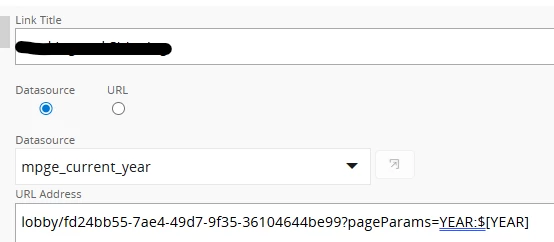
lobby/fd24bb55-7ae4-49d7-9f35-36104644be99?pageParams=YEAR:$[YEAR]
The $[COLUMN_NAME] syntax includes data values of the lobby element itself Azurewebsites, so this pulls the computed year directly from the SQL result.
Option 3 — Use #START_OF_THIS_YEAR# if YEAR accepts dates
If your YEAR parameter can be redefined as a date type and your SQL uses EXTRACT(YEAR FROM ...), you could pass #START_OF_THIS_YEAR# — but this only helps if you're willing to rework the datasource on the destination lobby.