


Solved

Navigation to a custom page through command in Aurena

  • January 5, 2021
  • 4 replies
  • 327 views

Forum|alt.badge.img+5

Hi,

I have created a custom page called Boq_Cco_Connections and have connected to navigator. It is working fine without any issues. Am trying to add a new command in contract change order window, which will have to navigate to the custom page that I have created (Boq_Cco_Connections).

But during the setup, its shows the page as below in the drop down to select.
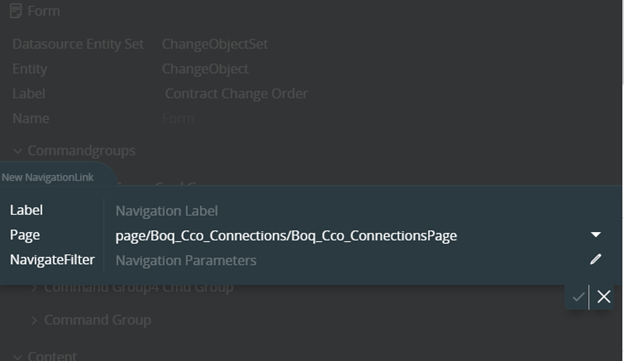
 

But when i try to add the navigation parameters, its not showing any attributes in the drop down.
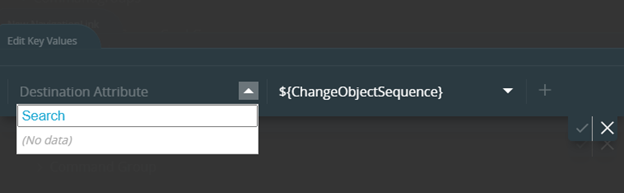
 

Am I missing any settings here? Any guidance would be appreciated.


Thanks!

Best answer by LakmaliRD

@Inisrinip  Please report a case to RnD. We can get this corrected in an upcoming update.


Cheers!

This topic has been closed for replies.

4 replies

LakmaliRD
Hero (Employee)
Forum|alt.badge.img+15
  • Hero (Employee)
  • January 5, 2021

Hi @Inisrinip ,

This looks like a bug. Are you on APPS 10 track ?


Forum|alt.badge.img+5
  • Author
  • Do Gooder (Partner)
  • January 5, 2021

Hi @LakmaliRD 

This customer is in APPS10 update 9


LakmaliRD
Hero (Employee)
Forum|alt.badge.img+15
  • Hero (Employee)
  • Answer
  • January 5, 2021

@Inisrinip  Please report a case to RnD. We can get this corrected in an upcoming update.


Cheers!


Forum|alt.badge.img+5
  • Author
  • Do Gooder (Partner)
  • January 5, 2021

@LakmaliRD Thanks for your input, will do.

