Question

LOV filtering

  • June 8, 2022
  • 4 replies
  • 416 views

Forum|alt.badge.img+7
  • Do Gooder (Partner)

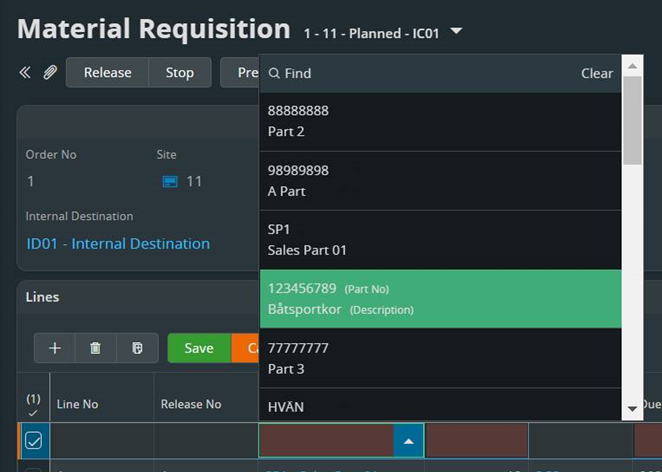
When adding a part to material requisition I get the PartNo and Part Description in the LOV

I would expect to be able to filter on both PartNo and Part Description when start typing.

To my knowledge I can only filter on PartNo.

Is this good or bad usability? 


4 replies

Forum|alt.badge.img+21

This functionality exists on other places. For example when adding material to a Work Task.

I don’t know if this is skipped intentionally or if it is “forgotten” or just not done.

Tested in 21R2 and it is still not possible to filter on description unless you go into “Find”.


Forum|alt.badge.img+11
  • Hero (Partner)
  • June 10, 2022

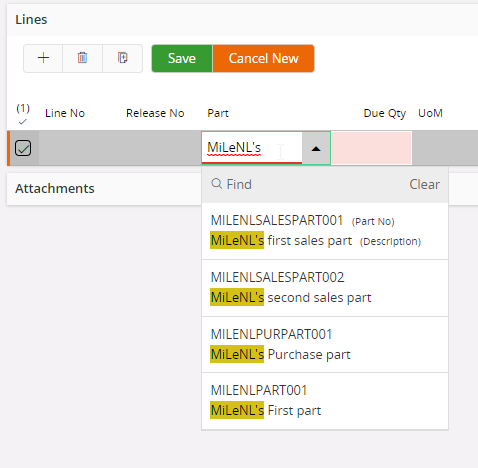
This can be enabled using the Page Designer. Go to the list where you are searching this part. Extend the content and go to the ‘Search’ option. Add PartNo and Description (or any other field)


Now searching on part name is also possible;


Forum|alt.badge.img+21

Good that you can add it there but it is inconsistent when this already exists in some places and some doesn’t have it. A harmonization of this amongst the product areas would be nice.


Forum|alt.badge.img+11
  • Hero (Partner)
  • June 10, 2022

Totally agree with that one 😉.