Solved

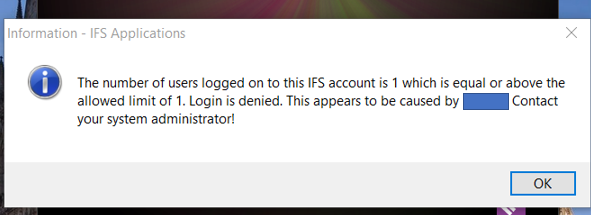
Login is denied. User has already logged onto IFS Account.

  • December 9, 2021
  • 4 replies
  • 510 views

Forum|alt.badge.img+15

Hi All,

Do you have any idea how to get the login screen again to enter different username and password.

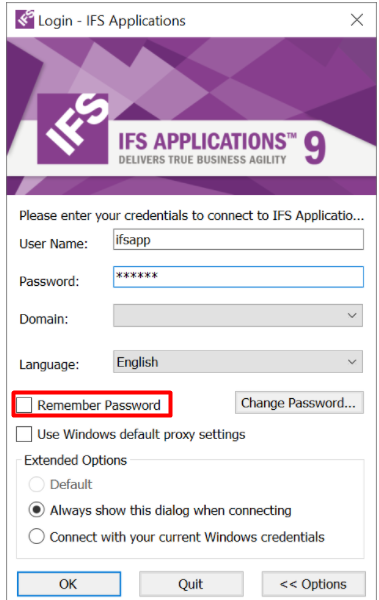
I have mistakenly left the Remember Password ticked, when login with another user for some testing. 

Please let me know if you have any idea to get that login screen back?

Thank you!


Best answer by Srikanth

select * from AO.FND_CLIENT_LOGON_TAB; should show you the session currently logged in as the user in question. You need to delete the row from the table to clear the session.

You can then login and user switch user option inside IEE client. 


This topic has been closed for replies.

4 replies

Forum|alt.badge.img+6
  • Sidekick (Employee)
  • December 9, 2021

The easiest way would be to ask that particular user to log off from the system briefly and after that you login and select the switch users option to get back the login window to change your settings.


Srikanth
Superhero (Partner)
Forum|alt.badge.img+18
  • Superhero (Partner)
  • Answer
  • December 9, 2021

select * from AO.FND_CLIENT_LOGON_TAB; should show you the session currently logged in as the user in question. You need to delete the row from the table to clear the session.

You can then login and user switch user option inside IEE client. 


Forum|alt.badge.img+15
  • Author
  • December 9, 2021

Hi @Srikanth, I have executed this query in database but I’m getting an error ‘ORA-00942: table or view does not exist’.

Is this table available in a different name in app 7.5 


Forum|alt.badge.img+15
  • Author
  • December 10, 2021

In app 7.5 session details contains in fnd_session_tab.

@Srikanth ,I was able to log in successfully by following your suggestion.

Thank you @Jagath Kandambi and @Srikanth for your valuable opinions.