Question

Lobby elements disappearing

  • July 21, 2025
  • 2 replies
  • 99 views

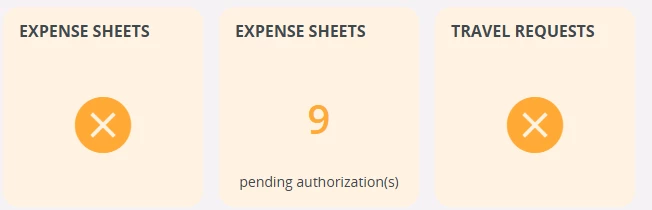
We have 24R2, and sometimes lobby elements created by users just poof, disappear. The element suddenly appears with an “X”, instead of the expected result, and when you try to edit it, it says the element doesn’t exist. This has happened twice now. 


Again, the lobby element existed. It’s on the lobby. It was working. Then, bam, instead of showing the counter, it just becomes an X and when you try to edit it, it says the lobby element doesn’t exist. I’m literally clicking on it and it says it doesn’t exist.


2 replies

Abdul
Superhero (Partner)
Forum|alt.badge.img+20
  • Superhero (Partner)
  • July 22, 2025

Hi ​@KKSloane,

I assume you are facing issue below. This issue comes when the Lobby Element directly granted to a Lobby page while end user still dont have access to lobby datasource.


This issue can be resolved by simply granting the Lobby Datasource access to the End User/Functional Role.


Regards

Abdul Rehman


Forum|alt.badge.img+5
  • Do Gooder (Customer)
  • August 27, 2026

We have this same problem and it will happen randomly and doesn’t stem from a permission issue since for users with admin level permissions it doesn’t show up either. The only fix we’ve found for this is waiting for IFS to eventually bring them back in a couple days.