



Solved

List of shop order tools in shop order page

  • February 25, 2026
  • 8 replies
  • 36 views

REOGIRARD
Hero (Customer)
Forum|alt.badge.img+9

Hello,

Today, our production team asked us to restore a tab on the Shop Order page that existed in IFS V8 but is no longer available in IFS Cloud 24R1.

This tab was called “Operation Tools.”
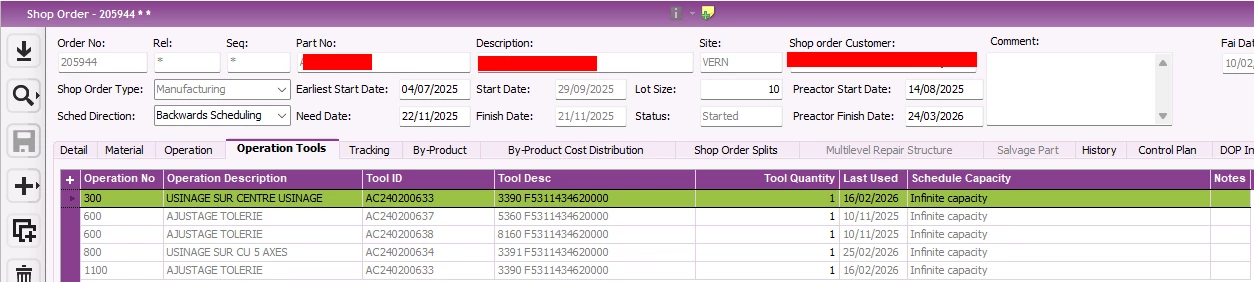
In IFS Cloud 24R1, we can still see the tools used by an operation by clicking the arrow (“v”) in the operation list on the Shop Order page.
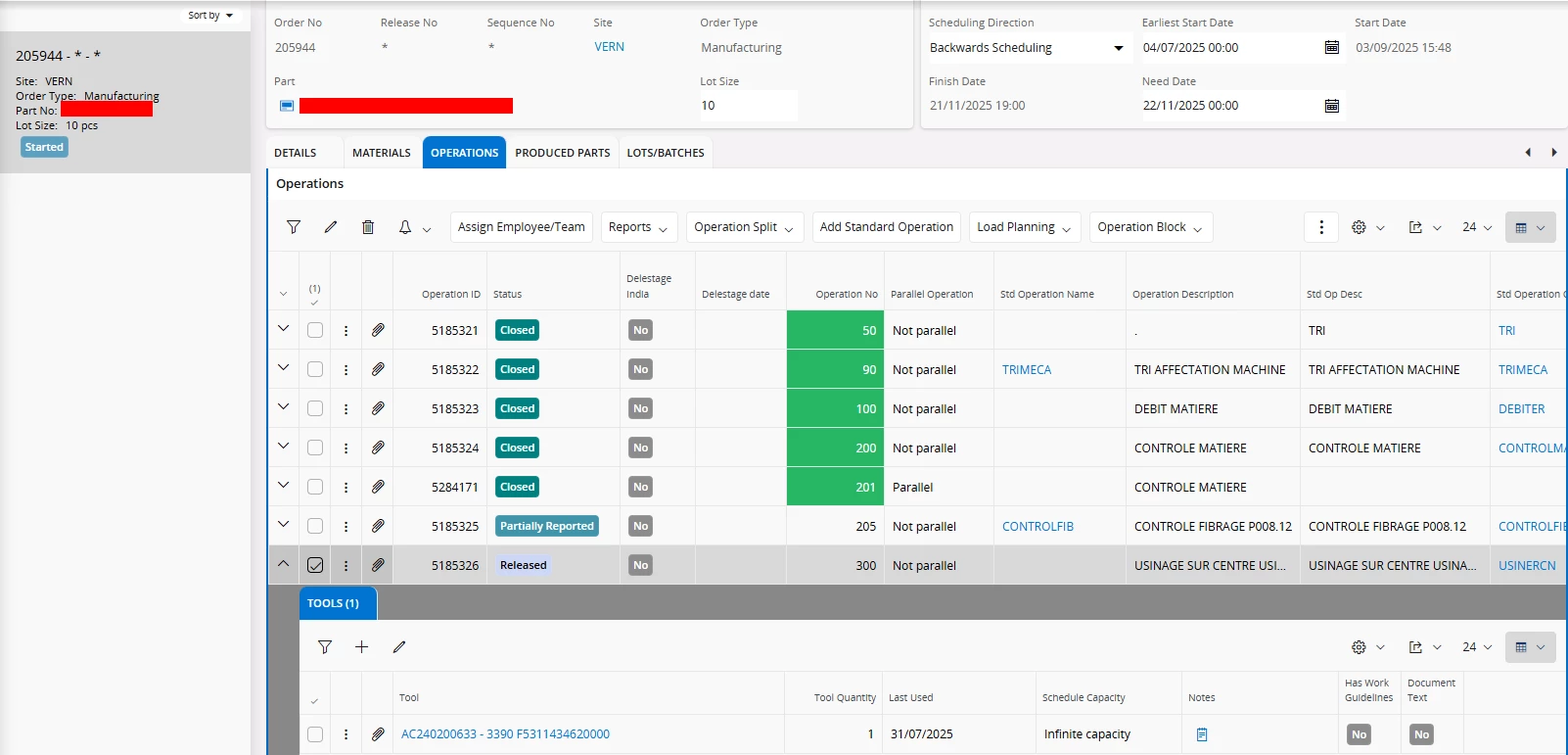

We are hosted on-premise, but we do not have a development license; we can only use IFS Cloud personalization.

After spending a few hours investigating, I believe it is not possible to recreate the “Operation Tools” tab exactly as it existed in IFS V8 due to the data structure:
1 shop order → N operations → N tools (one operation may have multiple tools).

I have already created custom projections based on standard projections with custom entity associations (for example, to display comments in Inventory Part Availability Planning, which was a specific dev on IFS8 which i remade only using personalization tools), but the data relationships in that case were different.

In this situation, we managed to display all tools without considering the shop order, and filtering the tab manually would gives the expected result. However, we did not find a way to automatically filter the list.

Could you please confirm whether it is possible to recreate this functionality without a development license?

Best regards,
Guillaume
Best answer by karale

This is exactly what we need.
Thank you for the confirmation, I’ll take a look.

Guillaume

Great! It is perfectly doable. The only tricky part is you have to make a “duplicate” of the ShopOrderOperTool entity using Query Designer (just select that entity and the fields you want), then add that query to ShopOrderHandling as a entity and associate it with the ShopOrd entity, using OrderNo, ReleaseNo and SequenceNo as key mappings. This is done in Projection Configuration. The last part is making the data visible via Page Designer, the automatic filtering is done via setting the binding in Page Designer.

8 replies

REOGIRARD
Hero (Customer)
Forum|alt.badge.img+9
  • Author
  • Hero (Customer)
  • February 26, 2026

up 😁


REOGIRARD
Hero (Customer)
Forum|alt.badge.img+9
  • Author
  • Hero (Customer)
  • March 12, 2026

Hello,

Any employee could confirm whether it is possible to recreate this functionality without a development license?

Guillaume


  • March 17, 2026

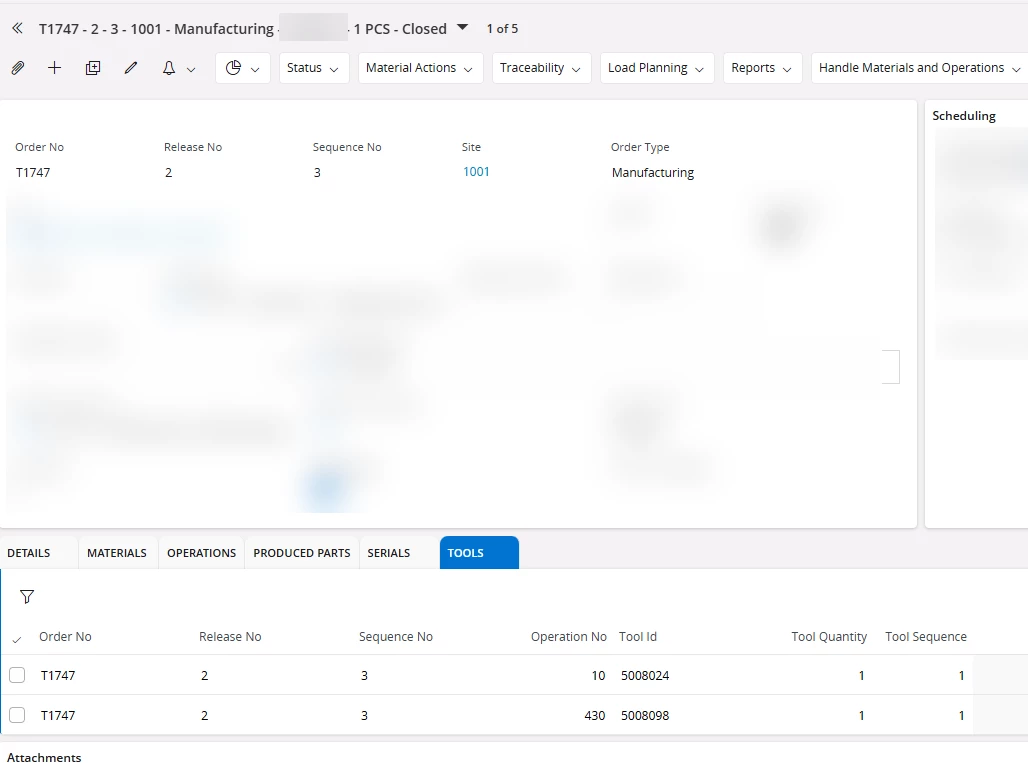
Is this what you’re looking for?


If yes, then this can be done through customization. Not sure what development license means, but if you have access to Query Designer, Projection Configuration and Page Designer, what is shown above can be done.


REOGIRARD
Hero (Customer)
Forum|alt.badge.img+9
  • Author
  • Hero (Customer)
  • March 17, 2026

This is exactly what we need.
Thank you for the confirmation, I’ll take a look.

Guillaume


  • Answer
  • March 18, 2026

This is exactly what we need.
Thank you for the confirmation, I’ll take a look.

Guillaume

Great! It is perfectly doable. The only tricky part is you have to make a “duplicate” of the ShopOrderOperTool entity using Query Designer (just select that entity and the fields you want), then add that query to ShopOrderHandling as a entity and associate it with the ShopOrd entity, using OrderNo, ReleaseNo and SequenceNo as key mappings. This is done in Projection Configuration. The last part is making the data visible via Page Designer, the automatic filtering is done via setting the binding in Page Designer.


REOGIRARD
Hero (Customer)
Forum|alt.badge.img+9
  • Author
  • Hero (Customer)
  • March 18, 2026

Hello Karale,

I wasn’t sure how to use the query. It feels a bit unusual that a query can be used as an entity, since it generates a projection. That was actually the point I was raising.

My coworker and I were wondering how you came up with this solution. Was it something you discovered through R&D, or is there any documentation describing this approach?

Thank you for sharing it with us.

Have a great day,

Guillaume


  • March 18, 2026

Hello Karale,

I wasn’t sure how to use the query. It feels a bit unusual that a query can be used as an entity, since it generates a projection. That was actually the point I was raising.

My coworker and I were wondering how you came up with this solution. Was it something you discovered through R&D, or is there any documentation describing this approach?

Thank you for sharing it with us.

Have a great day,

Guillaume

Found it accidentally while trying to solve a similar problem that you are having.

I don’t believe there is any documentation for it, the documentation only mentions “The Query Designer lets users create and publish advanced queries through a simple user interface. These queries can be consumed in areas such as Custom Pages, Integrations and Lobbies in IFS Cloud.” 


It’s really useful and flexible though, we have 3-4 configurations done using queries as entities that otherwise wouldn’t be possible to make.


REOGIRARD
Hero (Customer)
Forum|alt.badge.img+9
  • Author
  • Hero (Customer)
  • March 18, 2026

Well, let’s hope IFS doesn’t block this functionality in future updates. I did not see this possibility mentioned in the documentation, as you pointed out, so it seems this technique was not originally intended.

Thank you again for sharing this :)

All the best,

Guillaume