

Solved

Improved Integration with Custom Attributes in Outbound Messages

  • March 6, 2026
  • 7 replies
  • 89 views

Frbese
Sidekick (Partner)
Forum|alt.badge.img+5

The following is stated in 25R2 release notes, I believe. But what does in mine in practice? Where can I do this configuration?

Improved Integration with Custom Attributes in Outbound Messages
Custom attributes on business entities can now be included in outbound messages (e.g., Freight Booking, Dispatch Advice).
Uses configuration over customization.
Benefits:
Enhanced flexibility.
Cost savings.


Best answer by dsj

Hi ​@Frbese 


There’s a new property Enable on Outbound Messages available in custom attribute which include that in the outbound message.

More details can be found in the tech doc.

Custom Attributes - Technical Documentation For IFS Cloud


Cheers!

Damith

7 replies

dsj
Ultimate Hero (Partner)
Forum|alt.badge.img+22
  • Ultimate Hero (Partner)
  • Answer
  • March 6, 2026

Hi ​@Frbese 


There’s a new property Enable on Outbound Messages available in custom attribute which include that in the outbound message.

More details can be found in the tech doc.

Custom Attributes - Technical Documentation For IFS Cloud


Cheers!

Damith


Frbese
Sidekick (Partner)
Forum|alt.badge.img+5
  • Author
  • Sidekick (Partner)
  • March 6, 2026

Hi ​@Frbese 


There’s a new property Enable on Outbound Messages available in custom attribute which include that in the outbound message.

More details can be found in the tech doc.

Custom Attributes - Technical Documentation For IFS Cloud


Cheers!

Damith


Thanks, there we have it!


Forum|alt.badge.img+10
  • Hero (Partner)
  • March 6, 2026

@dsj what outbound messages are supported? I mean does this apply also on e-invoice xml export? 


dsj
Ultimate Hero (Partner)
Forum|alt.badge.img+22
  • Ultimate Hero (Partner)
  • March 9, 2026

@dsj what outbound messages are supported? I mean does this apply also on e-invoice xml export? 


Hi ​@kvbe 


There’s no proper indication on which outbound messages are supported with this. According to the documentation, to enable custom attribute support, structure-based projection action structures must be annotated with the configentity property. 


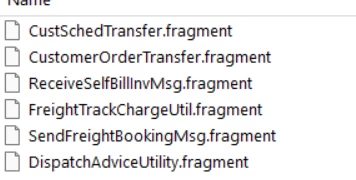
I did a simple search on 25R2 code base and found below contains the syntax. E-invoice is not there yet as per my guess, but worth checking with IFS.


Cheers!

Damith


Forum|alt.badge.img+13
  • Hero (Partner)
  • March 12, 2026

@dsj what outbound messages are supported? I mean does this apply also on e-invoice xml export? 


Hi ​@kvbe 


There’s no proper indication on which outbound messages are supported with this. According to the documentation, to enable custom attribute support, structure-based projection action structures must be annotated with the configentity property. 


I did a simple search on 25R2 code base and found below contains the syntax. E-invoice is not there yet as per my guess, but worth checking with IFS.


Cheers!

Damith

Hi ​@dsj,

Do you know by chance if the annotation of the the configentity property must be completed from the backend and if it applies to inbound messages as well?

I was working on a functional test of adding custom attributes on an inbound file (released in 24R1), but the new attributes do not appear in the API doc.


Frbese
Sidekick (Partner)
Forum|alt.badge.img+5
  • Author
  • Sidekick (Partner)
  • April 24, 2026

According to my customer who has tested it, it doesn't work perfectly. In the example of Dispatch Advice, only the header can export custom fields. Any CF added to the Dispatch lines, will not be shown in outbound messages.

Anyone, any comment on above?


Forum|alt.badge.img+1

Hi ​@Frbese ,

You mention your customer had success with CF on the header for DESADV - can you tell me, where they placed the CF? Which entity? And how they sent it?

And in regards to dispatch lines and handling units - if you place them in HandlingUnitHistory, they show up on Outbound Message Viewer. However, in the utility package they collect custom attributes from ShipmentHandlUnitWithHistory and DispatchAdviceLine which doesn’t correspond to any LU or TAB - so, I assume that’s an error. The view shpmnt_access_hu_with_history is based on handling_unit_history_tab, so I would assume it should be changed to HandlingUnitHistory.

My issue is that I can see the CFs on the Outbound Message Viewer, but none of the CFs are places in the DESADV JSON file when using INET_TRANS, and I have no idea why that is.