We’ve identified an issue this morning affecting import/export actions in IFS, such as downloading document attachments from purchase orders. When users attempt to save a file to their local machine, the IFS client crashes and closes. We’ve tested this across multiple user devices, and the behaviour is consistent.
Everything was functioning normally before the weekend, but as of this morning the feature is failing entirely in both our production and development environments.
As an additional check, I tested the same actions directly on the server/VM hosting our middleware instance, and import/export works correctly there. This makes me suspect the issue may be related to something on the local Windows machines, possibly a recent update.
Our application is accessed through an App Gateway, but this has been in place for some time without any issues, so it seems unlikely to be the cause.
Has anyone else seen this?
Best answer by TmRyk
We’ve identified the cause of the crash and a temporary workaround.
IFS EE ships its own copy of msvcp140.dll inside the 2.0 folder. In our environment that DLL is version 14.16.27033, which is several years old. Windows 25H1/25H2 includes a much newer Visual C++ runtime (our machines are running 14.44.35211). When IFS opens a File Explorer dialog, Windows loads the older DLL from the 2.0 folder instead of the system version. The version mismatch causes IFS EE to crash immediately.
If we delete the IFS‑bundled msvcp140.dll, Windows falls back to the system runtime and the crash disappears. Importing and exporting files then works normally.
The limitation is that if a user deletes their 2.0 folder or reinstalls IFS EE, the old DLL is downloaded again and the issue returns.
We’re currently testing an Intune policy to automatically remove the outdated DLL so IFS EE consistently uses the Windows runtime instead.
We’ll also highlight this with IFS to ensure a future patch will resolve it.
We’ve identified the cause of the crash and a temporary workaround.
IFS EE ships its own copy of msvcp140.dll inside the 2.0 folder. In our environment that DLL is version 14.16.27033, which is several years old. Windows 25H1/25H2 includes a much newer Visual C++ runtime (our machines are running 14.44.35211). When IFS opens a File Explorer dialog, Windows loads the older DLL from the 2.0 folder instead of the system version. The version mismatch causes IFS EE to crash immediately.
If we delete the IFS‑bundled msvcp140.dll, Windows falls back to the system runtime and the crash disappears. Importing and exporting files then works normally.
The limitation is that if a user deletes their 2.0 folder or reinstalls IFS EE, the old DLL is downloaded again and the issue returns.
We’re currently testing an Intune policy to automatically remove the outdated DLL so IFS EE consistently uses the Windows runtime instead.
We’ll also highlight this with IFS to ensure a future patch will resolve it.
We’ve identified the cause of the crash and a temporary workaround.
IFS EE ships its own copy of msvcp140.dll inside the 2.0 folder. In our environment that DLL is version 14.16.27033, which is several years old. Windows 25H1/25H2 includes a much newer Visual C++ runtime (our machines are running 14.44.35211). When IFS opens a File Explorer dialog, Windows loads the older DLL from the 2.0 folder instead of the system version. The version mismatch causes IFS EE to crash immediately.
If we delete the IFS‑bundled msvcp140.dll, Windows falls back to the system runtime and the crash disappears. Importing and exporting files then works normally.
The limitation is that if a user deletes their 2.0 folder or reinstalls IFS EE, the old DLL is downloaded again and the issue returns.
We’re currently testing an Intune policy to automatically remove the outdated DLL so IFS EE consistently uses the Windows runtime instead.
We’ll also highlight this with IFS to ensure a future patch will resolve it.
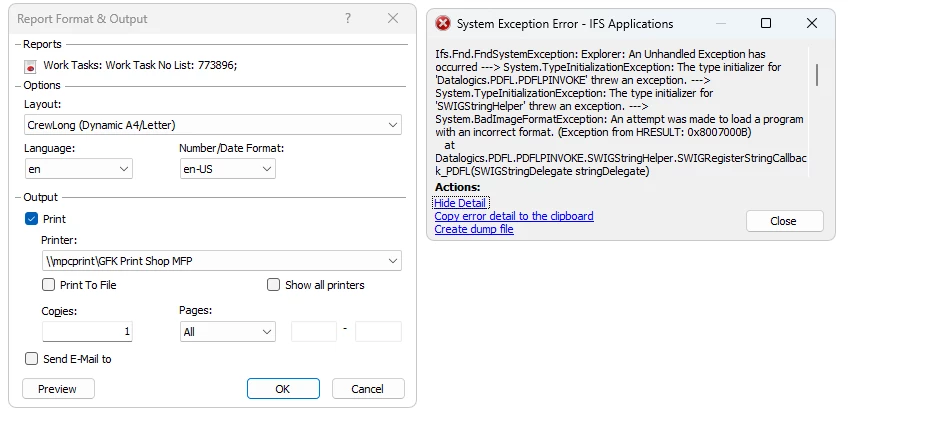
We tried this fix, and though it seems to deal with the attachments issue we then receive this error.
We’ve identified the cause of the crash and a temporary workaround.
IFS EE ships its own copy of msvcp140.dll inside the 2.0 folder. In our environment that DLL is version 14.16.27033, which is several years old. Windows 25H1/25H2 includes a much newer Visual C++ runtime (our machines are running 14.44.35211). When IFS opens a File Explorer dialog, Windows loads the older DLL from the 2.0 folder instead of the system version. The version mismatch causes IFS EE to crash immediately.
If we delete the IFS‑bundled msvcp140.dll, Windows falls back to the system runtime and the crash disappears. Importing and exporting files then works normally.
The limitation is that if a user deletes their 2.0 folder or reinstalls IFS EE, the old DLL is downloaded again and the issue returns.
We’re currently testing an Intune policy to automatically remove the outdated DLL so IFS EE consistently uses the Windows runtime instead.
We’ll also highlight this with IFS to ensure a future patch will resolve it.
We tried this fix, and though it seems to deal with the attachments issue we then receive this error.
Apps 10 UPD 25
Is this for only certain report outputs or is it throwing the same error for all?
I’ve just tested on some Crystal Reports & Inbuilt Report Designer ones and they all work as expected. Mind, I only ran print preview.
That was just the image I got from one of our tech support that was helping the user with the issue. I’d have to do some more testing but this was ater they pressed “OK”. I recommend to them to try click “Preview” and then print but I don’t believe they tried that yet. We have a new user that just had the issue arise so I can try see if we get any fixes for them. I have a ticket open with IFS as well so I will respond here with their fix once I hear more.
That was just the image I got from one of our tech support that was helping the user with the issue. I’d have to do some more testing but this was ater they pressed “OK”. I recommend to them to try click “Preview” and then print but I don’t believe they tried that yet. We have a new user that just had the issue arise so I can try see if we get any fixes for them. I have a ticket open with IFS as well so I will respond here with their fix once I hear more.
Hi
When IFS will start correcting, ask about Solution ID in LCS. I can check it and see progress
Here was what we got from IFS Customer Support and it seemed to resolve our issue.
Based on the investigation done from our end, it appears that the issue may be resolved by installing the latest C++ Redistributable together with the February Windows update (KB5077181).
Could you kindly verify whether the affected machines have the following installed? February Windows Update – KB5077181 Latest Microsoft C++ Redistributable
For reference, you may check the Windows update details here: https://support.microsoft.com/en-us/topic/february-10-2026-kb5077181-os-builds-26200-7840-and-26100-7840-f0fa9e54-a22a-4a06-96b6-bf5b2aded506
If these updates are not yet applied, we kindly recommend installing them and confirming whether the issue still persists.