Solved

IFS warning messages IFS 9

  • Sep 7, 2021 1:24 PM UTC
  • 4 replies
  • 614 views

ZTC ZTC JGOTA
Hero (Customer)
Forum|alt.badge.img+14

Hello IFS Community,


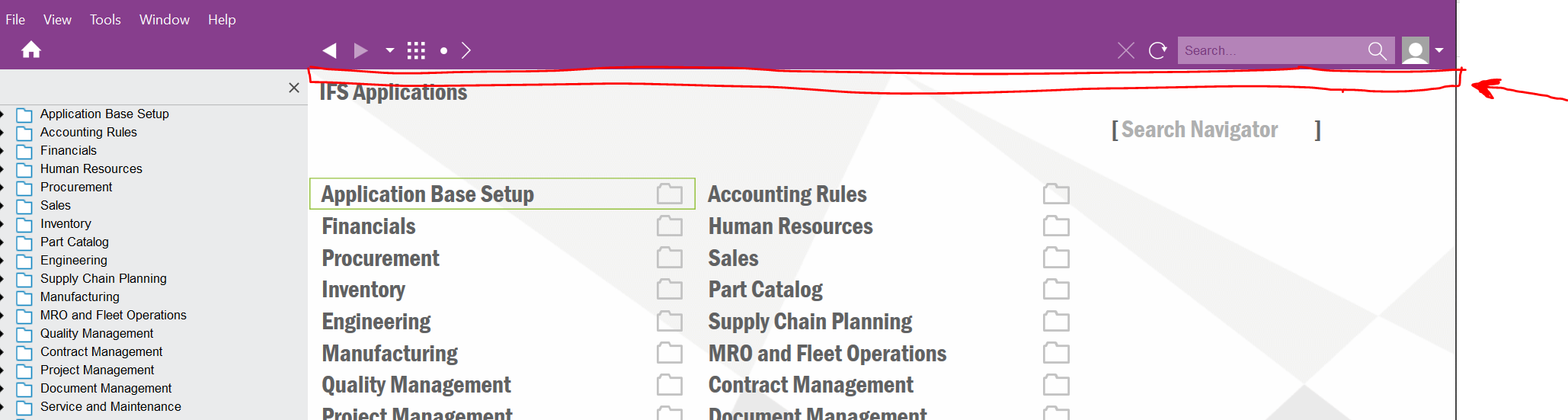
In my previous workplace, the IFS administrator used to set up a message warning about when IFS servers will be down and why. See the Screenshot for details (See the red arrow). 


The message used to display something like “IFS will be down from 2 am - 4 am” on the area with red on my Screenshot, and the message even moves. Any idea how to create that message? 


Best answer by knepiosko

Hint: Boradcast Messages

Solution Manager → User Interface → Broadcast Messages

View original

4 replies

Forum|alt.badge.img+17
  • Superhero (Partner)
  • Answer
  • Sep 7, 2021 1:27 PM UTC

Hint: Boradcast Messages

Solution Manager → User Interface → Broadcast Messages


Franck.G
Sidekick (Employee)
Forum|alt.badge.img+8
  • Sidekick (Employee)
  • Sep 7, 2021 1:28 PM UTC

it is necessary to look for Broadcast Messages… ifswin:Ifs.Application.CommonMessages.CommonMessages


durette
Superhero (Customer)
Forum|alt.badge.img+19
  • Superhero (Customer)
  • Sep 7, 2021 7:12 PM UTC

We use broadcast messages in our nonproduction refresh scripts to tell users when the environment was last refreshed from PROD. The bright orange banner also helps them notice they’re not in PROD.


(This is made with a call to COMMON_MESSAGES_API.NEW__.)


Forum|alt.badge.img+9
  • Sidekick (Customer)
  • Sep 10, 2021 1:02 PM UTC

Does anyone know how this works in Aurena?