Question

IFS Quicksight Reports

  • June 9, 2026
  • 3 replies
  • 35 views

Forum|alt.badge.img+7

Hello,


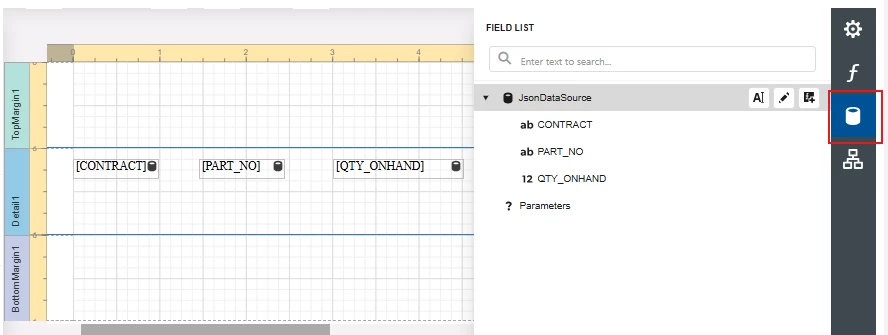
I was looking to use the new quick sight report functionality. II have defined a query for the report but for some reason I don’t see an option for the data member regarding my data source. I was wondering if maybe I missed something simple here or if it’s a bug? I was hoping to make a new label. 


Thanks,

Jay

3 replies

ashen_malaka_ranasinghe
Hero (Employee)
Forum|alt.badge.img+14

Hi ​@jayoneil98,

To create a Quicksight report, you must first create a query artifact in the query designer.

Refer to https://docs.ifs.com/techdocs/25r2/040_tailoring/225_configuration/600_query_designer/100_query_capabilities/ to understand the creation of query artifacts. You must publish the created query artifacts to use them in a Quicksight report.

Refer to this documentation as well: https://docs.ifs.com/techdocs/25r2/060_development/025_operational_reporting/060_report_studio/041_quicksight_reports/?h=quicksight+reports

If the data member option is not visible for your data source, this usually relates to how the query or data source is exposed to the report. Could you please check the following:

  1. Ensure the query returns results correctly (with proper column aliases)
  2. Confirm the query is saved and published/available to the report designer
  3. Verify your permission set includes access to the underlying data source
  4. Test whether the dataset returns at least one row

If all of the above look fine and the data member is still not visible, this could be related to a limitation or issue in the new Quick Sight reporting functionality. In that case, feel free to share:

  • Screenshot of the report definition
  • Query definition

and I can further investigate.


Forum|alt.badge.img+15
  • Superhero (Partner)
  • June 10, 2026

@jayoneil98 I don’t think that the concept of Data Members for theJsonDataSource is applicable to Quicksight reports since the Query being used produces a flat source.  Since the source is flat, you should get the desired repeating records without binding to a specific Data Member.


Forum|alt.badge.img+7
  • Author
  • Hero (Customer)
  • June 10, 2026

This is what my query designer looks like. I was able to publish the query and use it as a quick report, that worked fine, but as soon as I try to make it into a quick sight report, I’ve been having trouble with printing it.