


Question

IFS Apps10 - IEE System Exception Error: 500

  • April 28, 2026
  • 3 replies
  • 17 views

Forum|alt.badge.img+8

Dear Community, 


Maybe you have any idea about the following issue we are facing. We are on IFS Apps10 UPD21 (and UPD27) 

We have 3 test IFS Application servers - TEST, UAT, As-Shipped. All of these are in the same VLAN. 

We are trying to install a new IFS Touch App server in the same VLAN. 

IFS TAS server: Windows Server 2022 Standard

IFS App servers: Windows Server 2019 Standard

The new TAS test server is ready and all pre-required applications are installed. 

To be sure the connection works between any of our IFS test App server and the new TAS server we tried to purely log in to IEE in TAS server. 

The result is: 
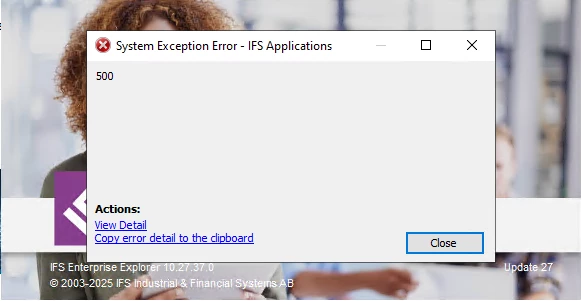
 

However we can log in to e.g.: the TEST App server Admin Console, and we also can log in to the Aurena client. But the IEE not start. All 3 test instance is available from every machine (also from different IFS Apps servers as well). 

We tried e.g.: check the TLS settings on the TAS server, we checked all firewall settings and opening - local and global. 

Have you ever seen this? Do you have any idea what is wrong on this machine? 

Thank you very much for any idea. 

Kind regards, 

Balazs


3 replies

NickPorter
Superhero (Customer)
Forum|alt.badge.img+18
  • Superhero (Customer)
  • April 28, 2026

So you can log in to Test IEE client from different machines, but not from the new TAS server?

Also, are you using database authentication or SSO/AD?


Forum|alt.badge.img+8
  • Author
  • Sidekick (Customer)
  • April 29, 2026

So you can log in to Test IEE client from different machines, but not from the new TAS server?

Also, are you using database authentication or SSO/AD?

Thank you very much the questions ​@NickPorter !

Yes, correct, I can log in from any machine to any test instance (TEST, UAT, As-Shipped) IEE, except from the new TAS server. 

It neither works with SSO nor with database authentication, I tried both. When the SSO window or when the login screen should pop up I got that 500 error window. 

Any idea is very welcome! 

Thank you very much!


NickPorter
Superhero (Customer)
Forum|alt.badge.img+18
  • Superhero (Customer)
  • April 29, 2026

I don’t know for sure but my guess is that Windows security controls or Antivirus etc on the new TAS server are preventing it from downloading the client runtime file that gets executed for IEE, or it is downloading the file but not allowing it to be executed.  The file it tries to download and run is typically named Ifs.Fnd.Explorer.application

You might be able to see something in the Windows event logs or other security tools you have that show it blocking, or you might need to check your settings in the web browser being used to download and launch the file.

