Question

IAL scheduling error

  • November 8, 2020
  • 4 replies
  • 483 views

Forum|alt.badge.img+3
  • Do Gooder (Customer)

Hi,

When I am trying to schedule an IAL in IFS10, the background job is showing error details as “Table not found. Redeploy the scripts manually                    ORA-20105: IalObject.REPTABNOTEXIST”

When the same IAL is configured as Live data, then there is no issue in fetching data.

Could anyone help in resolving this error? 

Thanks in advance!

4 replies

  • Superhero (Employee)
  • November 9, 2020

Hi,

When I am trying to schedule an IAL in IFS10, the background job is showing error details as “Table not found. Redeploy the scripts manually                    ORA-20105: IalObject.REPTABNOTEXIST”

When the same IAL is configured as Live data, then there is no issue in fetching data.

Could anyone help in resolving this error? 

Thanks in advance!
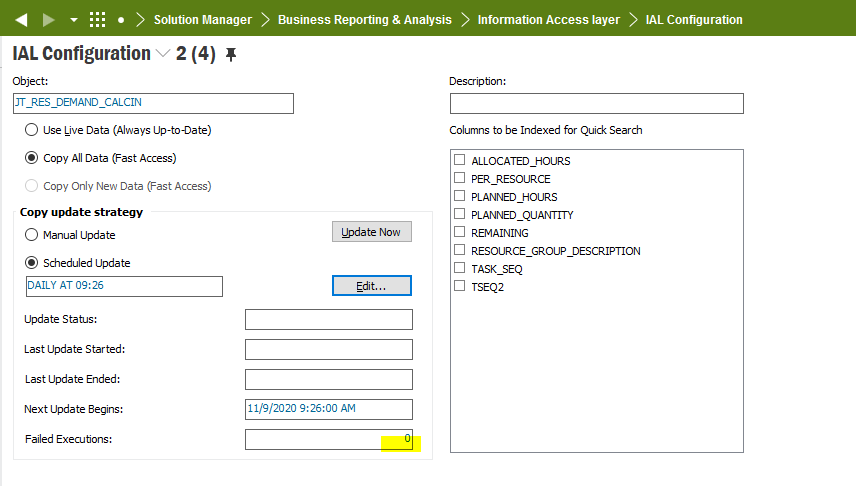
Can you see anything in the Oracle Alert Log?

How many Failed Executions to you have?
 

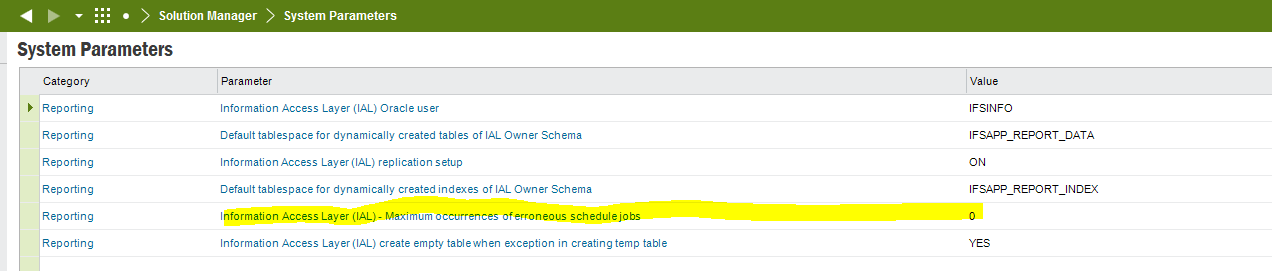
What is your Information Access Layer (IAL) - Maximum occurrences of erroneous schedule jobs system parameter set to? 


If it is 0, try setting it to -1 and then go to the IAL and RMB - > Reset Failed Executions and it should run again.


Forum|alt.badge.img+3
  • Author
  • Do Gooder (Customer)
  • November 19, 2020

This issue got resolved. I was using pipeline table query for creating IAL and was getting error while scheduling the IAL. When added the exception NO_DATA_NEEDED in pipeline table API, the error disappeared. Thank you.


Forum|alt.badge.img
  • Do Gooder (Customer)
  • August 18, 2026

This issue got resolved. I was using pipeline table query for creating IAL and was getting error while scheduling the IAL. When added the exception NO_DATA_NEEDED in pipeline table API, the error disappeared. Thank you.

Hi,

I have the same problem, but only with one IAL object (others work without any issues).

I would like to use your suggestion, but I don't quite understand where and at what stage I should make the changes. Could I ask you for a more detailed description?

Thank you,
Łukasz


Forum|alt.badge.img
  • Do Gooder (Customer)
  • August 19, 2026

I have resolved the issue.

In my case, the error was on the SQL source side (in the WHERE clause), where an explicit date conversion was required: t.invoice_date >= DATE '2026-01-01'. Instead, I had used the syntax: t.invoice_date >= '2026-01-01', which caused the scheduled job to fail even though it worked fine when triggered manually.

Best regards,
LR