Solved

How to unlock: Locked by another user IFS Cloud

  • Jul 2, 2024 10:22 AM UTC
  • 5 replies
  • 285 views

Forum|alt.badge.img+7

Hello,

I’ve created some workflows, deployed them and everythin OK. But when I want to undeploy them (deploying a new version of it), how can it be unlocked?
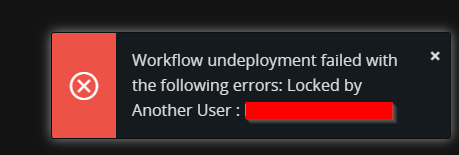
Locked by Another User

Thank you

Best answer by Abdul

Hi ​@TEFCRFU 

Please refer to the screenshot below, Workflow admin can unlock the workflow other than Locked User.

Please check with the user having permission set FND_BPA_ADMIN granted.

 

View original

5 replies

wahelk
Hero (Former Employee)
Forum|alt.badge.img+11
  • Hero (Former Employee)
  • Jul 4, 2024 11:48 AM UTC

is this connected to event action or projection action? if yes, remove it and try..


Forum|alt.badge.img+2
  • Do Gooder (Employee)
  • Jul 5, 2024 9:41 AM UTC

Seems the deployed version locked to some other user. To unlock this Workflow to you,

  • First ask that user to undeploy the Workflow. 
  • The same user should press the Unlock button, so that you can work on the same Workflow.


Forum|alt.badge.img+7
  • Sidekick (Customer)
  • Jun 18, 2026 6:42 AM UTC

We currently have the same problem and the user is away on vacation for a longer time. How can we unlock this without the user??


Abdul
Superhero (Partner)
Forum|alt.badge.img+20
  • Superhero (Partner)
  • Answer
  • Jun 18, 2026 6:01 PM UTC

Hi ​@TEFCRFU 

Please refer to the screenshot below, Workflow admin can unlock the workflow other than Locked User.

Please check with the user having permission set FND_BPA_ADMIN granted.


Forum|alt.badge.img+7
  • Sidekick (Customer)
  • Jun 22, 2026 9:02 AM UTC

Hi ​@Abdul,


all of us Workflow Developers now have the permission set FND_BPA_ADMIN. There were some people missing this permission set. Now we can unlock workflows if we need to.


best regards
Christian