

Solved

how to edit the field

  • March 20, 2026
  • 2 replies
  • 24 views

Forum|alt.badge.img+6

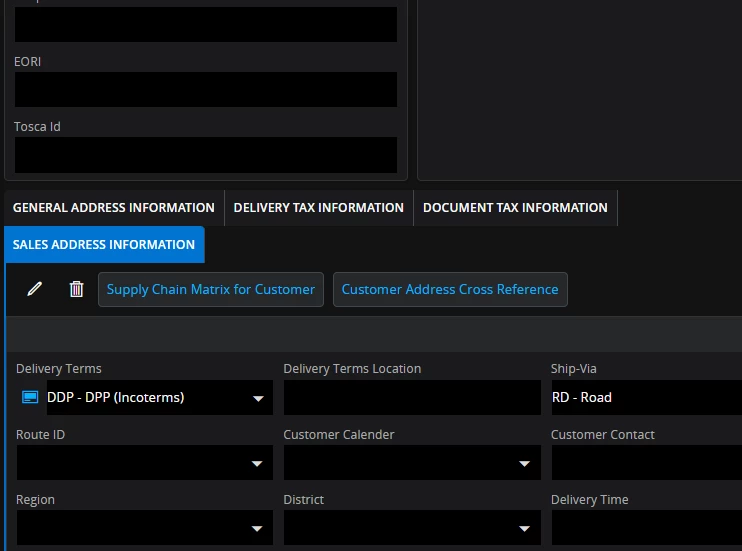
Delivery Terms state "DDP - DPP" this pulls through incorrectly to the Euro Commercial invoice as "DPP" the correct delivery term is DDP. How Can this be amended?
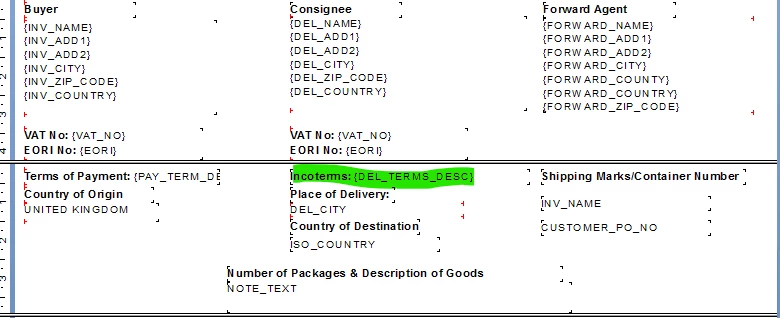
This invoice is  crystal report. How to amend in crystal report

Best answer by Lingesan08

Hi ​@MGDMONALI ,

What’s happening

  • Your Delivery Term = DDP
  • But description showing = “DDP - DDP”
  • You want = “DDP HOU”

 The invoice (Crystal Report) is pulling:

  • DEL_TERMS_DESC (standard description)
  • Instead of your specific text / location

   Why it behaves like this

In IFS:

  • Delivery Terms = Code (DDP)
  • Description = Maintained in basic data
  • Location (HOU) = separate field

 Standard report logic usually:

  • prints code + description
  • ignores Delivery Terms Location

 How people usually fix it

✔ Option 1 (quick fix – basic data)

Go to:

  • Order → Delivery Terms (Basic Data)

Update description:

  • From: DDP
  • To: DDP HOU

 Downside:

  • Affects all customers / documents globally

✔ Option 2 (recommended – report change)

Modify the Crystal Report:

Instead of:


DEL_TERMS_DESC

Use something like:


DELIVERY_TERMS || ' ' || DELIVERY_TERMS_LOCATION

 This gives:

  • DDP HOU dynamically

✔ Keeps standard data clean
✔ More flexible

✔ Option 3 (advanced / cleaner)

  • Use:
    • Custom field / custom expression
  • Or adjust the view used by the report

Then:

  • Pass correct formatted value to report

 Important check

Make sure:

  • Delivery Terms Location (HOU) is actually populated on:
    • Customer order / shipment

If blank → report won’t show it anyway

2 replies

Forum|alt.badge.img+7
  • Do Gooder (Partner)
  • Answer
  • April 2, 2026

Hi ​@MGDMONALI ,

What’s happening

  • Your Delivery Term = DDP
  • But description showing = “DDP - DDP”
  • You want = “DDP HOU”

 The invoice (Crystal Report) is pulling:

  • DEL_TERMS_DESC (standard description)
  • Instead of your specific text / location

   Why it behaves like this

In IFS:

  • Delivery Terms = Code (DDP)
  • Description = Maintained in basic data
  • Location (HOU) = separate field

 Standard report logic usually:

  • prints code + description
  • ignores Delivery Terms Location

 How people usually fix it

✔ Option 1 (quick fix – basic data)

Go to:

  • Order → Delivery Terms (Basic Data)

Update description:

  • From: DDP
  • To: DDP HOU

 Downside:

  • Affects all customers / documents globally

✔ Option 2 (recommended – report change)

Modify the Crystal Report:

Instead of:


DEL_TERMS_DESC

Use something like:


DELIVERY_TERMS || ' ' || DELIVERY_TERMS_LOCATION

 This gives:

  • DDP HOU dynamically

✔ Keeps standard data clean
✔ More flexible

✔ Option 3 (advanced / cleaner)

  • Use:
    • Custom field / custom expression
  • Or adjust the view used by the report

Then:

  • Pass correct formatted value to report

 Important check

Make sure:

  • Delivery Terms Location (HOU) is actually populated on:
    • Customer order / shipment

If blank → report won’t show it anyway


Forum|alt.badge.img+6
  • Author
  • Do Gooder (Customer)
  • April 2, 2026

Option 1 is worked good. Thanks!
