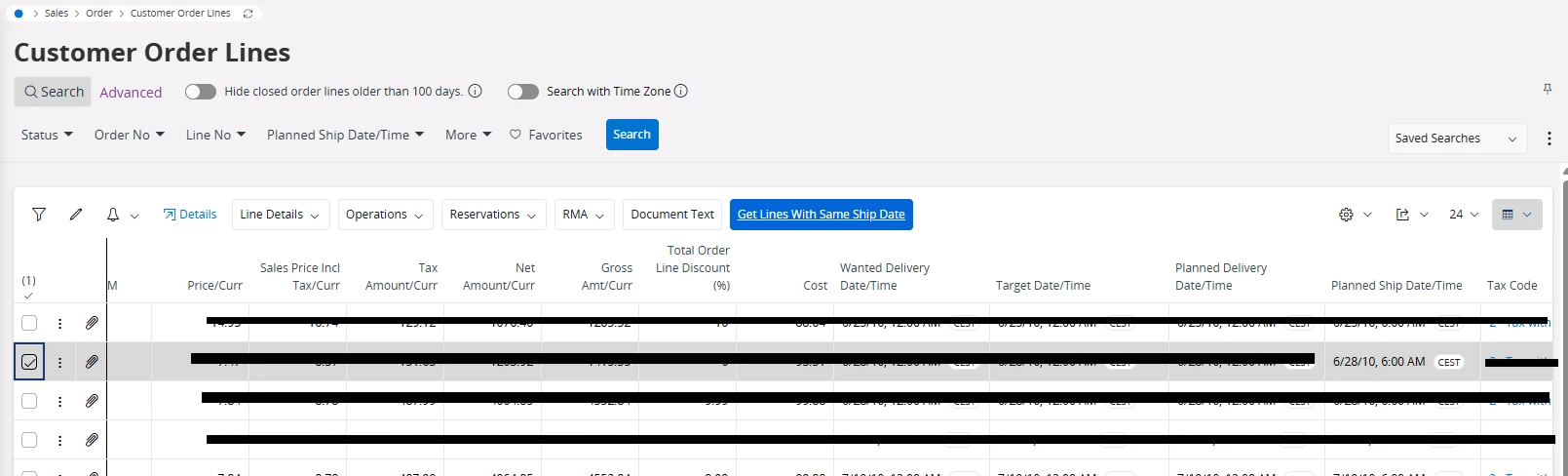
Say that I have a requirement where I need to write a custom command or a command in the Cust layer, to fetch all the Customer Order Lines that has same ‘Planned ship date’ as the one that I have selected.
command CGetSameShipDate for CustomerOrderJoin { label = "Get Lines With Same Ship Date"; execute { navigate { page CustomerOrderLines.List {filter(PlannedShipDate, PlannedShipDate);}}} -- navigate "page/CustomerOrderLines/List?$filter=PlannedShipDate eq $[PlannedShipDate]"; }
But writing like above or as a Custom command just doesn’t return any data because the entity CustomerOrderLines has timeZoneawareness set in the entity definition as TimestampTZRef "site(Contract)";
For example below line has Planned ship date/time as ‘6/28/10, 6:00 AM’
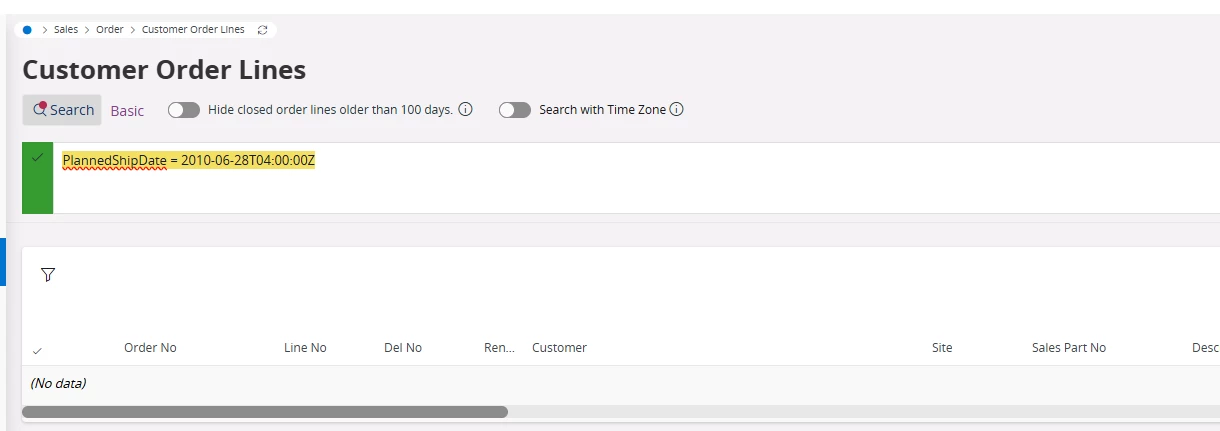
But the navigated form has the search value as ‘2010-06-28T04:00:00Z’ (and the URL query string is main/ifsapplications/web/page/CustomerOrderLines/List;$filter=PlannedShipDate%20eq%202010-06-28T04:00:00Z;)
But what i really need as the search value is ‘2010-06-28T06:00:00Z’. But how do you do that?
This issue exists when we have set the TimeZoneAwareness. similar operation done on a timestamp field on an entity without TimeZonEAwareness does not have this issue. (ex: in /page/ObjectTransactionsAnalysis/List; when you filter for ObjectTransactionDate)
Is there a special property to be set in the URL parameters?
Best answer by MadurangaJ
I have raised this issue to IFS and they acknowledged that this is a limitation in the system and that we would have to find a workaround to solve this.
So in the meantime the customer has just created a new custom field that simply converts the PlannedShipDate to a varchar by doing a to_char() operation, and then this field was then used as the filter in the custom command to do the navigation instead. And this essentially solved our requirement.
Below are more information from the explanation from IFS:
We have reviewed your requirement and the observed behavior. Based on our analysis, the issue appears to be related to how navigation filters are handled for time zone - aware timestamp fields in IFS Cloud.
In this scenario, the CustomerOrderLines entity is configured with time zone awareness (site-based). As a result:
• Timestamp values are internally stored and transferred in UTC format. • The UI displays the value based on the site/user time zone. • When using a navigation command with a direct $filter on a timestamp field, the value is converted to UTC (e.g., 2010-06-28T04:00:00Z), which may not match the expected site-based value.
Due to this, the generated filter condition does not return records, even though the displayed values appear identical. This behavior is consistent with how time zone aware entities are designed to function.
From our review, the current framework does not provide a supported mechanism to apply a timezone-aware filter (such as use-timezone-filter=true) via a simple navigation URL.
To achieve the expected behavior, additional implementation is typically required. For example:
• Handling the timestamp conversion explicitly (based on site or offset), or • Implementing alternative approaches (such as using backend logic or contextual filtering instead of direct URL equality filters).
Since this involves a design/implementation aspect aligned with specific business requirements, it falls outside the scope of Unified Support. For further assistance, we recommend:
• Raising this query in the IFS Community for design-level guidance, or • Engaging your IFS Partner or IFS Consulting team to implement a suitable solution.
I have raised this issue to IFS and they acknowledged that this is a limitation in the system and that we would have to find a workaround to solve this.
So in the meantime the customer has just created a new custom field that simply converts the PlannedShipDate to a varchar by doing a to_char() operation, and then this field was then used as the filter in the custom command to do the navigation instead. And this essentially solved our requirement.
Below are more information from the explanation from IFS:
We have reviewed your requirement and the observed behavior. Based on our analysis, the issue appears to be related to how navigation filters are handled for time zone - aware timestamp fields in IFS Cloud.
In this scenario, the CustomerOrderLines entity is configured with time zone awareness (site-based). As a result:
• Timestamp values are internally stored and transferred in UTC format. • The UI displays the value based on the site/user time zone. • When using a navigation command with a direct $filter on a timestamp field, the value is converted to UTC (e.g., 2010-06-28T04:00:00Z), which may not match the expected site-based value.
Due to this, the generated filter condition does not return records, even though the displayed values appear identical. This behavior is consistent with how time zone aware entities are designed to function.
From our review, the current framework does not provide a supported mechanism to apply a timezone-aware filter (such as use-timezone-filter=true) via a simple navigation URL.
To achieve the expected behavior, additional implementation is typically required. For example:
• Handling the timestamp conversion explicitly (based on site or offset), or • Implementing alternative approaches (such as using backend logic or contextual filtering instead of direct URL equality filters).
Since this involves a design/implementation aspect aligned with specific business requirements, it falls outside the scope of Unified Support. For further assistance, we recommend:
• Raising this query in the IFS Community for design-level guidance, or • Engaging your IFS Partner or IFS Consulting team to implement a suitable solution.