


Question

History Log vs Performance Impact

  • Nov 10, 2026 3:46 PM UTC
  • 5 replies
  • 42 views

Chamath Kuruppuarachchi
Hero (Partner)
Forum|alt.badge.img+13

Hi All,

One of my customers would like to track changes to certain fields in Master Part > Inventory Part and other objects.

I understand that I can enable History Log for the required logical units and fields. I also understand that old history records can be deleted automatically.

My question is Could enabling History Log affect application performance over time?

What has been your experience with using History Log? Have you noticed any performance issues after using it for a long time?

Thanks in advance for sharing your experience.


Thanks,
Chamath

5 replies

NickPorter
Superhero (Customer)
Forum|alt.badge.img+18
  • Superhero (Customer)
  • Nov 10, 2026 4:14 PM UTC

Not really.  Over time the only impact I found is that the data storage increases (slower backups, more disk usage etc).  As you say, keeping old records cleaned up is a good consideration.

The bigger impact to ongoing performance would be if you turn on history logging for a lot of items, in which case think of it as essentially doubling the amount of writes when changes are made in addition to storage increase over time.

Nick


Forum|alt.badge.img+17
  • Superhero (Partner)
  • Nov 10, 2026 4:31 PM UTC

I’ve always wondered why the cleanup flag is unchecked by default. When I asked support, I was told that it was designed that way and they couldn’t change it...


Forum|alt.badge.img+12
  • Hero (Customer)
  • Nov 11, 2026 1:43 AM UTC

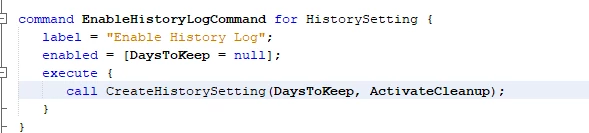
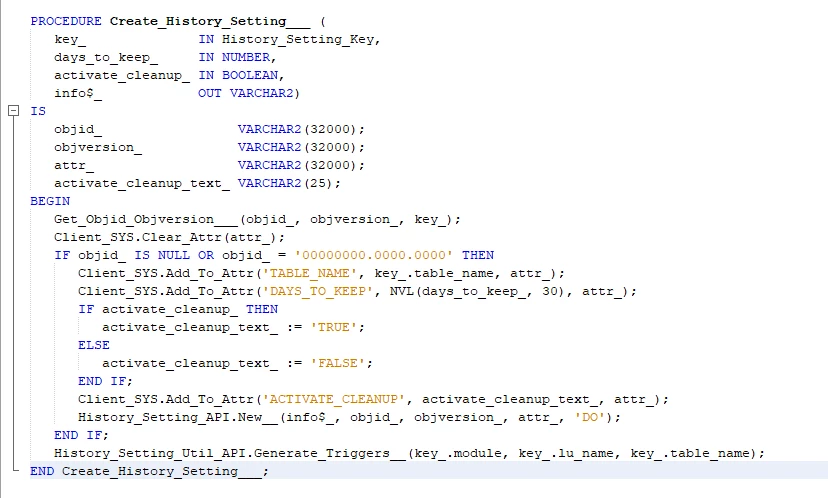
The reason it’s unchecked by Default is clearly an oversight. The command to enable it tries to send variables to it to tell entity action whether it should activate cleanup and the days to keep, except it sends the values of the CURRENT loaded entity record, which, if history log is disabled, will always be false/null.


DaysToKeep and ActivateCleanup will always be null/false if History log is currently disabled for the record you’re modifying, hence they have no effect


It’d be absolutely trivial to change behavior on this but HistoryLog belongs to FNDADMIN which is @Final, so it cannot be customized. R&D could change this in 5 minutes though if they wanted to


Forum|alt.badge.img+17
  • Superhero (Partner)
  • Nov 12, 2026 5:58 PM UTC

I found R&D Team answer:


We cannot set Automatic History Removal to ON by default because we cannot define a default retention period that fits all customers.

*Different usage patterns: Some customers enable very few history logs but want to keep them for long-term auditing/compliance, while others have heavy logging and prefer short retention.
* Retention flexibility: That's why we ask customers to enable Automatic History Removal with a custom days-to-keep value suited to their needs.
* Risk of data loss: Automatically enabling cleanup without a customer-defined retention period could cause accidental deletion of critical data.
* Varied resource constraints: Some customers have the resources to keep large data volumes and do not want automatic deletion.
*Documentation: Our documentation already highlights the need to configure this parameter to prevent database growth issues while ensuring data safety.
*This approach provides a flexible, customer-driven solution that supports both advanced use cases and performance optimization, rather than enforcing a one-size-fits-all default.


Finally, it works as designed...😒


Forum|alt.badge.img+12
  • Hero (Customer)
  • Nov 12, 2026 8:03 PM UTC

This is a bit of a diplomatic statement because it’d literally take 5 mins to create a dialog when you click on enable to ask the user whether auto removal should be ticked, and if so what the timeframe should be =p