


Question

Getting "Remote_Accesss_Failed" error

  • August 22, 2021
  • 4 replies
  • 133 views

Jeewaka Padmapriya
Hero (Employee)
Forum|alt.badge.img+10

Hi Everyone,

In a clustered environment, when Restarting the Servers, "Remote_Accesss_Failed" error appears on the 2nd server Node Manager.  However, after the restart, all the Middleware servers and Services are running without issues. Just curious about why is this "Remote_Accesss_Failed" error is occurring.

*The servers in the cluster have assigned IP addresses  and an antivirus software is running on them.
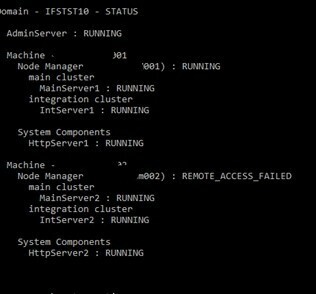
Remote Access Failed Error


Appreciate it if someone could help me on this.
 

Regards,
/Jeewaka.

 

This topic has been closed for replies.

4 replies

Forum|alt.badge.img+13
  • Hero (Partner)
  • August 23, 2021

Hi @Jeewaka Padmapriya ,

Logs should give you a better picture but just looking at the error message it’s something like your node manager windows service logon user is lacking permission. You may try by starting both services from a privileged user


Minoshini Fonseka
Superhero (Employee)
Forum|alt.badge.img+19

@Jeewaka Padmapriya ,

Perhaps there might be a network issue or any problem to connect to the second node. 


Charith Epitawatta
Ultimate Hero (Employee)
Forum|alt.badge.img+31

Hi @Jeewaka Padmapriya,

There is a fix for this in IFS Middleware Server binary patch 10.12.12.0.

Patch ID: 159363 (UPD 12). 

Global Solution ID: 288274.

Hope this helps!


Jeewaka Padmapriya
Hero (Employee)
Forum|alt.badge.img+10

Hi @Jeewaka Padmapriya ,

Logs should give you a better picture but just looking at the error message it’s something like your node manager windows service logon user is lacking permission. You may try by starting both services from a privileged user

Hi @Ruchira,

Thank you for the response!

I will try to get some logs for this but I have tried starting both services with admin privileges. But the issue still remains.

Regards,
/Jeewaka