Solved

Fire a custom event without a trigger

  • Sep 8, 2026 6:04 AM UTC
  • 7 replies
  • 126 views

Link
Superhero (Customer)
Forum|alt.badge.img+23
  • Superhero (Customer)

Dear developers,

my goal is to create a list of all background jobs with a status of 'warning' within a week and send this list via email to a user. To achieve this, I wrote an SQL code and put it in a custom event.

In this case I don’t need the custom event trigger.

Or can I just use a condition in my SQL code?

How can I handle it?


Thank you in advance.
Best answer by Tharshan SM

Hi ​@Link,

For a Custom Event you need a trigger point to execute the event even for the workflow, so for this requirement in my opinion, there can be two options. One is through a modification, where you can create a utility function and register it as a Database Task, and schedule. This gives you the full control over.

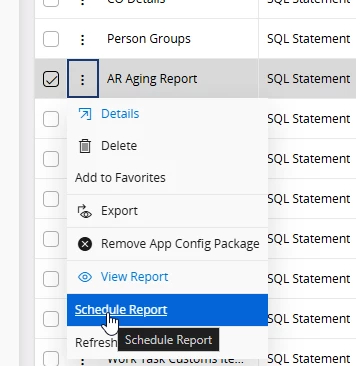
The other, and best option since this is mainly SQL based query, is to use a Scheduled Quick Report, which can run automatically at the interval and email the generated list to the users.

Regards

View original

7 replies

Tharshan SM
Hero (Customer)
Forum|alt.badge.img+6
  • Hero (Customer)
  • Answer
  • Sep 8, 2026 6:35 AM UTC

Hi ​@Link,

For a Custom Event you need a trigger point to execute the event even for the workflow, so for this requirement in my opinion, there can be two options. One is through a modification, where you can create a utility function and register it as a Database Task, and schedule. This gives you the full control over.

The other, and best option since this is mainly SQL based query, is to use a Scheduled Quick Report, which can run automatically at the interval and email the generated list to the users.

Regards


Link
Superhero (Customer)
Forum|alt.badge.img+23
  • Author
  • Superhero (Customer)
  • Sep 8, 2026 6:53 AM UTC

Hi ​@Tharshan SM 

I had a feeling for that.

But I just need to set up a trigger (somewhere) that will identify today as a specific day (e.g. Friday) and then initiate the event.

Otherwise the second option is fine too.


Link
Superhero (Customer)
Forum|alt.badge.img+23
  • Author
  • Superhero (Customer)
  • Sep 8, 2026 8:34 AM UTC

We will process the second option.

Thank you ​@Tharshan SM 


dsj
Ultimate Hero (Partner)
Forum|alt.badge.img+22
  • Ultimate Hero (Partner)
  • Sep 8, 2026 11:31 AM UTC

Hi ​@Link 


My method of scheduling event action/workflow is to create a small custom entity and create a migration job to create a new record on the table (schedule the migration job as per your will). Then you can create the event action based on the custom entity created :)


Cheers!

Damith


Link
Superhero (Customer)
Forum|alt.badge.img+23
  • Author
  • Superhero (Customer)
  • Sep 8, 2026 1:37 PM UTC

Hi ​@Link 


My method of scheduling event action/workflow is to create a small custom entity and create a migration job to create a new record on the table (schedule the migration job as per your will). Then you can create the event action based on the custom entity created :)


Cheers!

Damith

Hi ​@dsj 

good idea for next time. 😊

Thank you. 👍🏽


Grzegorz Byrski
Hero (Employee)
Forum|alt.badge.img+10

Responding on ​@hgruben  behalf as the response ended up in Community mailbox

“HI all, I also use the migration job scheduling to create triggers. I'm using it now for 3 years in Clound an works highly stable. BR”

Best
Grzegorz


Link
Superhero (Customer)
Forum|alt.badge.img+23
  • Author
  • Superhero (Customer)
  • Oct 29, 2026 1:51 PM UTC

Hello ​@Grzegorz Byrski 

that is a good idea. 👍🏾

Thank you.