Solved

Disable user and password field in Login dialog box

  • Aug 20, 2026 12:11 PM UTC
  • 3 replies
  • 81 views

Forum|alt.badge.img+6

Hi Team

Is it possible to disable the fields user and password in ifs aurena login dialog.To force only SSO or Azure login


Best answer by Asela Munasinghe

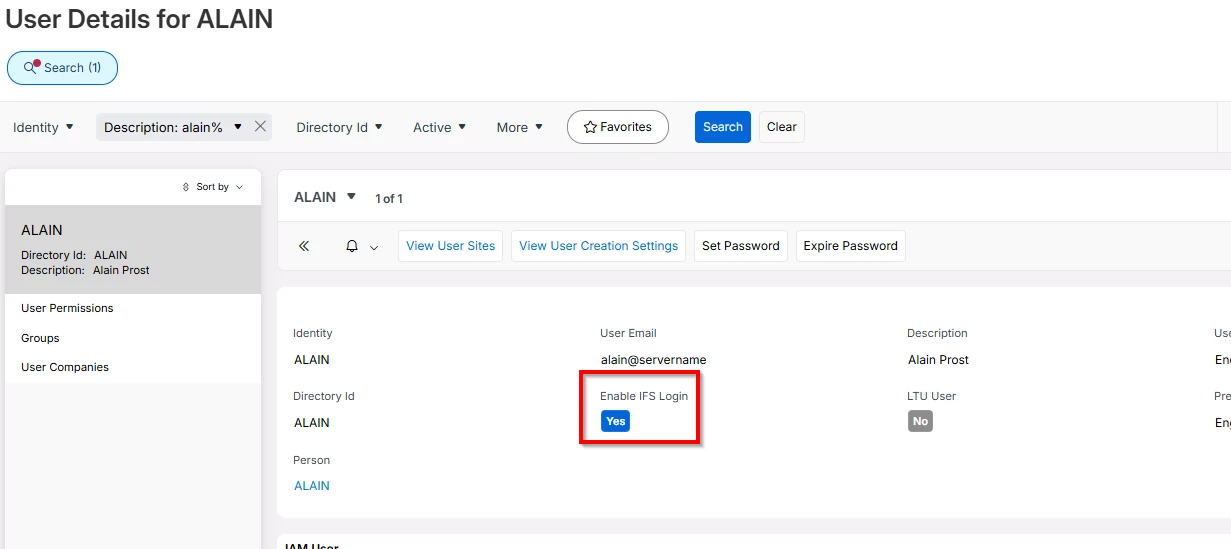
Yes when I disabled this off, secure SSO login is enabled.


View original

3 replies

Asela Munasinghe
Superhero (Customer)
Forum|alt.badge.img+24
  • Superhero (Customer)
  • Answer
  • Aug 20, 2026 12:26 PM UTC

Yes when I disabled this off, secure SSO login is enabled.


ashen_malaka_ranasinghe
Superhero (Employee)
Forum|alt.badge.img+14

Hi ​@Andres Palacios,

IFS Cloud supports Azure AD/OpenID Connect authentication and can be configured for Seamless SSO. However, I could not find any supported configuration that completely hides or disables the Username/Password section on the standard login page.

The recommended approach is to configure Azure AD as the primary Identity Provider and enable Seamless SSO so users are automatically redirected to Azure AD. The local login mechanism is typically retained as a fallback administrative authentication method.


Forum|alt.badge.img+10
  • Hero (Employee)
  • Aug 31, 2026 11:41 PM UTC

​@Andres Palacios 

To add to what ​@ashen_malaka_ranasinghe has said above re. fallback administrative authentication method, there are times when it’s necessary to connect a session for troubleshooting purposes as an admin user.  In such situations it can be very helpful / necessary to have a user & password option for session creation.