



Question

Default physical printer with Aurena Agent

  • September 30, 2024
  • 5 replies
  • 143 views

barner
Sidekick (Customer)
Forum|alt.badge.img+7

Hi,

We are using Aurena Agent and this gives us possibility to print on physical printers. 

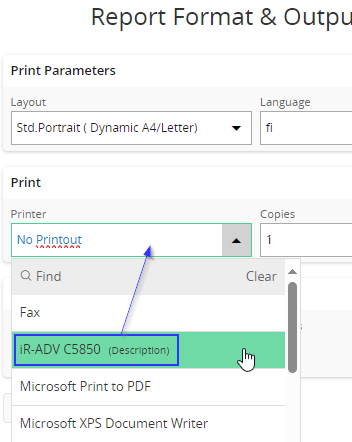
We can set default printer for logical printers, but is it possible to pre-define physical printer to be default printer and the “default” printer will be filled out in Print Dialog by default?

The printer is already defined as default printer on this PC, but it does not help. “No Printout” is filled out in Print Dialog.

Can set up Print Dialog so it will “remember” the last used/selected printer?

I think PrintDialog “remembered” the last used printer in earlier versions of IFS Cloud (22R1-23R1) but not after the last update (23R2Su5).

Br. Barbara
 

5 replies

Forum|alt.badge.img+5
  • Do Gooder (Partner)
  • May 26, 2025

Hi Barbara,

dou you have any update for this problem?

Thanks,

PB


Forum|alt.badge.img+17
  • Superhero (Partner)
  • May 26, 2025

I think this is not possible to do it. You can define rules only related to logical printers.


Forum|alt.badge.img+11
  • Hero (Customer)
  • June 29, 2025

Does anyone know what logic or rationale was behind stopping the “remember printer” function, as mentioned earlier in this thread?


Forum|alt.badge.img
  • Do Gooder (Customer)
  • January 27, 2026

Hi,
Has anyone found a solution to this problem? It causes serious slowdowns in operational and intensive work. It seems like a small problem, but I think it's a big one.


barner
Sidekick (Customer)
Forum|alt.badge.img+7
  • Author
  • Sidekick (Customer)
  • January 27, 2026

Hi, 

We do not have any solution on this issue. Those who print on pysical printer has to manually choose the printer every time. Not very nice solution.

Br. Barbara





