Question

Custom Fields - header in 2 lines

  • April 19, 2021
  • 3 replies
  • 201 views

Forum|alt.badge.img+9

Hello,

Maybe this is a simple one but I can’t figure it out.

Is there a way to allow Custom Fields header to use 2 lines in the corresponding header?

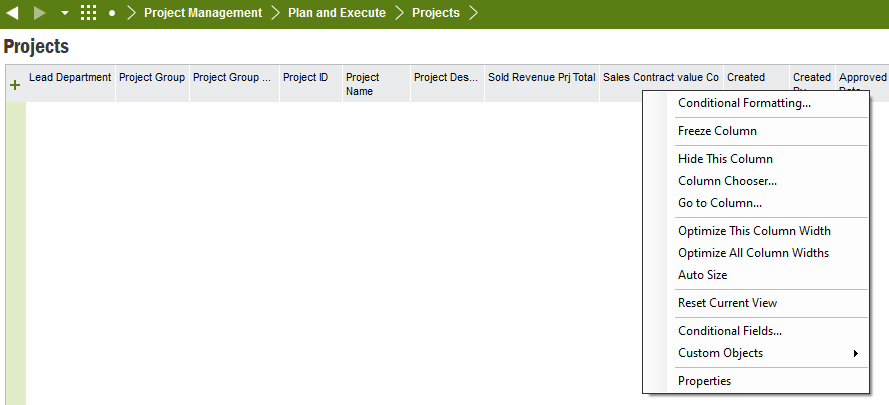
Please see below the header Project Name is split in 2 lines (this is a standard IFS field). However the 2 custom fields shown in the screenshot are not displayed in 2 lines. The Custom Fields are read only and the implementation type is select. 

We are on IFS 9 UPD17

Many thanks

Miguel



This topic has been closed for replies.

3 replies

ttzeleznik
Sidekick (Customer)
Forum|alt.badge.img+9
  • Sidekick (Customer)
  • April 19, 2021

Miguel,

I’m working in IFS 10 UPD8 - the “issue persists”.  I’ve learned (the hard way) to let it be.  :frowning2:  

I wanted to use the Base Profile to:

  1. bring in custom fields
  2. drive the number of column header text lines

At some point, after user base exercising, the column header text simply did not appear on the screen and neither did data.  It was like the screen wasn’t completing the build.

Hard to claim a bug here but for me,

  • Custom Field Column Header Text
  • Number of Column Header Text Lines

Don’t play nice together.  Cheers! 


william.klotz
Superhero (Customer)
Forum|alt.badge.img+21
  • Superhero (Customer)
  • April 19, 2021

Hi @Miguel ,


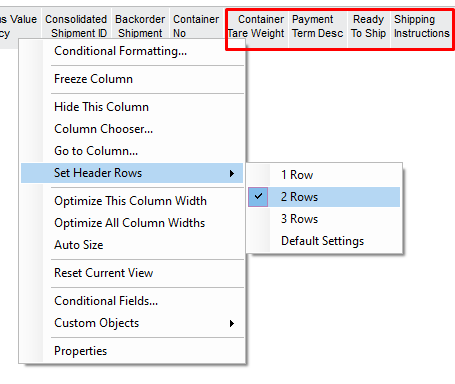
If you RMB in the column header and select Set Header Rows you if you change it from default settings to 2 or 3 rows IFS will display multiple rows and custom fields will also use multiple rows.  The fields in the red box are custom fields on our shipments screen.


Regards,

William Klotz


Forum|alt.badge.img+9
  • Author
  • Sidekick (Customer)
  • April 19, 2021

Hi @william.klotz ,

Many thanks for your feedback.

Unfortunately I don’t have that option in IFS 9 (UPD17). Please see screenshot below.

Regards,

Miguel