Solved

custom Background images in lobby element

  • Apr 11, 2022 2:35 PM UTC
  • 5 replies
  • 793 views

Forum|alt.badge.img+3

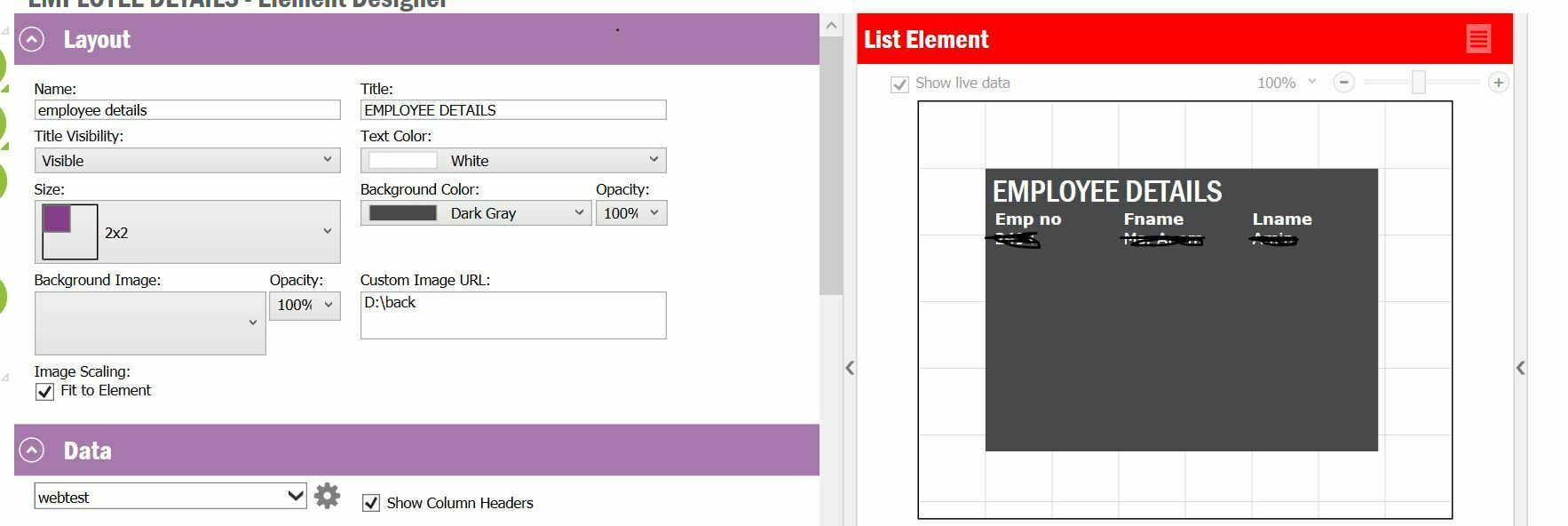
Can we add custom background image from our local machine or from a link in lobby element???

Best answer by Ozgun BAL

Hello @Anamamin ,


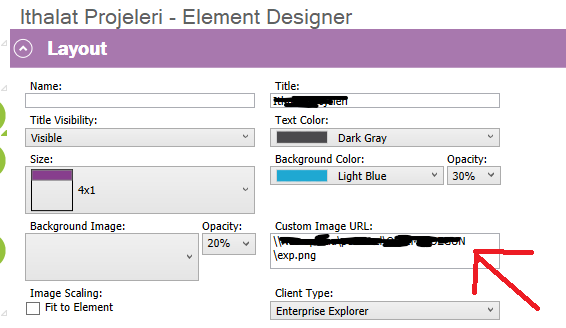
You have to add the type of image to URL. Like .JPEG or .PNG


And Please make sure the path is correct.


Kind Regards

Ozgun Bal

View original

5 replies

Forum|alt.badge.img+10
  • Hero (Customer)
  • Apr 11, 2022 3:47 PM UTC

Hi @Anamamin ,


Yes you can,

Put the image to a folder where every PC can reach.

 Then go to your element desing page, and paste the URL of the image.


Kind Regards

Ozgun Bal


Forum|alt.badge.img+3
  • Author
  • Do Gooder (Customer)
  • Apr 11, 2022 3:59 PM UTC

Thanks @Ozgun BAL 

Yes, I did the same thing, but it had no effect.


Forum|alt.badge.img+10
  • Hero (Customer)
  • Answer
  • Apr 11, 2022 4:04 PM UTC

Hello @Anamamin ,


You have to add the type of image to URL. Like .JPEG or .PNG


And Please make sure the path is correct.


Kind Regards

Ozgun Bal

Forum|alt.badge.img+3
  • Author
  • Do Gooder (Customer)
  • Apr 11, 2022 4:20 PM UTC

Thanks @Ozgun BAL  It’s working


ascheeka12
Sidekick (Customer)
Forum|alt.badge.img+8
  • Sidekick (Customer)
  • Jun 29, 2024 6:12 AM UTC

@Ozgun BAL Hi ozgun, i added custom image as background image , its reflecting as background image but image rotation is reverse showing, can you help me on this, how to fix image rotation.