Solved

Crystal Web Services Error - fails to retrieve report

  • July 31, 2020
  • 7 replies
  • 1072 views

Forum|alt.badge.img+8

Hi all,


I’ve created a new draft Purchase Order Crystal report - it pretty much got it’s design refreshed and re branded - all schema, data, report rules have been unchanged. 


I’ve given it different name to the original (added _v1 at the end). I’ve put it into correct folders on the server and I have also added new info in Report Definitions but yet I’m still getting typical error:
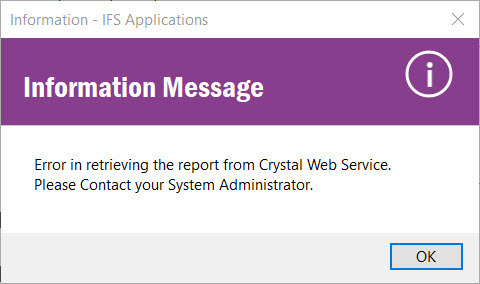
Any ideas what else I’m missing? This is so far within test instance of IFS. 
Best answer by durette

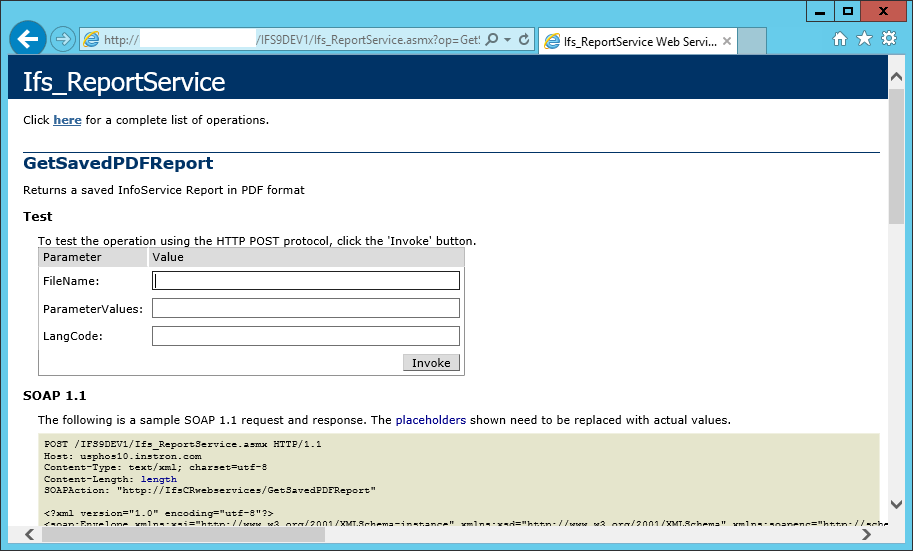
To debug, log on to the server hosting IIS for Crystal. Open the web browser:

http://host/directory/Ifs_ReportService.asmx?op=GetSavedPDFReport

From here, while coming from the local host, it provides a form where you can make a manual Crystal request.

FileName: your RPT filename
ParamaterValues: your result key if it's an operational report
LangCode: en (or your language)


7 replies

Forum|alt.badge.img+13
  • Hero (Partner)
  • July 31, 2020

Hi,

After changing the connected database objects names with _V1 did you grant them to IFSPRINT user?


if not you may try with below

grant select on 'object_name' to IFSPRINT; 


Forum|alt.badge.img+17
  • Superhero (Partner)
  • July 31, 2020

Hi


Which IFS version is it? There is a quite good debuger beginning with IFS9 version.


Best Regards

Piotr


Forum|alt.badge.img+8
  • Author
  • Sidekick (Customer)
  • July 31, 2020

Hi


Which IFS version is it? There is a quite good debuger beginning with IFS9 version.


Best Regards

Piotr

Hey Piotr,

Debug Console gives me identical PL/SQL details for report that works vs. one that doesn’t so nothing useful for me there yet. 


Thanks for your input! 

Kasia


Forum|alt.badge.img+17
  • Superhero (Partner)
  • July 31, 2020

Hey Piotr,

Debug Console gives me identical PL/SQL details for report that works vs. one that doesn’t so nothing useful for me there yet. 


Thanks for your input! 

Kasia

Hi


I mean Crystal debug feature which is configured on crystal web service machine.


Piotr


Forum|alt.badge.img+8
  • Author
  • Sidekick (Customer)
  • July 31, 2020

Hey Piotr,

Debug Console gives me identical PL/SQL details for report that works vs. one that doesn’t so nothing useful for me there yet. 


Thanks for your input! 

Kasia

Hi


I mean Crystal debug feature which is configured on crystal web service machine.


Piotr

With you now, will give this a go. Thanks very much! 


durette
Superhero (Customer)
Forum|alt.badge.img+19
  • Superhero (Customer)
  • Answer
  • August 3, 2020

To debug, log on to the server hosting IIS for Crystal. Open the web browser:

http://host/directory/Ifs_ReportService.asmx?op=GetSavedPDFReport

From here, while coming from the local host, it provides a form where you can make a manual Crystal request.

FileName: your RPT filename
ParamaterValues: your result key if it's an operational report
LangCode: en (or your language)


Forum|alt.badge.img+8
  • Author
  • Sidekick (Customer)
  • August 5, 2020

Issue was with one of the fonts that was being used within the report. It was not of a True Type therefore not supported by CR when being retrieved. 


Logs in wwwroot folder were the key to my issue. 

Thanks all for replying.