


Solved

Creating a Database Task using a custom API

  • September 4, 2021
  • 2 replies
  • 887 views

ZTC ZTC JGOTA
Hero (Customer)
Forum|alt.badge.img+14

Hello IFS community,


I created a custom API using the following information:

module_                       CONSTANT VARCHAR2(25) := 'EJUANL';
lu_name_                      CONSTANT VARCHAR2(25) := 'ZPURCHARSEAPI';
lu_prompt_                    CONSTANT VARCHAR2(25) := 'ZPURCHARSEAPI';

When I try to create a database task, I am only able to see the name “eJUAN Sol”. I do not have (+) symbol displaying the custom API (see example below highlighted in yellow). 

What do I need to do to make all the procedures and functions in my custom API available to create a task?

FYI -  I already refreshed the cache.

I was expecting to find something like the custom API => eNYNC Solutions, where I can click on (+) and see all the procedures and functions.
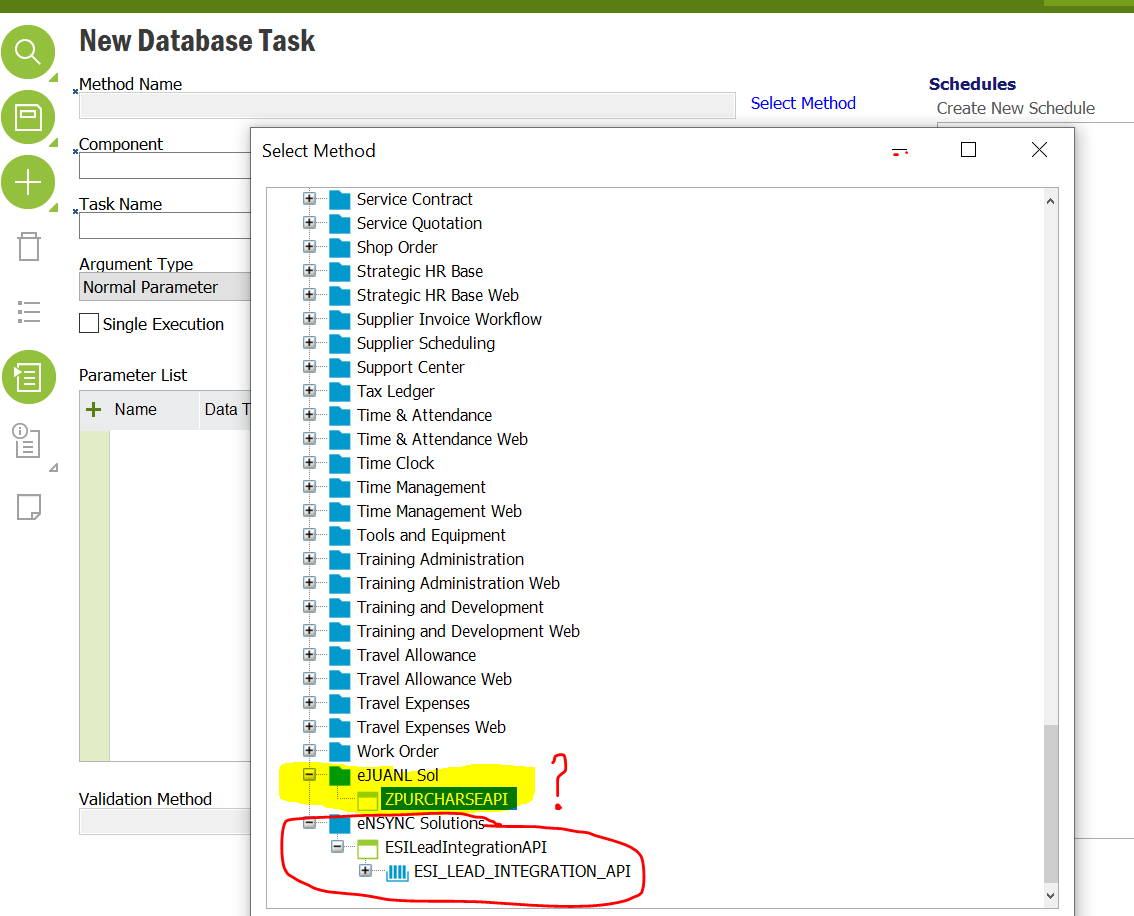
 

 You can see what I have in my custom API

create or replace package Z_PURCHASE_ORDER_API is


module_                       CONSTANT VARCHAR2(25) := 'EJUANL';
lu_name_                      CONSTANT VARCHAR2(25) := 'ZPURCHARSEAPI';
lu_prompt_                    CONSTANT VARCHAR2(25) := 'ZPURCHARSEAPI';

ESI_K__VERSION                CONSTANT VARCHAR2(8)  := '1.0';
ESI_K__EXPAND_OUTPUT          CONSTANT BOOLEAN      := FALSE;

PROCEDURE Init;
PROCEDURE UPDATE_PROBABILITY(ATTR_ IN VARCHAR2);
PROCEDURE GET_DIFERENCE_(ATTR_ IN VARCHAR2);
PROCEDURE send_mail (p_to        IN VARCHAR2,
                                       p_from      IN VARCHAR2,
                                       p_message   IN VARCHAR2,
                                       p_smtp_host IN VARCHAR2,
                                       p_smtp_port IN NUMBER DEFAULT 25);
PROCEDURE GET_TAX_COMPARATION(ATTR_ IN VARCHAR2);
FUNCTION GET_PRICE_LIST(CUSTOMER_NO_ IN VARCHAR2) return number;
                                       
PROCEDURE Register;
  
end Z_PURCHASE_ORDER_API;


Thanks,

Best answer by durette

Try some other values:

Use an existing module, such as FNDBAS. (I've never created a module, but I'd imagine this would require an insert into MODULE_TAB.)

Use as your LU name ZPurchaseOrder (case sensitive).


Then do this in order:

Grant your package to IFSSYS.

Refresh your dictionary cache.

Grant your package to a permission set.

Refresh your security cache.

2 replies

durette
Superhero (Customer)
Forum|alt.badge.img+19
  • Superhero (Customer)
  • Answer
  • September 4, 2021

Try some other values:

Use an existing module, such as FNDBAS. (I've never created a module, but I'd imagine this would require an insert into MODULE_TAB.)

Use as your LU name ZPurchaseOrder (case sensitive).


Then do this in order:

Grant your package to IFSSYS.

Refresh your dictionary cache.

Grant your package to a permission set.

Refresh your security cache.


ZTC ZTC JGOTA
Hero (Customer)
Forum|alt.badge.img+14
  • Author
  • Hero (Customer)
  • September 5, 2021

Thanks It was helpful

