
Question

Create page footing in crystal report

  • May 12, 2021
  • 3 replies
  • 119 views

Forum|alt.badge.img+14

Hi all,

I report designer, the invoice page footing is extracted into rows and columns.
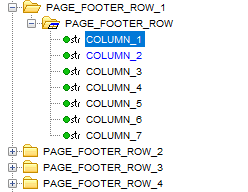
 

Is there an easy way to do something similar in Crystal Report?

This topic has been closed for replies.

3 replies

Sangeetha Jayamaha
Hero (Employee)
Forum|alt.badge.img+7

EntNadeeL
Hero (Partner)
Forum|alt.badge.img+10
  • Hero (Partner)
  • May 12, 2021

Hi @Hans Andersen ,

You can add FOOTER_FIELD and FOOTER_CONNECTION views and map the REPORT_ID in report view accordingly.


Forum|alt.badge.img+14
  • Author
  • Hero (Partner)
  • May 12, 2021

Thank you @Sangeetha Jayamaha ,

It helps a lot, and then not so much.

The report I am working on uses data from several views related to Business Opportunity and Estimate. I do not have a result_key. Instead it takes opportunity_no as input parameter.

My course right now is to make a CLU that stores the data needed (similar to s30, s31.. in ORDER_INFO_SERVICES_RPT). Unfortunate, I cannot find the api that extracts the data. I tried with this:

select 
client_sys.Get_Key_Reference_Value(d.PAGE_FOOTING, 1),
client_sys.Get_Key_Reference_Value(d.PAGE_FOOTING, 2),
client_sys.Get_Key_Reference_Value(d.PAGE_FOOTING, 3),
client_sys.Get_Key_Reference_Value(d.PAGE_FOOTING, 4)
from COMPANY_INVOICE_INFO d where d.company='1'

But the result is not as expected. 


You can add FOOTER_FIELD and FOOTER_CONNECTION views and map the REPORT_ID in report view accordingly.

I did consider that, but then I will have to change all other reports.