

Question

Conditional Fields not working in APP9 Environment

  • March 25, 2021
  • 4 replies
  • 184 views

WSHAH
Do Gooder (Customer)
Forum|alt.badge.img+8
  • Do Gooder (Customer)

 Hi All,

Condition Fields are used to add rules that control what data that can be entered in a page; rules to make fields mandatory or read only, and rules that filter drop down lists, depending on values of other fields.

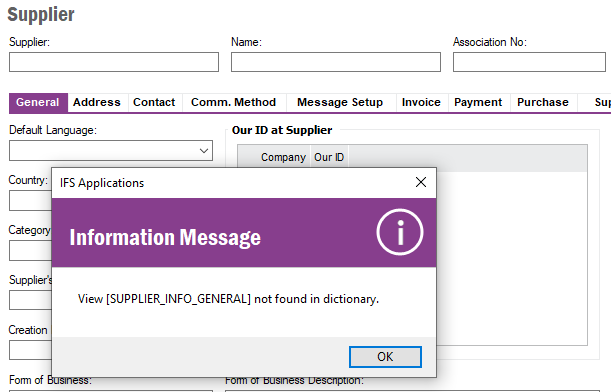
Conditional Fields is not working in our APP9 Environment, We have tried on different IFS windows but receive errors

View[ Form Name ] is not found in dictionary

I have refreshed the Dictionary Cache using the IFS Refresh Cache area.


Kindly support me on this issue


Print screen of some forms/window is attached below


Regards

This topic has been closed for replies.

4 replies

EntNadeeL
Hero (Partner)
Forum|alt.badge.img+10
  • Hero (Partner)
  • March 25, 2021

 Hi All,

Condition Fields are used to add rules that control what data that can be entered in a page; rules to make fields mandatory or read only, and rules that filter drop down lists, depending on values of other fields.

Conditional Fields is not working in our APP9 Environment, We have tried on different IFS windows but receive errors

View[ Form Name ] is not found in dictionary

I have refreshed the Dictionary Cache using the IFS Refresh Cache area.


Kindly support me on this issue


Print screen of some forms/window is attached below


Regards

Hi @WSHAH ,

Could you please restart your application and see if its working?

Btw your attachments are not available. 


WSHAH
Do Gooder (Customer)
Forum|alt.badge.img+8
  • Author
  • Do Gooder (Customer)
  • March 25, 2021

Hi


Attachments for reference

Regards


dhlelk
Superhero
Forum|alt.badge.img+15
  • Superhero
  • March 25, 2021

Hi @WSHAH,


This might normally occur if your dictionary is corrupted.
Have a look at the below article,


Cheers !
Dhananjaya.


dhlelk
Superhero
Forum|alt.badge.img+15
  • Superhero
  • March 25, 2021

Hi @WSHAH,


You could have a look at the below resolution which is caused due the dictionary being corrupted,


Cheers !
Dhananjaya.