Question

Changing Syntax Highlighting Colors in IFS Developer Studio

  • December 3, 2025
  • 3 replies
  • 5 views

Forum|alt.badge.img

Hi everyone,

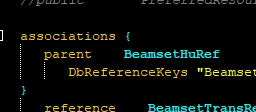
I’m currently using IFS Developer Studio with the “FlatLaf Dark” profile, and I noticed that some keywords, especially in Entity and Report files, are quite hard to read due to their current colors in the editor.

I have looked through the settings but couldn’t find an option to customize these keyword colors. Is there a way to adjust the color of specific keywords in IFS Developer Studio, or is it limited to the default color schemes?

Here’s an example screenshot showing the issue:

Any guidance or tips would be greatly appreciated!

Thanks in advance!

3 replies

hamalk
Superhero (Employee)
Forum|alt.badge.img+13
  • Superhero (Employee)
  • December 3, 2025

Hi ​@M_Bascietto 

According to my knowledge we have not provided any capabilities to set colors as we wish, you should go ahead with the default color scheme.


/Harshini


PhillBronson
Hero (Customer)
Forum|alt.badge.img+11
  • Hero (Customer)
  • December 3, 2025

@M_Bascietto I have had similar results but have landed on something readable


you can override the custom properties in Advanced properties of the FlatLaf (there are publicly available themes online to pull inspiration from)
you have additional control in the Font & Colors

you can’t control everything to the nth degree, but you do have some flexibility


Forum|alt.badge.img
  • Author
  • Do Gooder (Customer)
  • December 3, 2025

Hi ​@PhillBronson,

That would be exactly what we are looking for.

Would you mind share an example of how you customized the FlatLaf.properties?

Thanks in advance.

Marco