Solved

Aurena How can I see entire field in search

  • March 15, 2021
  • 9 replies
  • 208 views

Forum|alt.badge.img+5

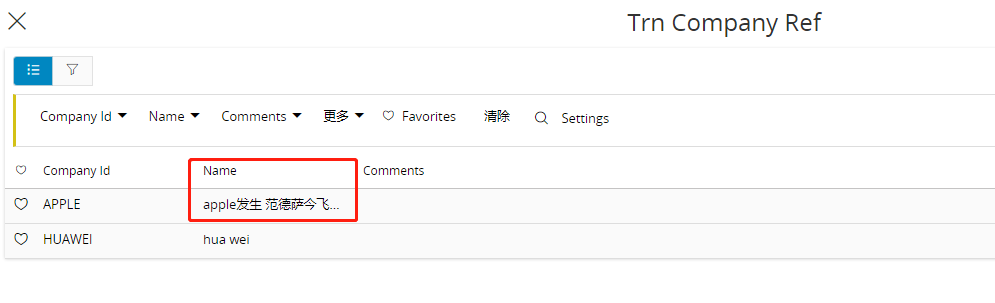
I need to read entire field in search dialog. How I can do for this.

Best answer by Dumeesha Wanigarathna

Hi,


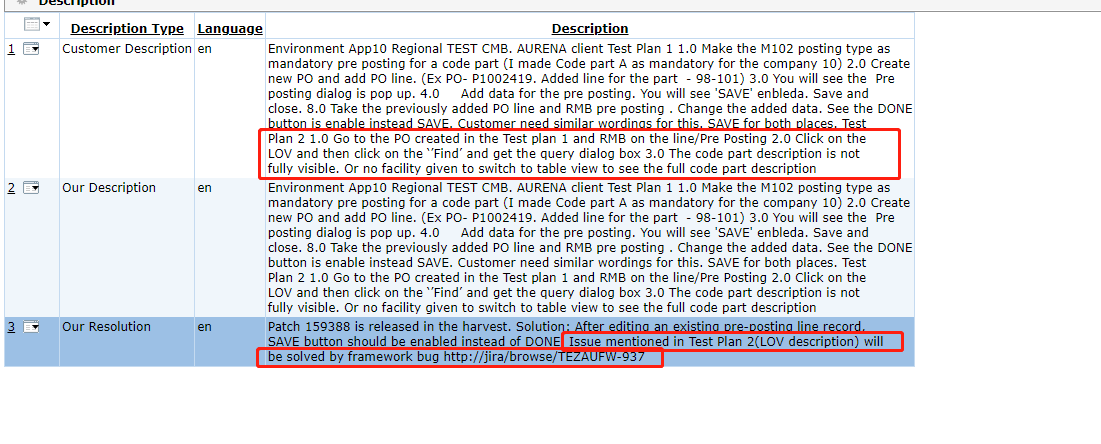
I have reported an similar kind of issue to framework team related to Purchase order -->Pre posting dialog → LOV (find) dialog. Solution id - 290938. The solution doesn’t contain any bug attached yet. However I have no idea whether your issue too covered by this.

This topic has been closed for replies.

9 replies

Mohamed Infaz
Hero (Employee)
Forum|alt.badge.img+10
  • Hero (Employee)
  • March 15, 2021

Hi @DalKylekY ,

Are you asking to show all the fields which can be queried? 


Forum|alt.badge.img+5
  • Author
  • Do Gooder (Partner)
  • March 15, 2021

@infaz  I need to show all of content in field ‘Name’


Dumeesha Wanigarathna
Superhero (Partner)
Forum|alt.badge.img+16

Hi,


I think the name column content  is not fully visible. As I can see you are  in the list view. can you check whether  everything is visible in table view. You can switch between list and table view in right hand upper corner


Forum|alt.badge.img+5
  • Author
  • Do Gooder (Partner)
  • March 15, 2021

@Dumeesha Wanigarathna   but I can not find the switch in search dialog  .the switch just can find in list page.


Dumeesha Wanigarathna
Superhero (Partner)
Forum|alt.badge.img+16

@DalKylekY  Sorry I didn’t noticed that you are looking inside search dialog


Forum|alt.badge.img+5
  • Author
  • Do Gooder (Partner)
  • March 15, 2021

@Dumeesha Wanigarathna So There is no way to show entire content  in name column  as the content string  is too long?


Dumeesha Wanigarathna
Superhero (Partner)
Forum|alt.badge.img+16

Hi,


I have reported an similar kind of issue to framework team related to Purchase order -->Pre posting dialog → LOV (find) dialog. Solution id - 290938. The solution doesn’t contain any bug attached yet. However I have no idea whether your issue too covered by this.


  • Superhero (Employee)
  • March 15, 2021

@Dumeesha Wanigarathna So There is no way to show entire content  in name column  as the content string  is too long?

A couple of work around suggestions (not great, but something).
1. Start typing the ID in the actual column (instead of clicking find) and you’ll see the entire description
2. Select the value in find and read the full description once selected. 


Forum|alt.badge.img+5
  • Author
  • Do Gooder (Partner)
  • June 30, 2021

Hi,


I have reported an similar kind of issue to framework team related to Purchase order -->Pre posting dialog → LOV (find) dialog. Solution id - 290938. The solution doesn’t contain any bug attached yet. However I have no idea whether your issue too covered by this.

Hi 

I check the solution id -290938。 there is a Resolution .where  can i find this patch to fix the bug.