Overview
While updating the system in IFS Cloud to a newer version, existing configurations could get impacted. After applying a delivery in IFS Cloud such as a Release Update, Service Update, or delivering tailored content, it is important to verify that existing configurations remain valid.
The Configuration Analyzer is a tool that analyzes and validates configurations in the target environment and identifies issues in configurations introduced by such deliveries. Typical issues are when a configuration references another object that is missing, renamed or in an invalid state after the update.
Detecting these issues early helps prevent runtime errors and ensures system stability after delivery of updates or tailored content such as customizations or configurations.
When and where should you use the Configuration Analyzer?
It is recommended to run the configuration analyzer while applying:
- A release update
- A service update
- Some tailored content
Configuration Analyzer can be used in use place as well as build place, wherever you require an impact analysis for configurations.
Using Configuration Analyzer
The Configuration Analyzer is available in IFS Cloud Client under Configuration in Solution Manager.
There are two navigator entries related to configuration analysis:
- Analyze Configurations – Page to initiate a new configuration analysis
- Configuration Analyzer History – Page to review with the results of completed analysis
In order to perform a configuration impact analysis:
- Navigate to Analyze Configurations
- Select one or more configuration types from the dropdown list
- Click "Start Analysis"
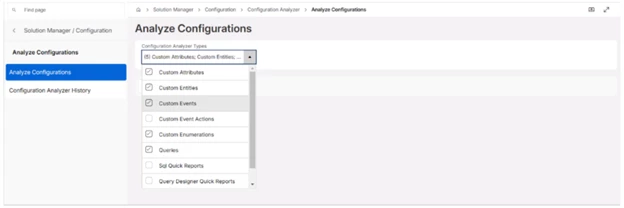
Once the analysis is completed, a toast message confirms completion. The user is automatically redirected to the Configuration Analyzer History page, displaying the results of the latest analysis.
Supported Configuration Types
Prior to IFS Cloud 25R1 SU10 & 25R2 SU2, Configuration Analyzer support was only available for Custom Attributes and Custom Entities. From IFS Cloud 25R1 SU10, 25R2 SU4 & 26R1 EA, analysis of all the following configuration types are supported in the tool.
- Custom Attributes
- Custom Entities
- Custom Events
- Custom Event Actions
- Custom Enumerations
- Projection Configurations
- Queries
- Query Designer Quick Reports
- SQL Quick Reports
Review Results
Completed analyses can be reviewed using the Configuration Analyzer History page. Analyses are ordered by analyzed timestamp, allowing users to easily access the most recent result.
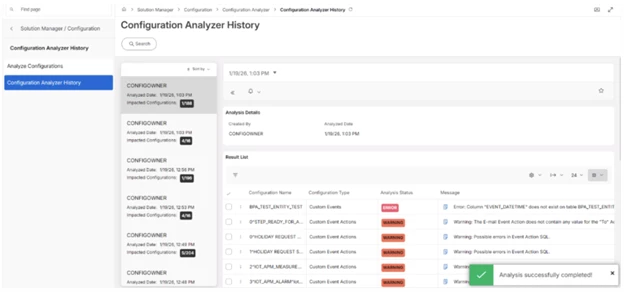
The history page consists of two main sections.
Analysis Details:
Displays metadata related to the analysis, including the user who initiated the analysis and the analysis timestamp
Result List:
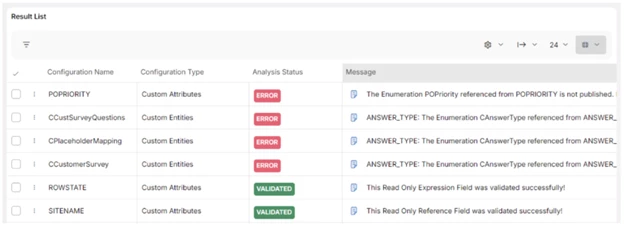
Displays all analyzed configuration items in a tabular format with:
- Configuration Name
- Configuration Type
- Analysis Status
- Message
Available analysis statuses are:
- Error
- Warning
- Validated
Configuration items with errors and warnings are displayed at the top, in the same sequence, followed by successfully validated ones to improve visibility. The full error or warning message can be viewed by selecting the message icon associated with each row.
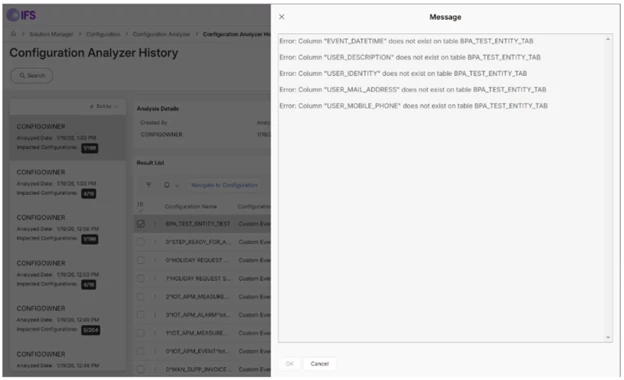
Impact Summary
A summary indicator is shown in the navigator, presenting:
Total number of analyzed configuration items
Number of configuration items with errors
This summary helps users quickly assess the overall impact and remediation effort required.
Navigate to the Corresponding Configuration
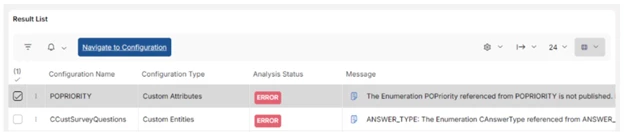
The Configuration Analyzer supports direct navigation to the configuration to apply the necessary fixes, when analyzed item has errors and warning. For the navigation, "Navigate to Configuration" command needs to be used while selecting the required record.
Validating Fixes
After applying fixes for the identified issues in configurations, re-run the Configuration Analyzer to confirm that the issues have been resolved. This ensures that all configuration impacts introduced by the delivery are fully addressed.
Conclusion
The Configuration Analyzer is an essential tool for validating configuration layer objects in IFS Cloud after core updates or tailored deliveries.
By proactively identifying invalid configurations, it helps:
- Early Detection of issues in the updating system
- Significant reduction in breaking business flows due to configurations in updates
- Improved stability in the running system even when having frequent updates
Using the analyzer as part of the validation process in updates, ensures a smoother upgrade experience for both administrators and end users.
References
Technical Documentation: Development Guide -> Development Tools -> Configuration Analyzer