


Solved

Why did depreciation stop on an Object?

  • Aug 11, 2022 7:36 PM UTC
  • 3 replies
  • 146 views

Forum|alt.badge.img+9

Hello


I have an object / asset , 2021-33 that was activated in October 2021.  In November 2021, a manual entry was entered to adjust the value of the asset. 
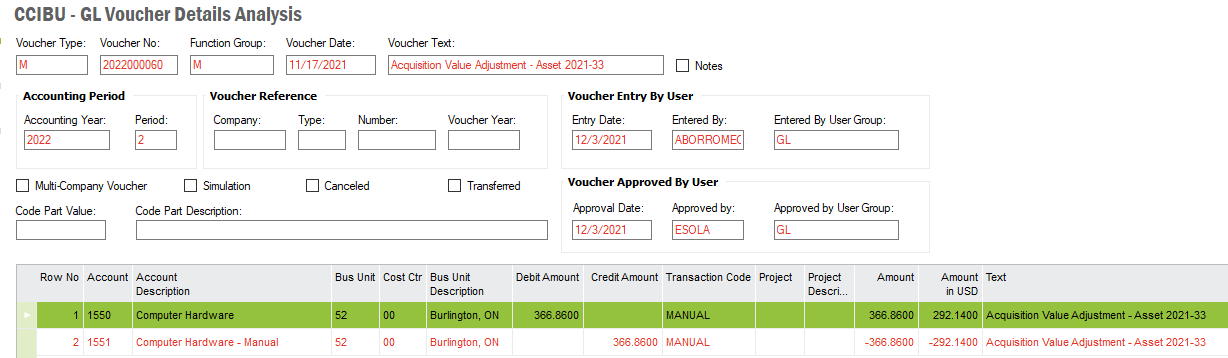


After this, it stopped depreciating. When we run a depreciation proposal, we get this message in the log:



I would appreciate any help on how to correct this and get the object to depreciate again. Thank you.


Best answer by PamithK

Hi Andrei,

You need to complete the value addition to the asset.

Go to Financials\Fixed Assets\Object Functions\Add Investment - Progress and RMB on the FA and ‘Activate’.  

It should get picked for depreciation after that.


Regards

Pamith

View original

3 replies

PamithK
Sidekick (Partner)
Forum|alt.badge.img+8
  • Sidekick (Partner)
  • Answer
  • Aug 11, 2022 7:58 PM UTC

Hi Andrei,

You need to complete the value addition to the asset.

Go to Financials\Fixed Assets\Object Functions\Add Investment - Progress and RMB on the FA and ‘Activate’.  

It should get picked for depreciation after that.


Regards

Pamith


Forum|alt.badge.img+9
  • Author
  • Sidekick (Customer)
  • Aug 11, 2022 8:19 PM UTC

Thank you Pamith! Much appreciated.


Ralph Gericke
Superhero (Employee)
Forum|alt.badge.img+14
  • Superhero (Employee)
  • Aug 16, 2022 3:01 PM UTC

And just to add … if you look into the log of the depreciation proposal it will be stated there that additional acquisitions are not fully processed.

Regards

