Question

Unable to Perform Final Year End

  • April 6, 2026
  • 2 replies
  • 7 views

Forum|alt.badge.img+8

Hello. We set up a new company by duplicating an existing company.  The new company has accounting years from 2003 to 2026. We booked a journal entry in 2025. No activity occurred before 2025. 


Preliminary year end and Clear Revenue/Cost Balance were performed for 2025. But when we try to perform Final Year End below, we get an error. 
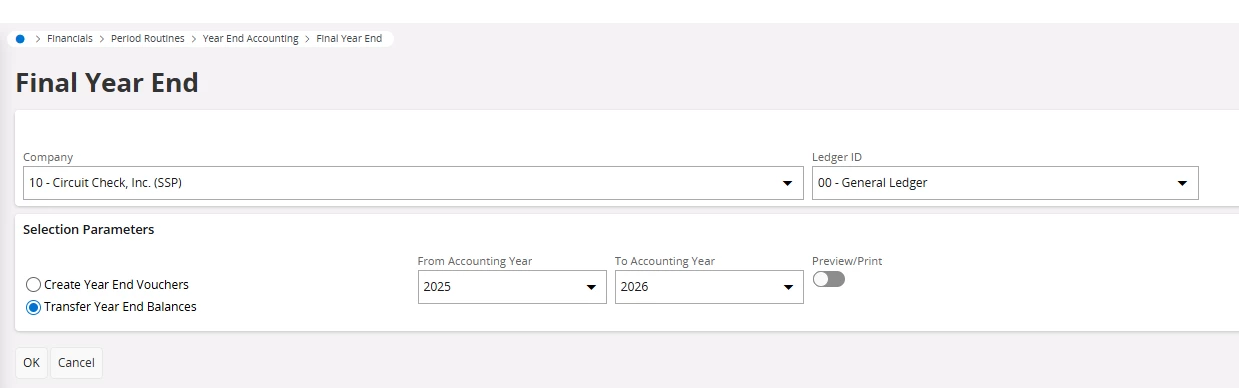


It seems like it wants year end process to be performed for the previous year but there was no activity or balances booked before 2025 so there is nothing to process for year end.  I would appreciate if someone could advice on how to resolve this.


2 replies

Forum|alt.badge.img+9
  • Hero (Partner)
  • April 6, 2026

Hello. We set up a new company by duplicating an existing company.  The new company has accounting years from 2003 to 2026. We booked a journal entry in 2025. No activity occurred before 2025. 


Preliminary year end and Clear Revenue/Cost Balance were performed for 2025. But when we try to perform Final Year End below, we get an error. 
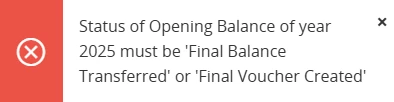


It seems like it wants year end process to be performed for the previous year but there was no activity or balances booked before 2025 so there is nothing to process for year end.  I would appreciate if someone could advice on how to resolve this.

 

Hi ​@andrei.borromeo ,

You need to complete the year-end status for 2025 even if there is no activity. Below are the steps to resolve this:

  1. Check Accounting Year Status

    • Go to: Accounting Rules → Accounting Year

    • Verify year 2025 status for your company and ledger

  2. Run Final Voucher Creation

    • Go to: Periodical Processing → Year End Accounting → Final Voucher Creation

    • Select year 2025

    • Run the process (this must be completed even if no transactions exist)

  3. Run Transfer Year End Balances

    • Go to: Periodical Processing → Year End Accounting → Transfer Year End Balances

    • Select:

      • From Year: 2025

      • To Year: 2026

    • Execute the process

  4. Verify Status

    • Go back to Accounting Year

    • Ensure 2025 now shows:

      • Final Voucher Created OR

      • Final Balance Transferred

  5. Run Final Year End

    • Now retry Final Year End for 2025 → 2026

 Note:
Even with zero balances, IFS requires these steps to set the correct status flags before allowing Final Year End.

Thanks


Forum|alt.badge.img+19

Hi, 

Hate to say… The above is correct, however you can’t complete 2025 without 2024. You can’t do 2024 without 2023 and so on. 

This is one of the reasons why R&D added the ability to use the starting year, when copy from an existing company.    Sorry. 


Best regards, 

Thomas