Solved

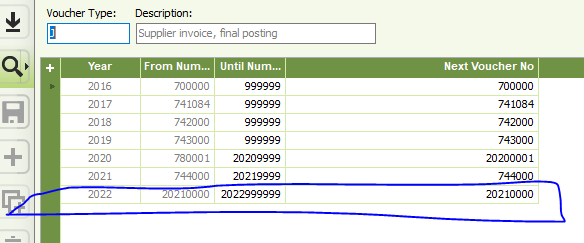
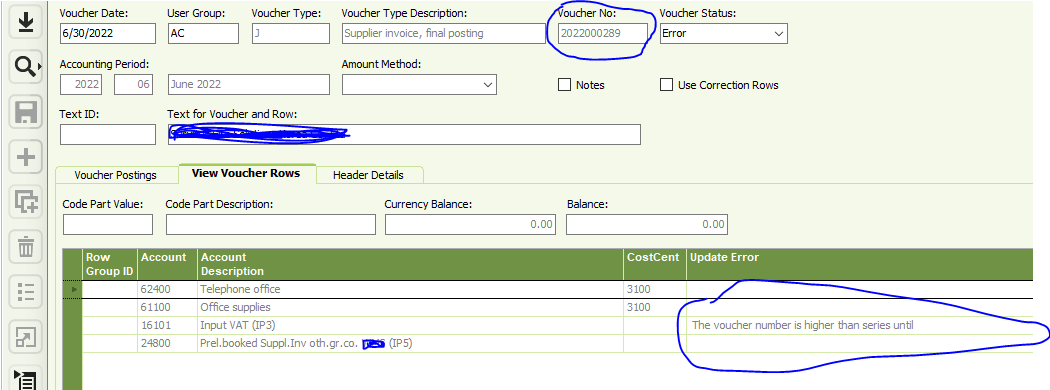
The voucher number is higher than series until

  • Jul 6, 2022 7:06 AM UTC
  • 8 replies
  • 709 views

Forum|alt.badge.img+7

Hi Team,


Can Anyone help me on below issue 


Best answer by Adam Bereda

Hi, 
Please check if this invoice has period allocation applied - this error might be related to X voucher, not J…
Anyway, you have very strange voucher numbering defined...

View original

8 replies

Forum|alt.badge.img+16
  • Hero (Customer)
  • Answer
  • Jul 6, 2022 2:17 PM UTC

Hi, 
Please check if this invoice has period allocation applied - this error might be related to X voucher, not J…
Anyway, you have very strange voucher numbering defined...


Forum|alt.badge.img+12
  • Hero (Customer)
  • Jul 6, 2022 2:55 PM UTC

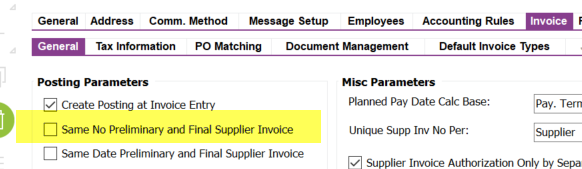
check you I voucher type as well.  In your company set up is this box checked off?  As then it’s trying to use the same numbering.  You should then set your J voucher number sequence the same.  I think you should also update 2021 since it doesn’t appear to have been used.  You are overlapping voucher # sequence with the use of 20219999 as your “until number”.   You should start 2022 with 20220000 not 20210000.


Forum|alt.badge.img+12
  • Hero (Customer)
  • Jan 16, 2024 9:48 PM UTC

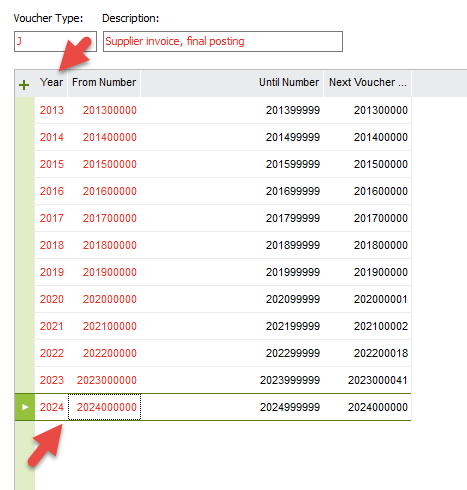
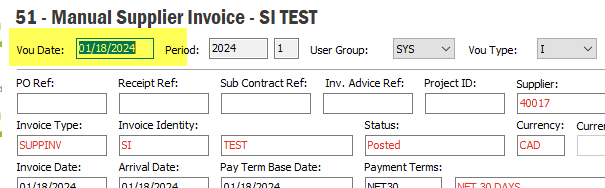
Hi @Patanm can you confirm for your voucher types J and I you have year 2024 inputed? You first screen shot only shows only up to 2022 year.   Your invoice date may be 2022 but your voucher date in this latest screen shot is 2024, Period 1


Forum|alt.badge.img+12
  • Hero (Customer)
  • Jan 17, 2024 6:44 PM UTC

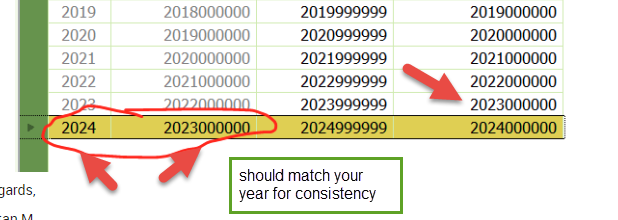
@Patanm can you fix your J  “From Number” to match the year? (all your years are incorrect it looks like)   ie: you have them out of sequence. Look at your I voucher typer “From Number” and match that.   I’m thinking as you have 202300000 as your next voucher no in year 2023 it’s conflicting with 2024 set up of using 202300000 as your from number so want to confirm.   


Forum|alt.badge.img+12
  • Hero (Customer)
  • Jan 18, 2024 2:59 PM UTC

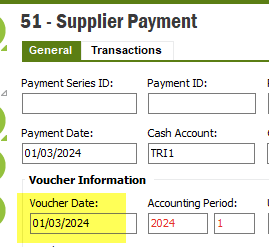
Did you resolve your other issue?    This new message relates to the supplier payment general tab having a ‘Payment date” earlier than your invoice’s voucher date which is not allowed.

Invoice voucher date:


Forum|alt.badge.img+12
  • Hero (Customer)
  • Jan 23, 2024 2:55 PM UTC

That user needs to reset their default directory in document management to open files, they have an invalid path


Forum|alt.badge.img+12
  • Hero (Customer)
  • Jan 23, 2024 4:00 PM UTC

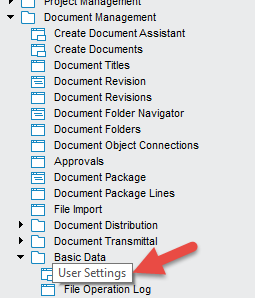
No you can not check, the end user needs to be logged into IFS and do this update themselves. You would have to go to their desk to watch.    Screen shot above is the navigation path under document management folder > Basic Data > User Settings


Forum|alt.badge.img+12
  • Hero (Customer)
  • Jan 23, 2024 4:15 PM UTC

click in the “local check-out path” field and select Browse.  Select a directory the user has read/write capabilities too.      You wouldn’t need the other two if you are using the typical documents like PDF, WORD, Excel, etc.      See what the other users have that open it successfully.