Question

Swiss QR Code - Project Invoice

  • March 9, 2026
  • 7 replies
  • 29 views

Forum|alt.badge.img+4

We have set up Swiss QR code invoicing successfully on Instant Invoice, however when we create a project invoice (for the same customer in the same company) no QR code layout is produced.

Does anyone know why this might be? Is there additional set up required to enable this on project invoices?


7 replies

Forum|alt.badge.img+4
  • Author
  • Do Gooder (Partner)
  • March 11, 2026

This issue is resolved


Forum|alt.badge.img+1
  • Do Gooder (Customer)
  • March 12, 2026

How did you set up this in Instant Invoice? Was it through a customization set up or standard IFS process?


Forum|alt.badge.img+4
  • Author
  • Do Gooder (Partner)
  • March 12, 2026

How did you set up this in Instant Invoice? Was it through a customization set up or standard IFS process?

Standard IFS process:

  • ‘Company’/’Invoice’ - Select Swiss Invoice 27 in ’Customer Invoice Creation Method’
  • Enable DTACHCU ‘payment format’ for the company
  • Create a DTACHCU ‘payment method’
  • Add DTACHCU payment method to ‘Payment methods per institute’
  • Add ‘Format specific info per institute’ of the QR IBAN code
  • in ‘Payment term’ enable ‘print QR bill’ toggle and add the ‘payment institute’ to the Installment line
  • Ensure ‘Customer’ / ‘Invoice’ currency is CHF (or I believe EUR)
  • on ‘Customer’ / ‘Payment’ enable ‘use default payment method’ and enter a payment method of DTACHCU and set this as default

Be aware that IFS converts a concatenation of Invoice Series, invoice number and customer number into the payment reference for the QR. This can be no longer than 26 characters once it has been converted into ASCII code https://www.ascii-code.com/.

For example II for instant invoice becomes 7373 so 4 of your 26 characters. If your customer IDs are alpha then this can make your payment reference too long.


Forum|alt.badge.img+1
  • Do Gooder (Customer)
  • March 12, 2026

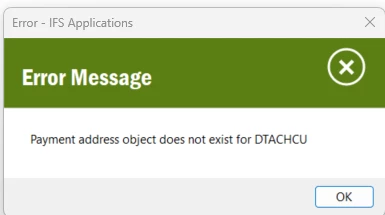
Thank you for the detailed steps. I have done the set up and tried creating an invoice and when my invoice (instant invoice) is saved i get the below error message.


Is it because of this data here in format specific info per institute?


Appreciate you input.


Forum|alt.badge.img+4
  • Author
  • Do Gooder (Partner)
  • March 12, 2026

Thank you for the detailed steps. I have done the set up and tried creating an invoice and when my invoice (instant invoice) is saved i get the below error message.


Is it because of this data here in format specific info per institute?


Appreciate you input.


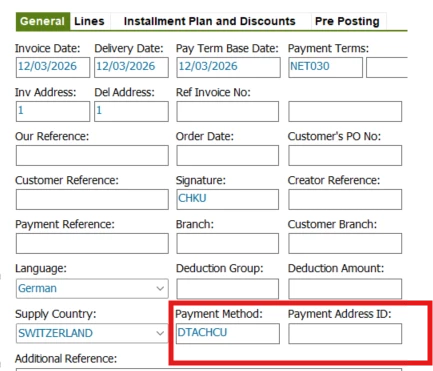
When you create the invoice record, before you print, is the payment method and payment address completing on the instant invoice screen? Check the installment section and see if the data is in there.

This sounds like an issue coming from customer record.


Forum|alt.badge.img+1
  • Do Gooder (Customer)
  • March 12, 2026

In the instant invoice payment address ID field is empty.


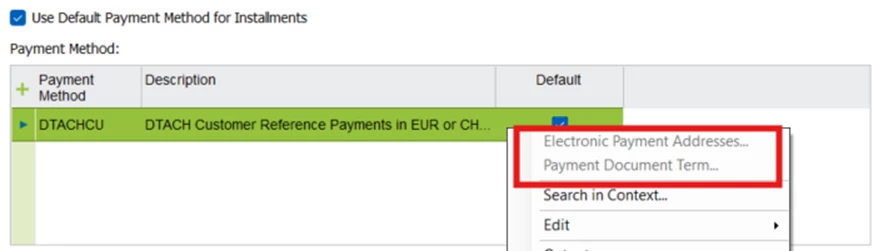
Also it is not possible to define electronic payment address for the payment method DTACHCU. 


were you able to define the electronic payment address for the customer?


Forum|alt.badge.img+4
  • Author
  • Do Gooder (Partner)
  • March 17, 2026

In the instant invoice payment address ID field is empty.


Also it is not possible to define electronic payment address for the payment method DTACHCU. 


were you able to define the electronic payment address for the customer?


On the instant invoice, if this is after you have added a line then this looks to be a customer set up issue.
Once you add a line the payment method and payment address info should complete automatically.
If this is not happening I would suggest setting up a new test customer and ensuring all set up mentioned above is in place before trying to create your invoice.


You dont need to add any electronic payment address info for DTACHCU payment method on the customer record, hence why the option is disabled.