Question

Supplier Posting Proposal modify posting

  • December 15, 2025
  • 2 replies
  • 28 views

Forum|alt.badge.img+6

Hello every one,


We have a scenario where a preposting is assigned to the purchase order line. In some cases, this value may be empty, but it will be know once the invoice is received.

When matching the purchase order with the invoice, we are unable to edit the code in part I field.
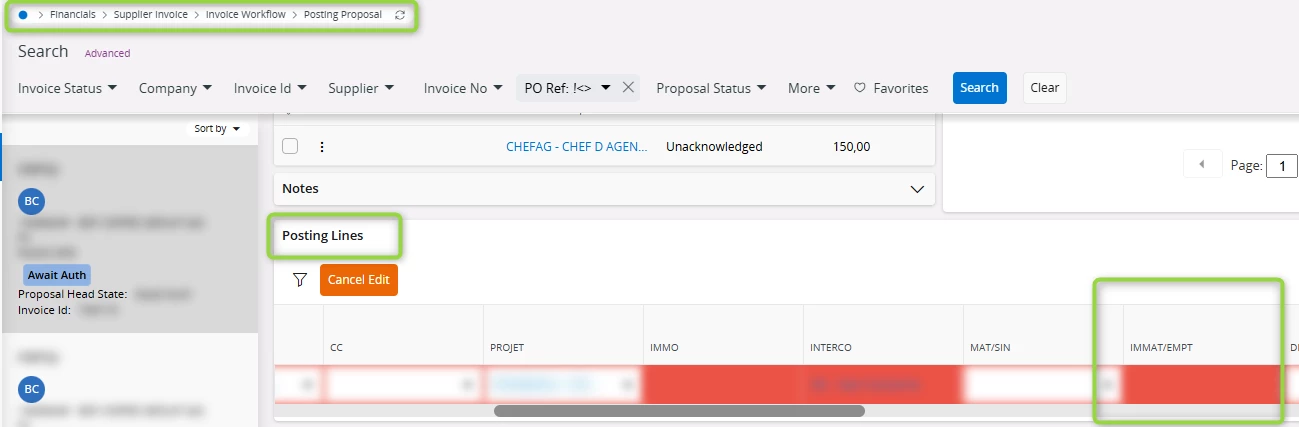
 

Any idea how to activate the edit of this value from the posting proposal page?


thank you in advance

2 replies

Forum|alt.badge.img+19
  • Superhero (Employee)
  • December 15, 2025

Hi, 

You can’t modify the system generated posting lines.   A common process tis to create the reversing entries / reclassing entries.  Debit string X for the original postings, credit sting X as a reversing posting, and post the new debit to account string Y. 


Best regards, 

Thomas


Furkan Zengin
Ultimate Hero (Partner)
Forum|alt.badge.img+21
  • Ultimate Hero (Partner)
  • December 15, 2025

Hello ​@N.GEORGI 

Delete the posting line and go to Purchasing>Match PO Receipts. Select the line and preposting button should be enabled.

Enter the preposting information before completing the matching and click OK

It should work as you expect

Hope this helps

Furkan