Solved

Posting template creating duplicate rows- IFS Cloud R23.1.8

  • March 14, 2024
  • 6 replies
  • 136 views

Forum|alt.badge.img+8

Hi,

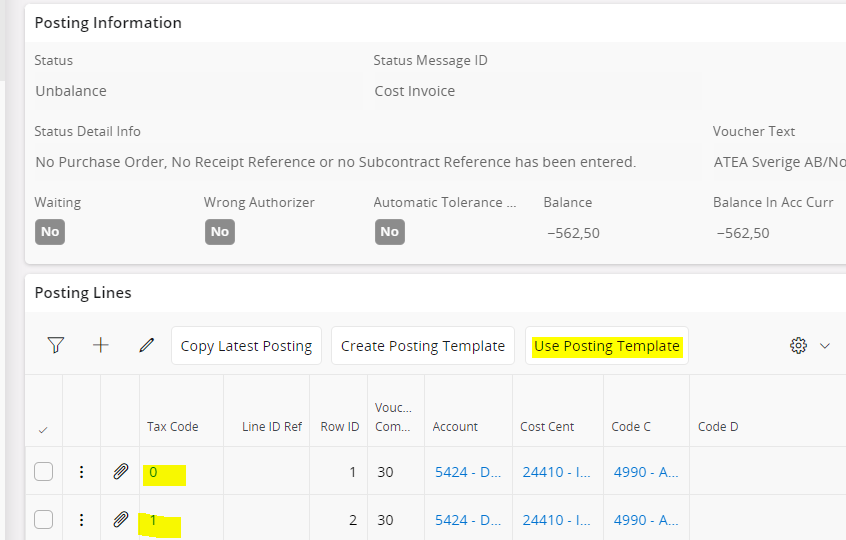
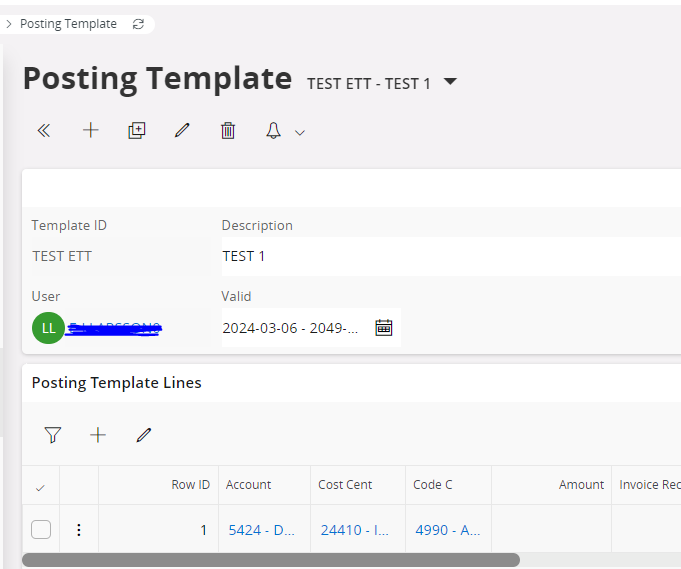
When I klick User Posting Template button in Posting Proposal view, pick a template, it creates dubble rows with different tax code even though Posting Template have only one row. Does anyone know if there is bug report for this?  Our version is IFS Cloud R23.1.8, please advice. 
 

Best answer by lisvse

Hi,

This is a parameter that we have had for a really long time. It is placed in Invoice tab in Company sub menu Tax Control.


Best regards, 

Linda

6 replies

lisvse
Hero (Employee)
Forum|alt.badge.img+10
  • Hero (Employee)
  • March 14, 2024

Hi,

Does the invoice have more than one invoice line/s with different tax codes? I assume you have invoice line with tax code 0 and invoice line with tax code 1. 


Best regards, 

Linda


Forum|alt.badge.img+8
  • Author
  • Sidekick (Customer)
  • March 14, 2024

Hi Linda,

Yes, the invoice have one line with tax code 0 and another line with tax code 1. 


lisvse
Hero (Employee)
Forum|alt.badge.img+10
  • Hero (Employee)
  • March 18, 2024

Hi, 

This is the designed functionality. It has been like this since 2015. If parameter “tax correspondence invoice line - postings” is TRUE then we will insert posting lines (from posting template) per tax code. 


Best regards, 

Linda


Forum|alt.badge.img+8
  • Author
  • Sidekick (Customer)
  • March 18, 2024

Hi Linda, 


Thank you for the information, may I know where I could find “tax correspondence invoice line - postings” ?  We have IFS CLoud R23. 


Best regards,

Asadan


lisvse
Hero (Employee)
Forum|alt.badge.img+10
  • Hero (Employee)
  • Answer
  • March 19, 2024

Hi,

This is a parameter that we have had for a really long time. It is placed in Invoice tab in Company sub menu Tax Control.


Best regards, 

Linda


Forum|alt.badge.img+8
  • Author
  • Sidekick (Customer)
  • March 19, 2024

Well noted, thanks a lot Linda :-)