Question

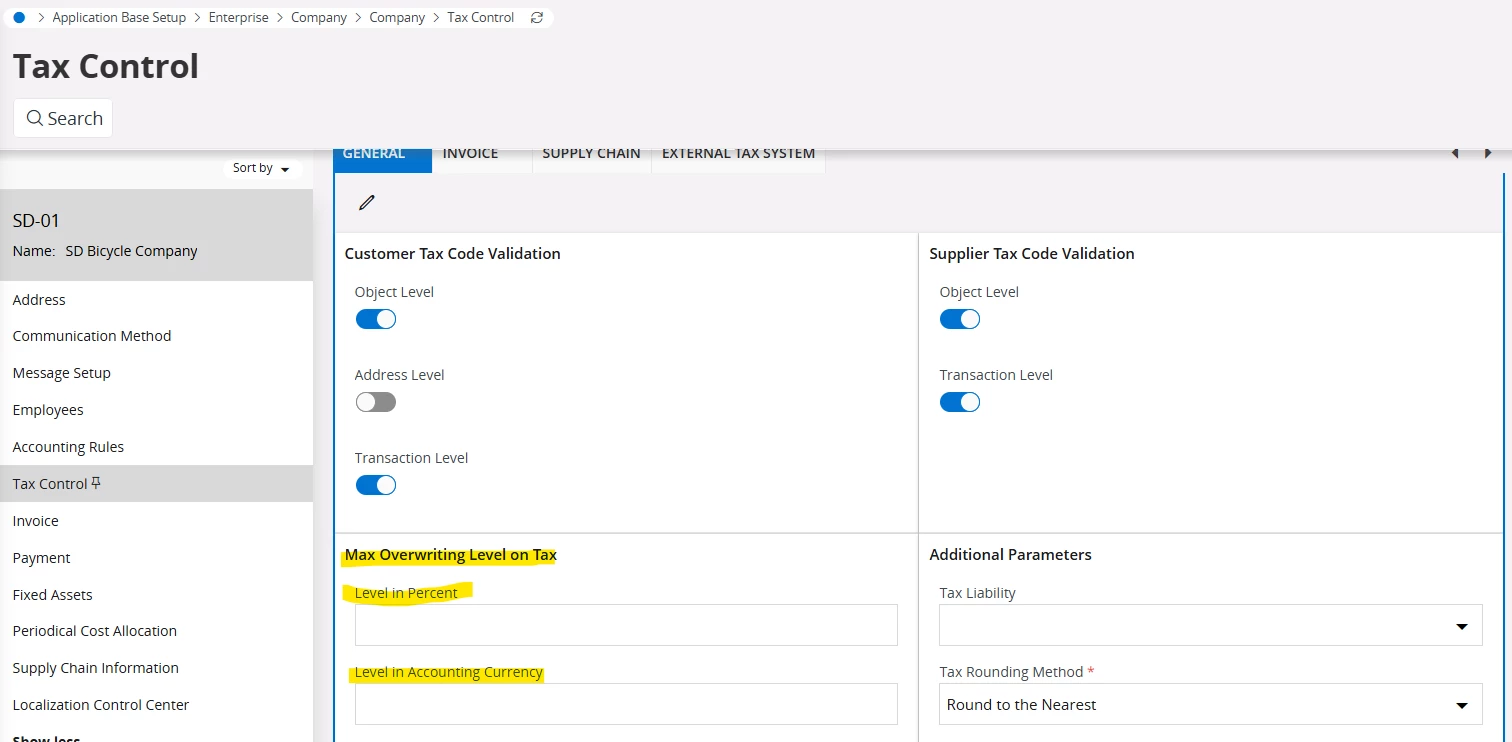
Maximum overwriting level on tax

  • September 8, 2026
  • 2 replies
  • 9 views

Forum|alt.badge.img

Hi,

I would like to know more detail about Maximum overwriting level on tax in Company setup-Tax Control.

  1. How the functionality works
  2. Windows Applicable
  3. Negative Consequences


Thanks in Advance,

Vismini

2 replies

Forum|alt.badge.img+8
  • Sidekick (Employee)
  • September 8, 2026

I hope the following information helps - 


In IFS Cloud (and IFS Applications), the Maximum Overwriting Level on Tax setting in Company Setup → Tax Control (or Company / Tax Control) is a corporate governance and validation parameter that governs how much users can manually adjust or override system-calculated tax amounts on transactions.

Below is a detailed breakdown covering how this functionality operates, where it applies across IFS, and the potential negative consequences of misconfiguring it.

1. How the Functionality Works

In IFS, when financial transactions (such as Purchase Orders, Supplier Invoices, Customer Invoices, or Vouchers) are created, the system automatically calculates tax using the configured Tax Code, Tax Rate (%), and Tax Rules (e.g., Tax Basis, Deductible %, Gross/Net calculation).

However, external documents—most notably Supplier Invoices—frequently have slight tax differences due to vendor rounding rules, regional tax calculation methods, or multi-line aggregation.

System Logic & Validation Flow:

  1. Calculation: The system calculates the expected tax amount:
    $$\text{System Tax} = \text{Tax Base Amount} \times \text{Tax Rate %}$$

  2. Manual Override Attempt: A user attempts to manually enter or edit the Tax Amount on a document line or header.

  3. Variance Check: The system computes the absolute difference:
    $$\text{Tax Variance} = |\text{Manual Tax Amount} - \text{System Tax Amount}|$$

  4. Tolerance Validation: The variance is compared against the Maximum Overwriting Level on Tax (which can be configured as a fixed currency amount, a percentage tolerance, or a control level such as Not Allowed, Warning, or Error):

    • Within Tolerance / Allowed Level: The manual tax entry is accepted, and posting lines are updated accordingly.

    • Exceeds Tolerance / Level: The system triggers an error message blocking the save/posting, or requires administrative override/authorization depending on the rule configuration.

2. Windows and Pages Applicable

This parameter affects pages across Financials, Procurement, Sales, and Logistics where tax amounts can be entered or modified:

A. Basic Data & Configuration

  • Company / Tax Control (or Company / Invoice / Tax Control) — Where the maximum tax overwriting tolerance/level is defined per company and currency.

B. Supplier Invoicing (Accounts Payable)

  • Manual Supplier Invoice

  • Instant Supplier Invoice

  • Posting Proposal (Matching PO receipts to vendor invoices where tax differs from calculated values)

  • Subcontract Payment Order / Invoicing

C. Customer Invoicing & Sales (Accounts Receivable & Order Management)

  • Instant Customer Invoice

  • Direct Customer Invoice

  • Customer Order / Customer Order Lines

  • Project Invoicing

D. General Ledger & Accounting

  • Manual Voucher / Voucher Entry (when posting to tax-related accounts or entering manual tax transactions)

  • Tax Proposal / Tax Ledger Adjustments

3. Negative Consequences of Setting High or Uncontrolled Overwriting Levels

While allowing tax overwriting is necessary to reconcile minor vendor invoice rounding differences (e.g., $$0.01$–$$0.05$), setting the tolerance too high—or disabling restriction checks altogether—introduces significant operational and financial risks:

  1. Inaccurate Statutory Tax Reporting & Returns:

    • Tax returns (VAT/GST returns, Sales Tax filings, SAF-T reports) rely on the relationship between the Taxable Base and the Tax Code Rate.

    • Overwriting the tax amount without changing the Tax Code creates a mismatch where reported tax does not equal $\text{Base} \times \text{Rate}$. This triggers audit flags with revenue authorities.

  2. Subledger to General Ledger (GL) Reconciliation Mismatches:

    • Manual overrides can cause discrepancies between the Tax Ledger, Accounts Payable / Receivable Subledgers, and the General Ledger Tax Accounts, making periodic tax account reconciliation difficult and labor-intensive.

  3. Risk of Disallowed Input Tax Credits & Fines:

    • In Accounts Payable, if a user manually inflates the tax amount to match an incorrect supplier invoice, your company may over-claim Input Tax Credit (ITC / Recoverable VAT).

    • Upon statutory audit, tax authorities will disallow the excess claim and impose penalties, interest, and fines.

  4. Internal Control Breakdown & Fraud Risk:

    • Unrestricted tax overwriting removes internal controls, allowing users to alter tax values to cover up data entry errors, misallocate expenses, or manipulate net invoice totals without supervisor visibility or authorization.

  5. Downstream Automation Blockers:

    • In automated invoicing flows (e.g., e-Invoicing, Supplier OCR Scanning, Optical Character Recognition matching), excessive manual tax overrides degrade automated matching algorithms, increasing exception queues for finance teams.

Thanks!  Jane


piswpl
Hero (Partner)
Forum|alt.badge.img+5
  • Hero (Partner)
  • September 9, 2026

Hi Jane,

I am assuming your answer was AI assisted.

I would like to clarify how these things can be achieved:

  1. “ (which can be configured as a fixed currency amount, a percentage tolerance, or a control level such as Not AllowedWarning, or Error):”
  2. “or entering manual tax transactions)”
  3. Tax Proposal / Tax Ledger Adjustments”

Would you mind explaining these or review/update your answer?

Thanks,

Piotr