Question

IFS Cloud Trial Balance

  • April 29, 2026
  • 6 replies
  • 35 views

Forum|alt.badge.img+4

We are moving from IFS APPS 10 to IFS Cloud this summer.  The Report Generator is not available in IFS Cloud.  How do you run a trial balance in IFS Cloud?

6 replies

Forum|alt.badge.img+7
  • Hero (Partner)
  • April 29, 2026

Hi Paula,

Often, the GL Balance Analysis screen is used for this - enter the Year(s) / Period(s) that you are interested in, and it should provide a Trial Balance. This can be output to Excel if desired.

Alternatively, it would be possible to build a Business Reporter report which provides this in a pre-defined Excel format.

Chris


Forum|alt.badge.img+8

Hi ​@PaulaAdkins ,

Similar to APP10 in IFS Cloud, I believe Trial Balance can be generated using standard General Ledger Operational Reports (via Order Report for GENLED component) without customization.

For this purpose you can use General Ledger Report, General Ledger Transaction Report or even an export of GL Balance Analysis may cater your requirement as these reports can be filtered by,

  • Company
  • Accounting year and period

I also came by a similar community posts for Business Reporter.

Hope this helps.


Thank you.

Best regards,

Shamalaka Perera


Forum|alt.badge.img+4
  • Author
  • Do Gooder (Customer)
  • April 29, 2026

GL Balance Analysis is what I use in APPS 10, however when I use GL Balance Analysis in IFS Cloud I am not getting the correct balances.

How do you filter to get the correct balances as of 4/30/25 for example?


piswpl
Hero (Partner)
Forum|alt.badge.img+5
  • Hero (Partner)
  • April 29, 2026

Accounting Structures + GL Structure Balance Analysis (Period or YTD) or Accounting Structures + Business Reporter (Period and YTD, previous period/year, etc.) is my recommendation.


piswpl
Hero (Partner)
Forum|alt.badge.img+5
  • Hero (Partner)
  • April 29, 2026

GL Balance Analysis is what I use in APPS 10, however when I use GL Balance Analysis in IFS Cloud I am not getting the correct balances.

How do you filter to get the correct balances as of 4/30/25 for example?


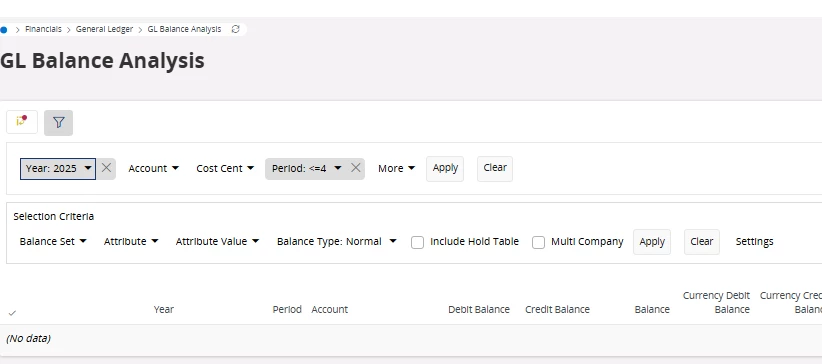
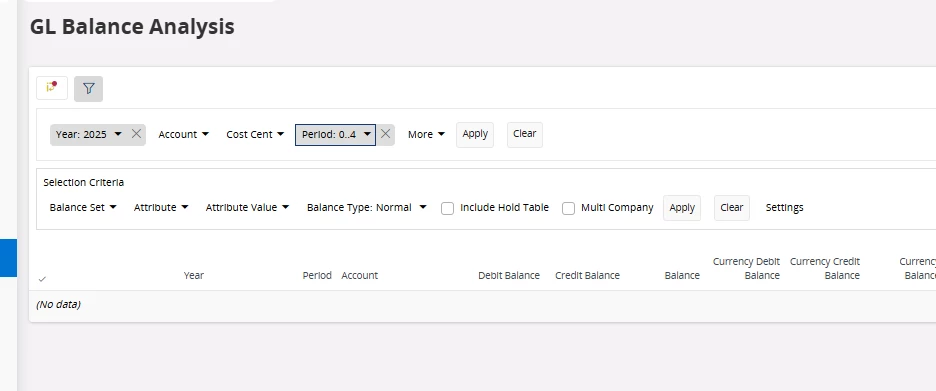
Make sure you always select a year, and then filter the accounting period using <=, for example <=4 or 0..4. If you have period allocations for future periods then this will give you the correct balances. Also uncheck the grouping per period to show the YTD balances. Lastly, make sure you have transferred the preliminary year end if the previous accounting year has not been closed yet. 


Forum|alt.badge.img+4
  • Author
  • Do Gooder (Customer)
  • April 29, 2026

Thank you everyone for your help.  I figured it out now.