Solved

How to import salaries to IFS Cloud

  • July 10, 2026
  • 20 replies
  • 130 views

Link
Superhero (Customer)
Forum|alt.badge.img+23
  • Superhero (Customer)

Dear experts,

we want to import salaries (csv file) to IFS cloud as expense.

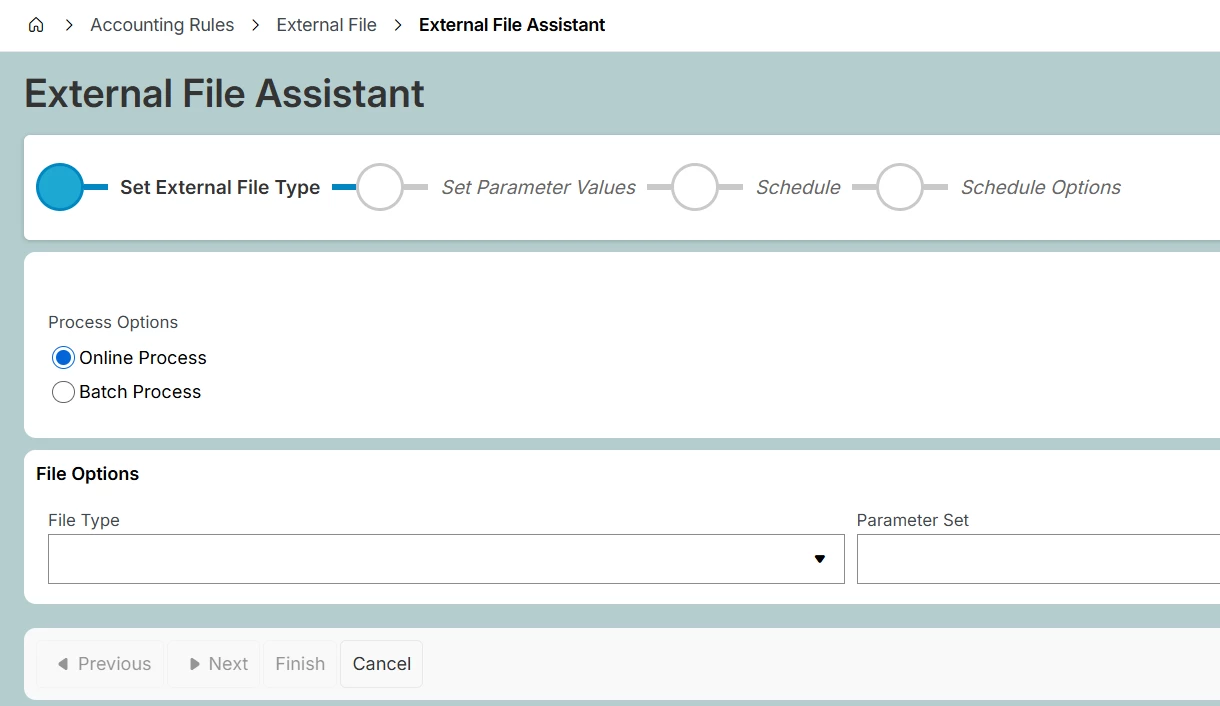
Can I do that with the external file assistant?
 

Best answer by Furkan Zengin

Hello ​@Link 

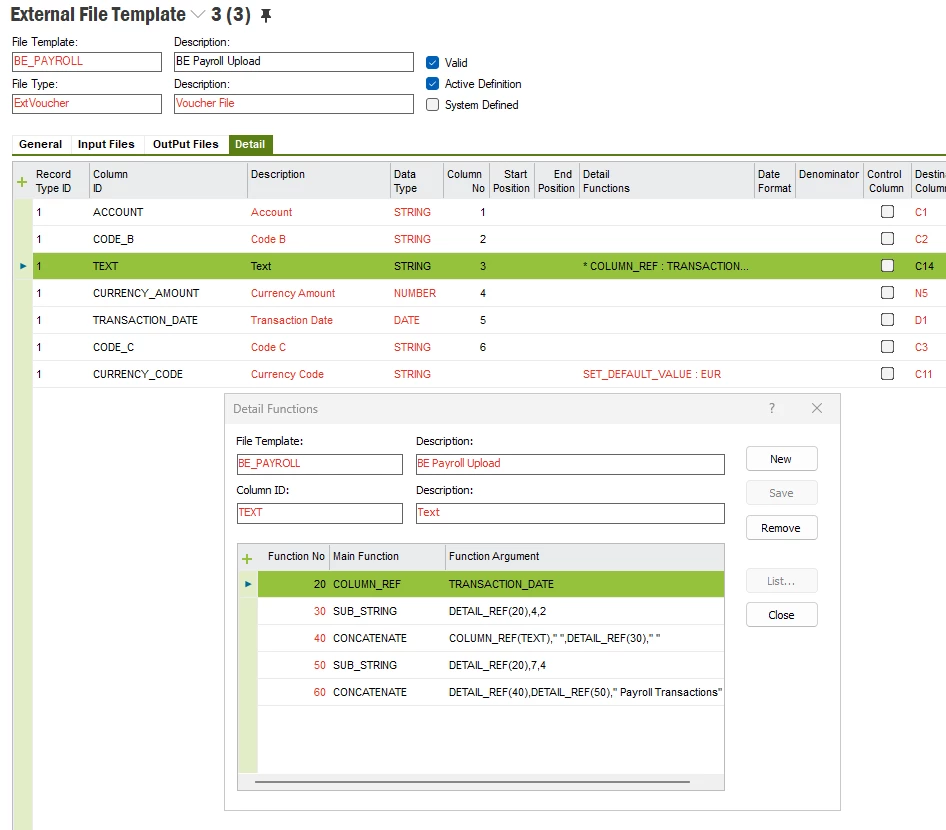
I always create a new external file template with limited number of columns and automate most of columns where the info is not available in the file. E.g. currency, company, or text etc


See an example
 

Hope this helps

Furkan

20 replies

Furkan Zengin
Ultimate Hero (Partner)
Forum|alt.badge.img+21
  • Ultimate Hero (Partner)
  • Answer
  • July 10, 2026

Hello ​@Link 

I always create a new external file template with limited number of columns and automate most of columns where the info is not available in the file. E.g. currency, company, or text etc


See an example


Hope this helps

Furkan


Link
Superhero (Customer)
Forum|alt.badge.img+23
  • Author
  • Superhero (Customer)
  • July 10, 2026

Hi ​@Furkan Zengin 

thank you. So you used the file type ExtVoucher.

What do you do after the import?


Furkan Zengin
Ultimate Hero (Partner)
Forum|alt.badge.img+21
  • Ultimate Hero (Partner)
  • July 10, 2026

In my case always there are code parts. At least account and cost center, once imported I am following regular voucher import process.

Check external voucher

Create external voucher

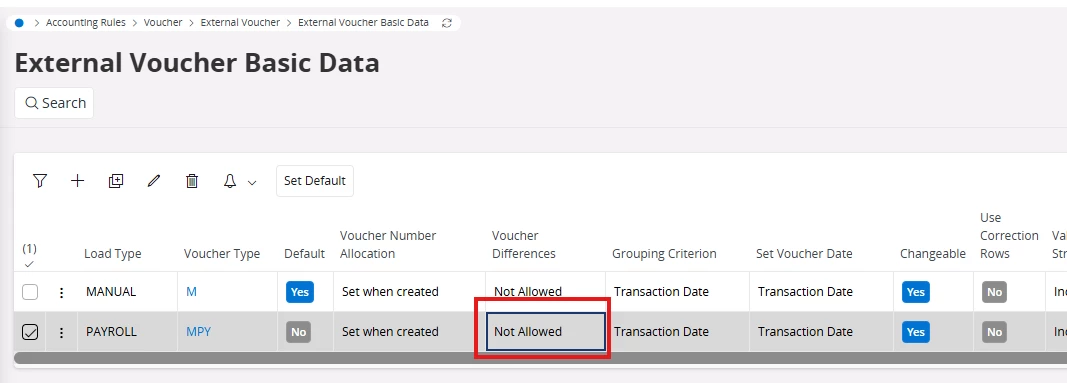
If the external file does not provide payables to employee account info then allow for voucher differences and set the posting control as your employee payable account

Also create a separate load type and voucher type so you can easily track the payroll transactions.


Hope this helps


Link
Superhero (Customer)
Forum|alt.badge.img+23
  • Author
  • Superhero (Customer)
  • July 10, 2026

Thank you. I will get back to you again. 😊


Link
Superhero (Customer)
Forum|alt.badge.img+23
  • Author
  • Superhero (Customer)
  • July 16, 2026

Hi ​@Furkan Zengin 

how do you handle Debit and Credit? Withe a plus/minus sign?

Thank you in advance.


Furkan Zengin
Ultimate Hero (Partner)
Forum|alt.badge.img+21
  • Ultimate Hero (Partner)
  • July 16, 2026

Hi ​@Link 

Yes exactly, in my case the amount is in a single field  with plus/minus sign

If you have separate columns then you can add currency_debit_amount and currency_credit_amount fields into your file template.


Link
Superhero (Customer)
Forum|alt.badge.img+23
  • Author
  • Superhero (Customer)
  • July 16, 2026

Hi ​@Link 

Yes exactly, in my case the amount is in a single field  with plus/minus sign

If you have separate columns then you can add currency_debit_amount and currency_credit_amount fields into your file template.

Great. Thank you. 👍🏽


Link
Superhero (Customer)
Forum|alt.badge.img+23
  • Author
  • Superhero (Customer)
  • July 21, 2026

Hi ​@Furkan Zengin ,

how do you import the salaries in IFS Cloud?

Via IFS Connect?

Do you have a documentation how to set up the process?


Link
Superhero (Customer)
Forum|alt.badge.img+23
  • Author
  • Superhero (Customer)
  • August 3, 2026

One question more.

What field can I use for the employee's personal number?


Furkan Zengin
Ultimate Hero (Partner)
Forum|alt.badge.img+21
  • Ultimate Hero (Partner)
  • August 3, 2026

Hi ​@Link 

We are importing via external voucher import. I don’t have documentation for IFS Connect, if you have please share me :)

For the employee’s number, i would use reference_number field, i guess.

Thanks

Furkan


Link
Superhero (Customer)
Forum|alt.badge.img+23
  • Author
  • Superhero (Customer)
  • August 3, 2026

Hi ​@Furkan Zengin 

thank you again for your quick feedback.

I’ve already managed the import. 

I will try the import with the field “reference_number”.


Link
Superhero (Customer)
Forum|alt.badge.img+23
  • Author
  • Superhero (Customer)
  • August 12, 2026

Dear ​@Furkan Zengin 

sorry for bothering you again.

What field can I use for the workers working time?

Maybe “Quantity”?

Or will IFS multiply the “Quantity” by the “Amount”?

Thank you in advance.


Furkan Zengin
Ultimate Hero (Partner)
Forum|alt.badge.img+21
  • Ultimate Hero (Partner)
  • August 12, 2026

Hello ​@Link 

The quantity is only for statistics and PCA calculations. Therefore it has no impact on calculation nor final amount. You can use it. Remeber there is no field to identify unit of measure like days or hours etc.

Thanks

Furkan


Link
Superhero (Customer)
Forum|alt.badge.img+23
  • Author
  • Superhero (Customer)
  • August 12, 2026

Hello ​@Furkan Zengin 

thank you very much for your expertise.

I appreciate it. 😊


Forum|alt.badge.img+20

Sorry, but some of the above is misleading from my experience. 

First quantities are and can be important on voucher postings, it’s not just for PCA.  Minor. 

However, most clients / most countries, do not want detail payroll including employee ID in the voucher. Reason, what we pay employees usually stays in HR.  When that personal data flows to GL people can see it. That’s typically very sensitive data.  Often times, clients request to summarize the data into given code strings so that the details are not in the posting line. It mostly masks what people are being paid for salary. 


Link
Superhero (Customer)
Forum|alt.badge.img+23
  • Author
  • Superhero (Customer)
  • August 13, 2026

Sorry, but some of the above is misleading from my experience. 

First quantities are and can be important on voucher postings, it’s not just for PCA.  Minor. 

However, most clients / most countries, do not want detail payroll including employee ID in the voucher. Reason, what we pay employees usually stays in HR.  When that personal data flows to GL people can see it. That’s typically very sensitive data.  Often times, clients request to summarize the data into given code strings so that the details are not in the posting line. It mostly masks what people are being paid for salary. 

Hi ​@Thomas Peterson 

thank you for you comment.

For data privacy reasons, salaries should not be imported using personnel numbers. That is absolutely correct. The HR department would like to analyse and monitor salaries in IFS. Is there a better solution?

Thank you in advance.


Forum|alt.badge.img+10
  • Hero (Customer)
  • August 13, 2026

Hello ​@Link 

Where you able to find a documentation that you are able to share for the IFS connect please?


Kind Regards


Link
Superhero (Customer)
Forum|alt.badge.img+23
  • Author
  • Superhero (Customer)
  • August 13, 2026

Hello ​@Link 

Where you able to find a documentation that you are able to share for the IFS connect please?


Kind Regards

Hi ​@N.GEORGI 

you only need IFS Connect if you want to import files automatically.

Is that your goal?


Forum|alt.badge.img+10
  • Hero (Customer)
  • August 13, 2026

@Link Yes


Link
Superhero (Customer)
Forum|alt.badge.img+23
  • Author
  • Superhero (Customer)
  • August 13, 2026

@Link Yes


I just posted it here: External File Template Directory | IFS Community