
Solved

How can i create manual supplier and math PO receipt with no Prelim status?

  • Aug 17, 2023 2:30 PM UTC
  • 5 replies
  • 188 views

Forum|alt.badge.img+1

How can i create manual supplier on IFS cloud and math PO receipt with no Prelim status?

Best answer by Furkan Zengin

Hello @PaengmuangJ 


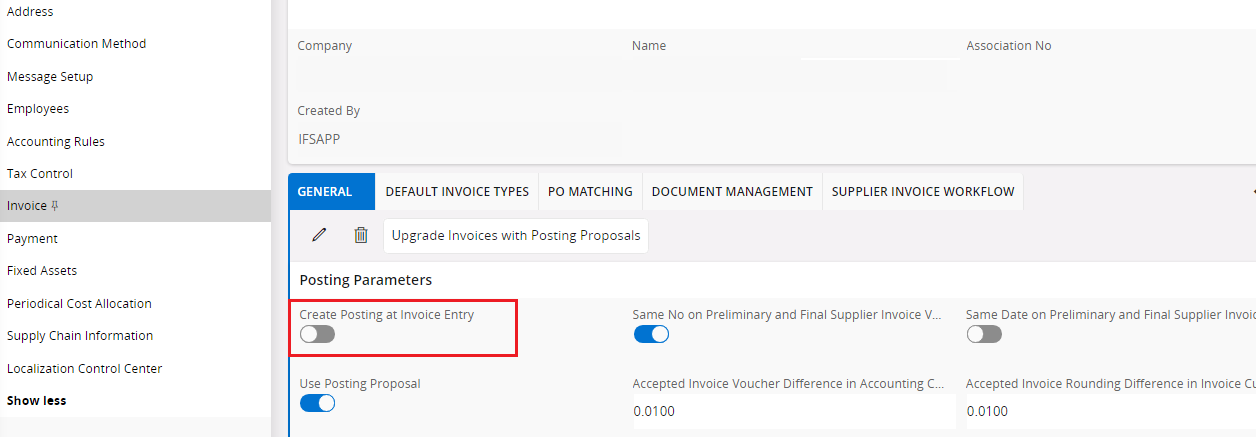
If you have this setup disabled like below then invoices will be created in preliminary status.


Regards 
 

View original

5 replies

Furkan Zengin
Ultimate Hero (Partner)
Forum|alt.badge.img+21
  • Ultimate Hero (Partner)
  • Answer
  • Aug 17, 2023 2:38 PM UTC

Hello @PaengmuangJ 


If you have this setup disabled like below then invoices will be created in preliminary status.


Regards 



Forum|alt.badge.img+1
  • Author
  • Do Gooder (Partner)
  • Aug 17, 2023 2:52 PM UTC

Dear @gumabs 


Thank you so much for your help. I can solve my issue because of your ans!


Forum|alt.badge.img+1
  • Author
  • Do Gooder (Partner)
  • Aug 17, 2023 3:38 PM UTC

Dear @gumabs 

sorry for my unclear explanation, I mean that i dont want Prel post auth status when i match PO receipt. because it’s will create 2 voucher from supplier invoice with PO. That’s not the way we want.


How can i setup for this issue?  


Furkan Zengin
Ultimate Hero (Partner)
Forum|alt.badge.img+21
  • Ultimate Hero (Partner)
  • Aug 17, 2023 4:44 PM UTC

Hi,

PrelPosted is created either when you manually trigger post from manual supplier invoice or when you have above setup enabled and save the invoice. I dont know if you are using posting proposal or not. But If you will disable the setup (like on the screen shot) the invoices will be registered with Preliminary status. After matching with PO lines you can manually post invoice from Manual supplier invoice (in case you are not using posting proposal), or post manually from Posting Proposal window or post all authorized invoices as batch job from Final Posting Propolals window

Hope this explanation helps


Forum|alt.badge.img+1
  • Author
  • Do Gooder (Partner)
  • Aug 19, 2023 1:25 AM UTC

@gumabs 


Thank you so much


